Best AI Tools for Shopify: What I Actually Run, by Job
Every post about AI tools for Shopify lists thirty of them. Nobody runs thirty. I run a Shopify store’s data and operations and consult on others, and after two years of trying what people recommend, this is what is still open on a Monday morning, grouped by the job it does rather than by what the vendor calls it.
Where I built the thing rather than bought it, the build is linked. Where I dropped a tool, I say why.
1. Running the store: Shopify Sidekick and Magic
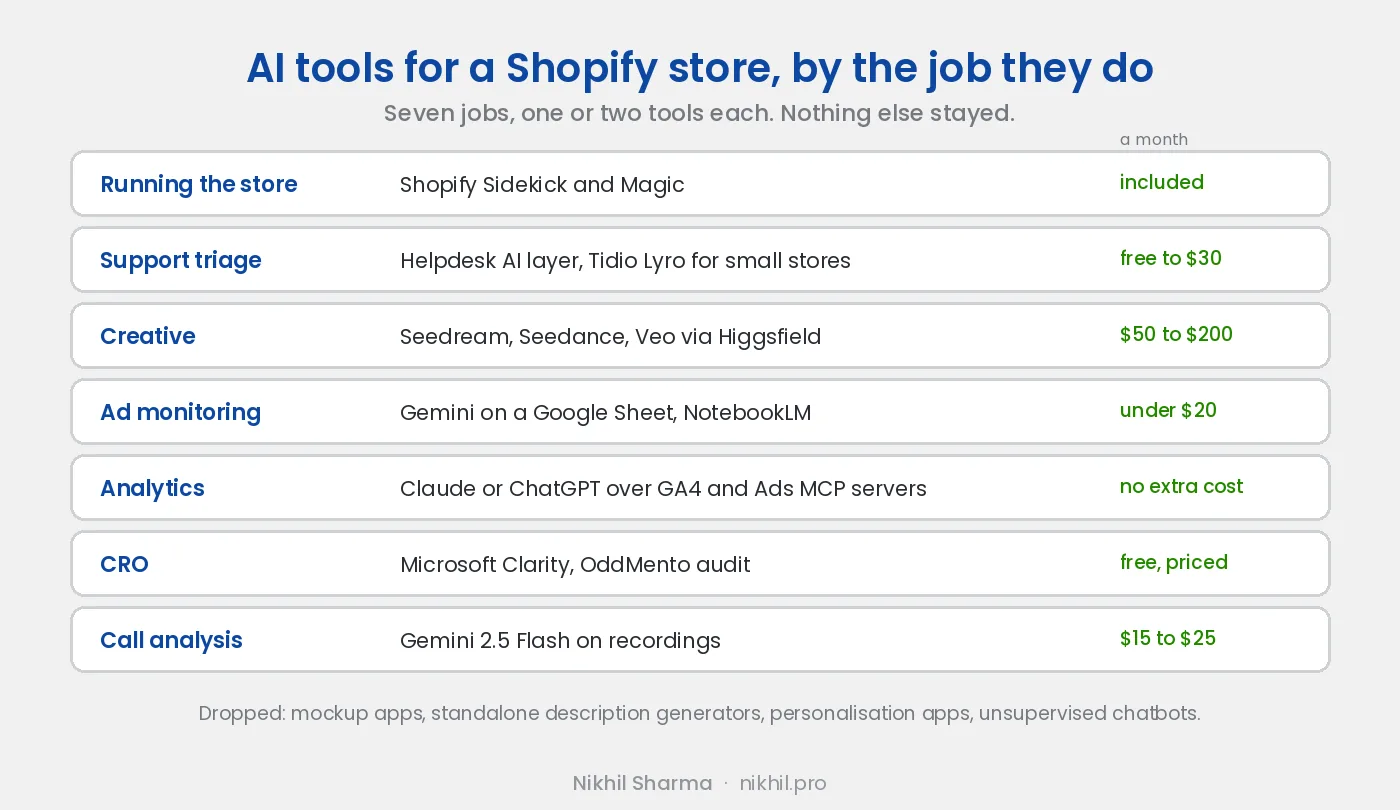
Start with what is already included. Sidekick is Shopify’s assistant inside the admin, and it answers questions about your own store that used to need a report: which products had the most refunds last month, which discount code was used most, what changed in conversion rate after the theme update. Magic is the generation layer in the editors: product descriptions, email subject lines, background removal and replacement on product images.
Neither is a reason to install anything else, and both are the first thing to try before paying for an app that does the same job.
Cost: included in the plan.
2. Customer support: a helpdesk with an AI layer
The job is triage and first response, not replacing the person. A good helpdesk AI reads the incoming ticket, pulls the order, drafts a reply that a human sends or edits, and tags the ticket by reason so the pattern is visible at the end of the month.
For a small store, Tidio with its Lyro assistant does this well and I used it for years before the AI features existed. Larger stores will be on a bigger helpdesk and most of them now ship the same layer. The tool matters less than the setup: feed it your policies, your shipping rules and your product FAQ, or it will answer confidently and wrong.
The part most stores skip is reading what the tickets say in aggregate. I wrote up a pre-call briefing tool that gives agents a five second summary before they pick up, and the conversation analysis that turned a month of tickets into a ranked list of what was actually broken.
Cost: free tier to around $30 a month for a small store; included in the plan on larger helpdesks.
3. Creative: Seedream, Seedance and Veo through Higgsfield
This is where AI earns its keep for a store that runs paid ads, because Meta now punishes creative that looks the same and a weekly shoot is not realistic for most brands.
The stack I run: Seedream for stills, Seedance for animating them, Veo where the clip has to pass as real footage, Kling for lip sync in Spanish. All of it through Higgsfield, which puts the models behind one interface and one credit balance. Stills first, then animate the ones that work, which is a tenth of the cost of generating video from a blank prompt.
The rule that matters more than the tool: AI is for hooks and for the shots you cannot film. The product in hand, the founder talking, the unboxing, stay real. At least 60 percent of every ad is footage someone shot. The full workflow, with prompts and costs, is in the AI UGC ads post.
Dropped: the Shopify apps that generate product mockups and swap models in photos. Fine in 2024, but the general models overtook them within a year and they charge a monthly fee for what is now a prompt.
Cost: credit based, $50 to $200 a month for a brand producing new concepts weekly.
4. Ad monitoring: Gemini reading a Google Sheet
Meta Ads Manager is slow and reading it across forty creatives is a job nobody wants. The AI ad dashboards that fix this cost $200 to $500 a month. I built the same thing with a Google Sheet that syncs from the Ads API every thirty minutes, Apps Script that colour codes it, and Gemini reading the sheet to flag fatigue and new ads worth watching. NotebookLM sits on top for the written weekly summary.
It took a weekend. It has run for months. The post has the setup and the prompts.
Cost: Gemini API usage, under $20 a month at store scale. Sheets and Apps Script are free.
5. Analytics: Claude or ChatGPT connected to GA4 and Google Ads
Google now ships official MCP servers for Google Analytics and Google Ads, which means an assistant can query your property or your ad account in plain English instead of you exporting reports. “Which campaigns drove purchases last week where GA4 and Google Ads disagree” is a question you can now ask, and the reconciliation it produces is the kind of thing that used to take an afternoon in spreadsheets.
Setup for Google Analytics takes fifteen minutes. Google Ads takes longer because of a developer token approval. Both are read only, which is the right default for anything touching an ad account. When the system holding your data has no official server, you build one: that is what I did for our point of sale.
Cost: the assistant subscription you already have. The servers are free.
6. CRO: Microsoft Clarity and an audit tool
Clarity is free, records sessions, draws heatmaps and now summarises what it saw in plain language. It is the fastest way to find out why people leave a product page, and the AI summary is good enough that I read it before the recordings.
For the structured version, where someone works through tracking, product page, checkout and mobile in order and hands you a ranked list, I built OddMento, which runs a Shopify CRO audit against your store. It exists because the manual audit kept finding the same ten things and most stores needed the list more than they needed me.
Cost: Clarity is free. OddMento is priced on the site.
7. Call analysis: Gemini on the recordings
If your store takes phone calls and nobody listens to the recordings, you are paying for data you never read. I run every call through Gemini 2.5 Flash, which transcribes, translates where the call was in Spanish, scores agent tone and customer sentiment, and tags the reason for the call, then writes a row to a sheet the team already uses.
Monday reporting went from two hours to ten minutes and agent coaching went from a feeling to a number. The build, including what broke, is in automating CloudTalk call analytics with Gemini. This is the one on the list that needed a developer.
Cost: $15 to $25 a month in API usage for a few hundred calls a week.
What I dropped, and why
Personalisation apps that promise AI recommendations: on a catalogue under a few hundred products the recommendations were the same ones a merchandiser would pick in an afternoon, and the monthly fee was not. Product description generators as standalone apps: Magic does it inside the editor now. Mockup and model swap apps: see above. AI chatbots that talk to customers without a human in the loop: the first time one promised a refund we do not offer was the last.
The pattern in all four is the same. A thin SaaS wrapper around a general model, charging monthly for what the model does directly or Shopify now includes.
How to pick
Take the task you most resent. Find the tool that removes it. Run it for a month and count the hours it gave back. Then, and only then, pick a second. The stores that get value from AI have two or three tools wired into a process they already had. The ones that do not have fifteen trials and a credit card statement.
The longer version of that argument, with the six systems I run and what each one cost in real hours, is AI workflows for Shopify. The book of the same name is the story of a small team running a large store on exactly this principle.
Want help with this?
I work with Shopify brands on Meta and Google Ads, alongside running data and operations engineering for a DTC brand. If you want help deciding which of these is worth wiring into your store, book a call.
Frequently asked questions
What are the best AI tools for a Shopify store?
Is Shopify Magic and Sidekick enough, or do I need other AI apps?
How much do AI tools for Shopify cost?
Are AI apps safe to install on Shopify?
Can AI write my product descriptions?
What AI tool should a Shopify store start with?
Do I need to know how to code to use these?
Get new posts in your inbox
Occasional notes on Shopify, paid ads, and what I learn. No spam.
Thanks. Check your inbox to confirm.

Nikhil Sharma
I run data and operations for a DTC brand on Shopify, consult on Meta and Google Ads, and build AI automations for ecommerce teams. I write about what I build and run.