
Automate the Shopify Weekly Report with Google Sheets and Gemini
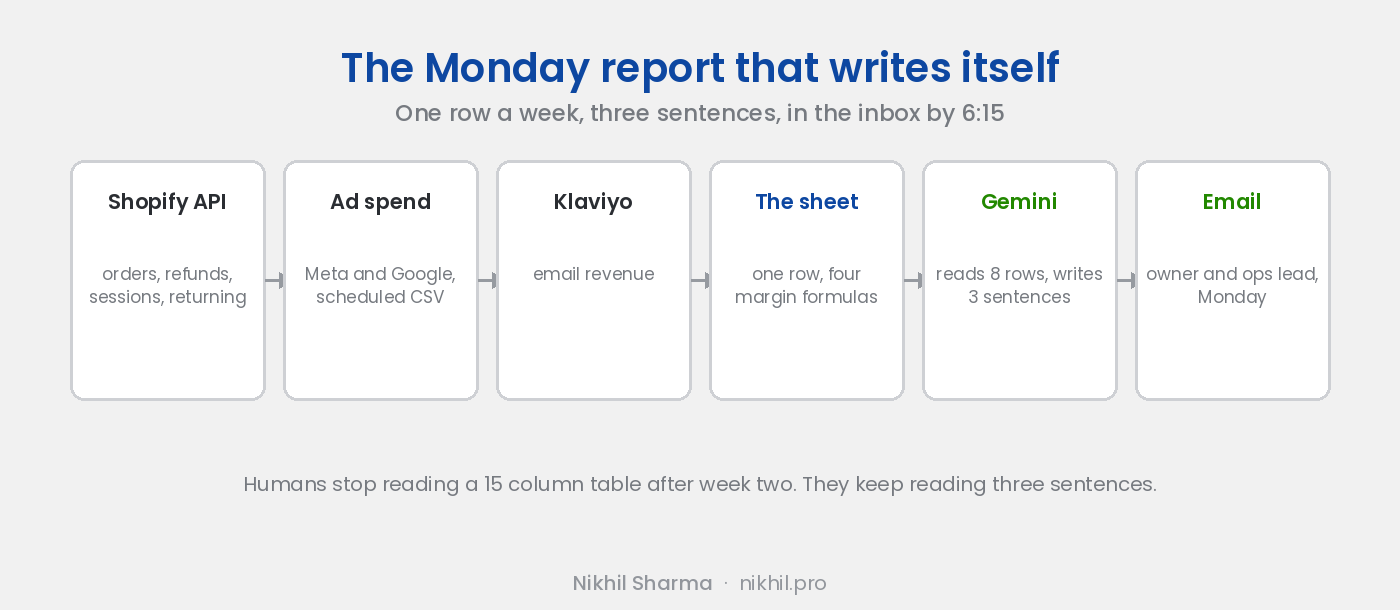
Every store has the Monday report, and every store resents it. Someone opens Shopify Analytics, opens Ads Manager, opens Google Ads, opens Klaviyo, types six numbers into a sheet, and writes two sentences the owner reads in the car. Two hours, weekly, for a document that goes stale by Tuesday.
I built the Meta ads monitor on the principle that a Google Sheet, a scheduled script and a model reading the sheet replace a $300 a month dashboard. The same build, pointed at the store instead of the ad account, replaces the Monday report. This is how it is put together and what goes in it.
What goes in it
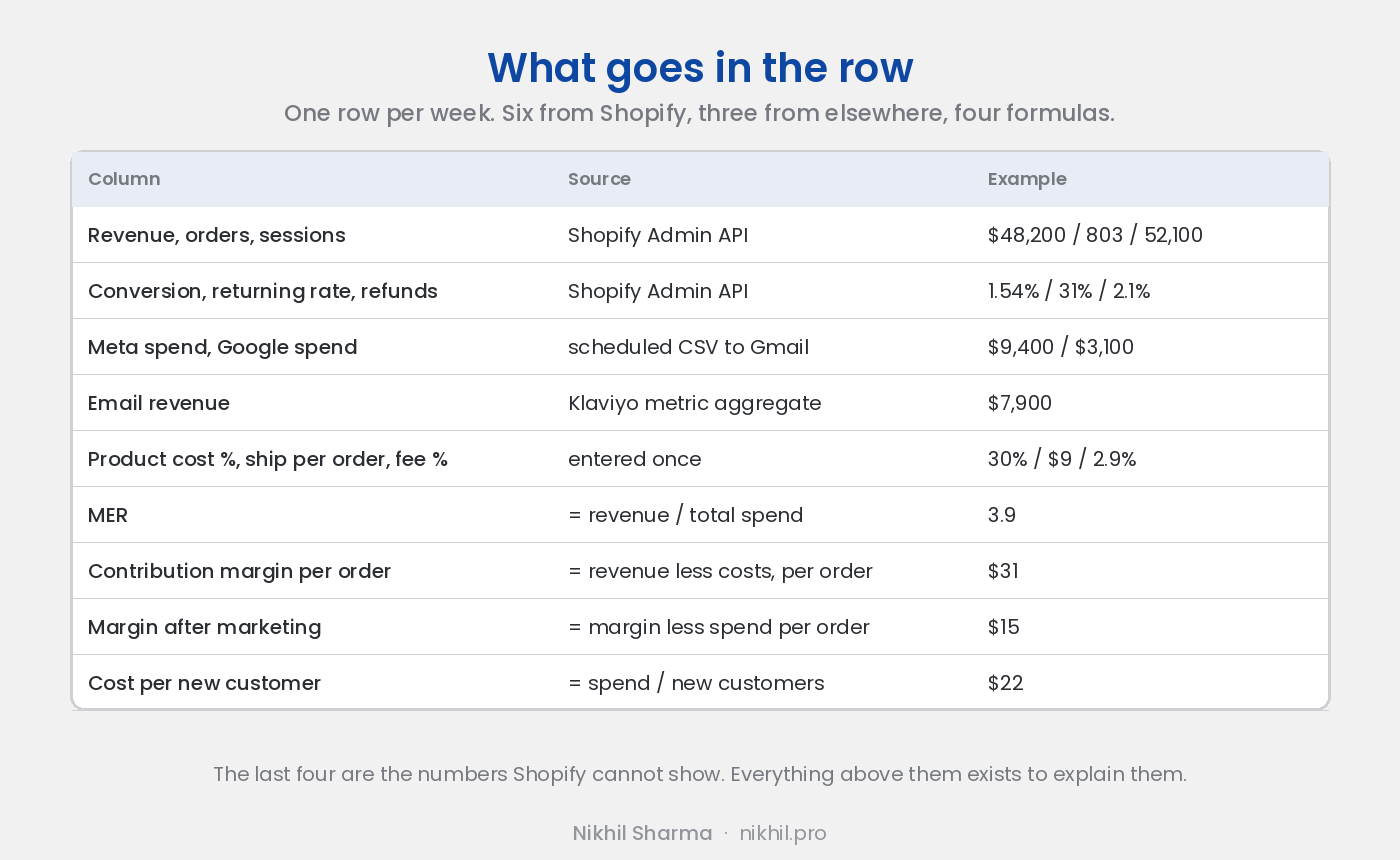
One row per week. Six columns from Shopify: revenue, orders, sessions, conversion rate, returning customer rate, refunds. Two from the ad platforms: Meta spend, Google spend. One from Klaviyo: email revenue. Three you enter once and rarely change: average product cost as a share of revenue, average shipping and packaging cost per order, payment fee rate.
From those, four formulas: marketing efficiency ratio (revenue over total spend), contribution margin per order, contribution margin after marketing, and cost per new customer. These four are the numbers Shopify cannot show you and the ones that decide whether the store makes money. Everything else on the row exists to explain them.
Step 1: the Shopify side
In Shopify, Settings, Apps and sales channels, Develop apps, create a custom app with read scopes on orders, products, customers and reports. Install it, copy the Admin API access token, and put it in Apps Script under Project Settings, Script Properties. Never in a cell.
The script calls the Admin GraphQL API for the week’s orders: created date, total, refunds, customer’s order count at the time (which gives returning versus new), and discount codes. Aggregate to the week and write the row. Sessions and conversion rate come from the same API’s analytics queries, or, if you already have the GA4 connector for Sheets, from there.
A time driven trigger runs it Monday at 6am. Mine runs for the previous Monday to Sunday and appends.
Step 2: the spend
Meta and Google both have APIs and both are more work than the Shopify side. The shortcut that works: both platforms will email a scheduled report as a CSV, and Apps Script can read Gmail. A Monday 5am scheduled report from each, parsed by the script at 6am, gives you spend without a developer token. The Google Ads MCP post covers why the proper API route takes days of approval; for a weekly number, the email is enough.
Klaviyo’s revenue by week is a metric aggregate query against its API with a private read key, ten lines.
Step 3: the model
This is the part people skip and the part that makes the report get read. After the row is written, the script sends the last eight rows to Gemini with a prompt that says, roughly: you are reading a weekly report for a Shopify store, here are the last eight weeks, write three sentences for the owner on what changed this week and the most likely cause, mention a number only if it moved more than ten percent, do not congratulate anyone.
The output goes into a cell next to the row and into the email. Examples from a real week: “Revenue down 8 percent on flat sessions; conversion fell from Thursday and only on mobile, which lines up with the theme update on Wednesday.” “Refunds doubled and 70 percent are one product.” “Email revenue up 40 percent, the first full week of the winback flow.”
Humans stop reading a table of 15 columns after the second week. They keep reading three sentences. The ads monitor taught me that and it has held.
Step 4: send it
Apps Script sends the email: the three sentences at the top, the six Shopify numbers against last week and last year, the four margin numbers, a link to the sheet. Monday, 6:15am, to the owner and the ops lead. If something in the row fails to populate, the script says which column and sends anyway; a report with one blank is better than no report.
What this is not
It is not a dashboard. Dashboards get built and stop being opened. When more than one person does need the same view, the sheet is already the right source for one: Looker Studio reads a Google Sheet natively, and when that is worth doing is covered in the analytics post. This is a row and three sentences that arrive. If someone wants to dig, the sheet is there and Sidekick answers follow up questions inside Shopify.
It is also not a replacement for looking. The model writes what changed. Someone still decides what to do about it, and the report’s job is to make sure that decision happens on Monday rather than at the end of the quarter.
What it costs
A weekend to build, if the Shopify API is new to you. Gemini usage for eight rows a week is cents. The ongoing cost is the ten minutes a month when a column breaks because a platform changed an export format, which is the same ten minutes the ads monitor costs.
If you would rather have it built and tuned to your numbers, with the cost columns worked out from your actual carrier invoices, that is one of the builds I do. The wider set of systems on the same principle is in AI workflows for Shopify.
Frequently asked questions
Can I automate Shopify reports without an app?
What should a weekly Shopify report contain?
What does Gemini add to a spreadsheet?
How does the sheet get Shopify data?
Is it safe to put the access token in Apps Script?
Why not just use Shopify Analytics?
Get new posts in your inbox
Occasional notes on Shopify, paid ads, and what I learn. No spam.
Thanks — check your inbox to confirm.

Nikhil Sharma
I run data and operations for a DTC brand on Shopify, consult on Meta and Google Ads, and build AI automations for ecommerce teams. I write about what I build and run.