Free AI Meta Ads Monitor: Google Sheets, Gemini, NotebookLM
Why I Built This
If you run a Shopify store and spend serious money on Meta ads, you know the frustration. Meta’s Ads Manager is cluttered, slow, and makes it difficult to see patterns across dozens of active creatives.
Third-party AI dashboards exist, but they typically cost $200 to $500 per month. For a growing Shopify brand, that is difficult to justify when the same outcome can be achieved with free tools and a weekend of setup.
So I built my own system using:
-
Meta Marketing API
-
Google Apps Script
-
Google Sheets
-
Gemini
-
NotebookLM
It syncs every 30 minutes, detects creative fatigue automatically, flags new ads the moment they launch, and lets me have a full AI conversation with my live ad data.
The AI Stack (All Free)
| Tool | Role |
|---|---|
| Meta Marketing API | Fetches real-time ad data, metrics, creatives, and targeting |
| Google Apps Script | Automates syncing, processes data, writes to Sheets |
| Google Sheets | Live dashboard with color-coded performance indicators |
| Gemini | Real-time Q&A against sheet data |
| NotebookLM | Deep weekly AI analysis of exported ad data |
No servers. No databases. No subscriptions. Just AI working directly on real data.
How the Real-Time Sync Works
The system runs on two automated schedules.
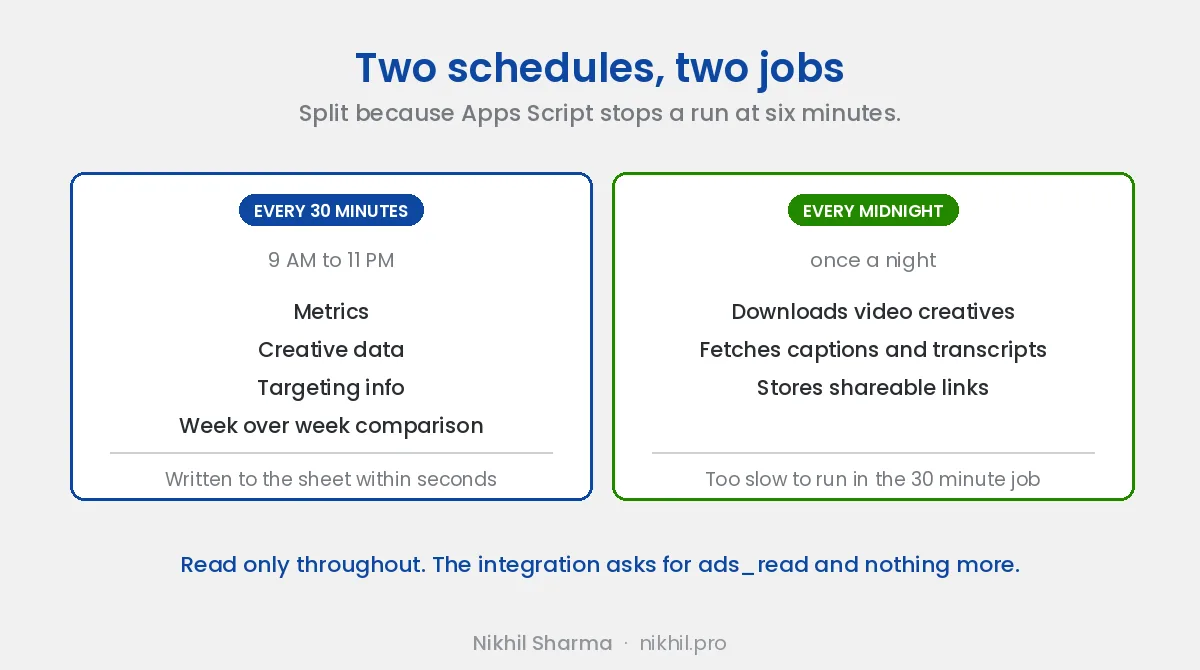
Every 30 Minutes (9 AM to 11 PM)
Fetches:
-
Metrics
-
Creative data
-
Targeting info
-
Week-over-week comparisons
All results are written to Google Sheets within seconds.
Every Night at Midnight
-
Downloads video creatives to Google Drive
-
Fetches captions and transcripts
-
Stores shareable links directly in the sheet
const CONFIG = {
  ACCESS_TOKEN: PropertiesService.getScriptProperties().getProperty('ACCESS_TOKEN'),
  AD_ACCOUNT_ID: 'act_XXXXXXXXXXXXXXXXX',
  API_VERSION: 'v25.0',
  CAMPAIGN_IDS: [
    'YOUR_CAMPAIGN_ID_1',
    'YOUR_CAMPAIGN_ID_2',
  ],
};
The token lives in Script Properties, never hardcoded. The script only uses ads_read permission, so it is fully read-only and cannot modify campaigns or budgets.
What the AI Sees
Each ad gets one flat row containing every metric needed for analysis.
Core Identity
-
Ad name
-
Campaign
-
Ad set
-
Status
-
Budget
Lifetime Metrics
-
Spend
-
CTR
-
CPC (Outbound)
-
CPM
Purchase Funnel
-
Adds to Cart
-
Checkouts Initiated
-
Purchases
-
Purchase Value
-
Cost per Purchase
-
ROAS
-
Spend per Cart
-
Spend per Checkout
Week-over-Week Comparison
-
Spend
-
CTR
-
Purchases
-
ROAS
-
Cost per Purchase
Each metric includes percentage change columns.
Creative Details
-
Headline
-
Body copy
-
CTA button type
Targeting
-
Age range
-
Gender
-
Placements
-
Audience name
-
Geo location
Video Assets
-
Thumbnail
-
Google Drive link
-
Captions or transcript
AI Signals
-
Fatigue status
-
New ad flag
This flat structure makes it extremely easy for Gemini and NotebookLM to reason across the entire account.
The Color-Coded Dashboard
The sheet uses a visual system so performance can be scanned in seconds.
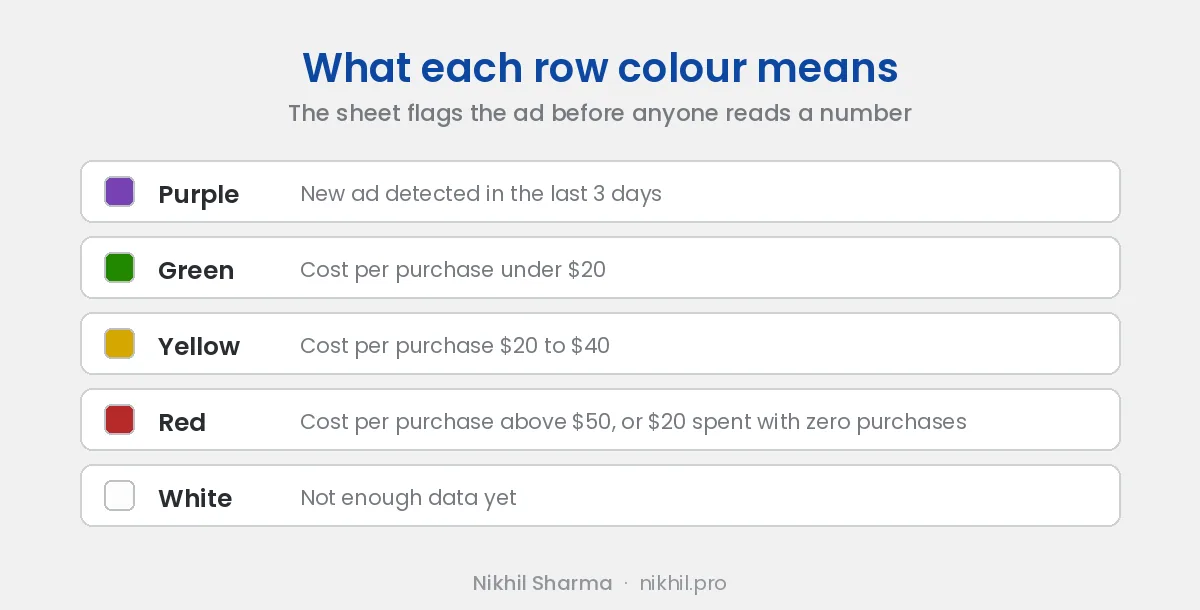
Additional Cell Signals
Amount Spent
Blue heat map where darker indicates higher relative spend.
Cost per Purchase
-
Green under $20
-
Yellow $20 to $40
-
Red above $40
Purchases
-
Dark green for 5 or more
-
Light green for 1 to 4
-
Red for zero
Fatigue Status
-
Healthy
-
Moderate
-
Severe
Week-over-week columns
-
Green text for improvement
-
Red text for decline
AI-Powered Creative Fatigue Detection
Every sync compares CTR from the last 7 days with the previous 7 days.
If CTR drops significantly, the system flags fatigue.
const ctrDrop = lastWeekCTR > 0 ? (lastWeekCTR - thisWeekCTR) / lastWeekCTR : 0;

if (ctrDrop >= 0.50) fatigueStatus = 'Severe Fatigue';
else if (ctrDrop >= 0.30) fatigueStatus = 'Moderate Fatigue';
else fatigueStatus = 'Healthy';
Fatigued ads automatically populate a Fatigue Alerts sheet containing:
-
Ad name
-
Campaign
-
CTR comparison
-
Percentage drop
-
Spend
-
Purchases
-
Severity level
Detecting fatigue earlier prevents wasted spend.
Automatic New Ad Detection
The script stores all known Ad IDs in Script Properties.
Any ID not previously seen is flagged as a new ad.
function checkAndUpdateNewAds(adIds) {
  const now = Date.now();
  const knownAds = getKnownAdIds();

  for (const id of adIds) {
    if (!knownAds[id]) {
      knownAds[id] = now;
    }
  }

  saveKnownAdIds(knownAds);
  return knownAds;
}
New ads remain highlighted for three days, making it easy to see when Meta begins allocating spend.
The AI Layer
Gemini: Chat With Your Live Data
Gemini integrates directly with Google Sheets, allowing natural language queries.
Examples:
Which ads have spent over $50 this week with zero purchases?
What is my blended ROAS across all active campaigns?
Show every ad where CTR dropped more than 40 percent versus last week.
Which campaign has the lowest cost per purchase?
Gemini reads the sheet structure directly and returns answers instantly.
NotebookLM: Deep Weekly Analysis
NotebookLM acts as a private AI research assistant.
Each Monday:
-
Export the Active Ads sheet as CSV
-
Upload it to NotebookLM
-
Add brand context notes
-
Ask analytical questions
Examples:
-
Which ads have high ROAS but low spend?
-
What patterns exist in top performing headlines?
-
Which audiences convert under $35 CPP?
-
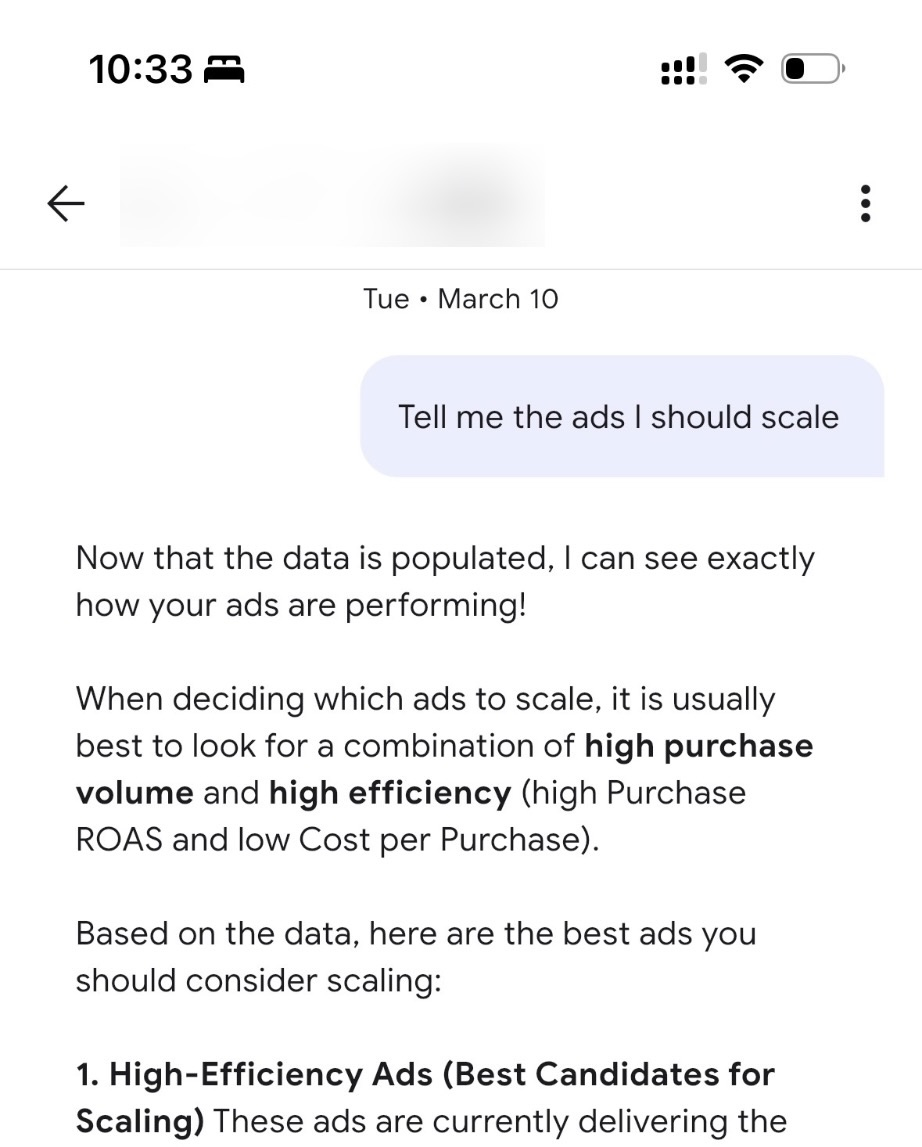
Which ads should be scaled?
NotebookLM can synthesize patterns across hundreds of rows.
The Prompt Used for NotebookLM
You are a performance marketing analyst for a US-based Shopify brand.
Our ROAS target is 2.5x. Target Cost per Purchase is under $35.

Analyze this Meta Ads data and give me:

1. Top 5 performing ads by ROAS and what they have in common
2. Top 5 wasted spend ads (high spend with low or zero purchases)
3. Patterns in winning headlines and body copy
4. Which audiences convert best and at what CPP
5. Specific actions to take in the next 48 hours

Be direct. Skip the preamble. Lead with numbers.
The results often surface insights that traditional dashboards miss because the AI understands the brand’s actual goals.
Setting It Up
Step 1: Create a Meta App
-
Go to developers.facebook.com
-
Create a new app with Business type
-
Add the Marketing API product
-
Generate a User Token with
ads_readpermission -
Exchange it for a long-lived token
Step 2: Set Up the Google Sheet
-
Open Google Sheets
-
Go to Extensions → Apps Script
-
Paste the script
-
Open Project Settings → Script Properties
-
Add:
ACCESS_TOKEN = your long lived tokenStep 3: Add Campaign IDs
CAMPAIGN_IDS: [
  'YOUR_CAMPAIGN_ID_1',
  'YOUR_CAMPAIGN_ID_2',
],
Campaign IDs can be found inside Ads Manager URLs.
Step 4: First Sync
Run syncFast() manually once to authorize permissions.
After that, everything runs automatically.
Step 5: Enable Auto Refresh
Start Smart Refresh (30 minutes).
Two triggers are created:
-
smartRefreshevery 30 minutes -
nightlyVideoDownloadevery midnight
Technical Lessons Learned
CTR values are already percentages.
Formatting them incorrectly in Sheets multiplies them by 100.
Use:
0.00"%"Budget values return in cents.
Always divide by 100.
Meta API rate limits appear during development.
Error 80004 indicates rate limits. The script should pause and retry.
Always paginate API results.
Campaigns with more than 100 ads return paginated responses.
Follow paging.next until null.
Google Apps Script execution limit is six minutes.
Heavy tasks like video downloads should run only during nightly jobs.
Real Results
After running this system for several weeks:
-
Fatigued creatives detected earlier
-
New ads identified within 30 minutes
-
Weekly AI analysis reduced from two hours to fifteen minutes
-
Wasted spend reallocated faster
-
Midday budget questions answered instantly
What Comes Next
Future improvements include:
-
Weekly AI email digest
-
Spend pacing tracker
-
AI clustering of creative patterns
Final Thoughts
You do not need a $300 per month SaaS tool for professional AI-powered ad reporting.
The Meta Marketing API is free.
Google Apps Script is free.
Google Sheets is free.
Gemini is free.
NotebookLM is free.
What this system provides is a fully customized AI layer trained on your own data and goals, updating automatically every 30 minutes.
If you run Meta ads for a Shopify brand and want the full Apps Script and the sheet template, join the newsletter and reply to the welcome email with the word monitor; I send it back the same day. If you would rather have it set up on your account with the alerts tuned to your numbers, that is one of the builds I do.
The fatigue signals this monitor flags are explained in Facebook ad fatigue, and the reason a refresh often fails to reset them is in creative similarity. If you would rather ask the account questions in plain English than build a sheet, Google’s MCP server for Ads does the same for the Google side.
Frequently asked questions
Can you monitor Meta Ads performance for free?
How do you pull Meta Ads data into Google Sheets?
How often should an ads dashboard refresh?
Can AI detect creative fatigue automatically?
What is NotebookLM useful for with ads data?
Is it worth paying for an AI ads dashboard?
Get new posts in your inbox
Occasional notes on Shopify, paid ads, and what I learn. No spam.
Thanks. Check your inbox to confirm.

Nikhil Sharma
I run data and operations for a DTC brand on Shopify, consult on Meta and Google Ads, and build AI automations for ecommerce teams. I write about what I build and run.