
Claim Your Business in ChatGPT: Business Hub, Verification, Insights and Agents
On 10 November 2026 OpenAI opened Business Hub, a place inside ChatGPT where a business can claim its own listing. It is the first time a store has been able to control what ChatGPT says about it, connect a product feed from the same screen, and see any numbers at all on how often ChatGPT mentions it in ordinary, unpaid answers. It is free, it is in beta, and the verification is stricter than most people expect.
This is the process as it runs today for an online business, what each step unlocks, and the three things to read before you claim. If you want the wider picture of how products get into ChatGPT’s answers, the product listing guide covers the feed, the crawlers and the merchant application; this post covers only the Hub.
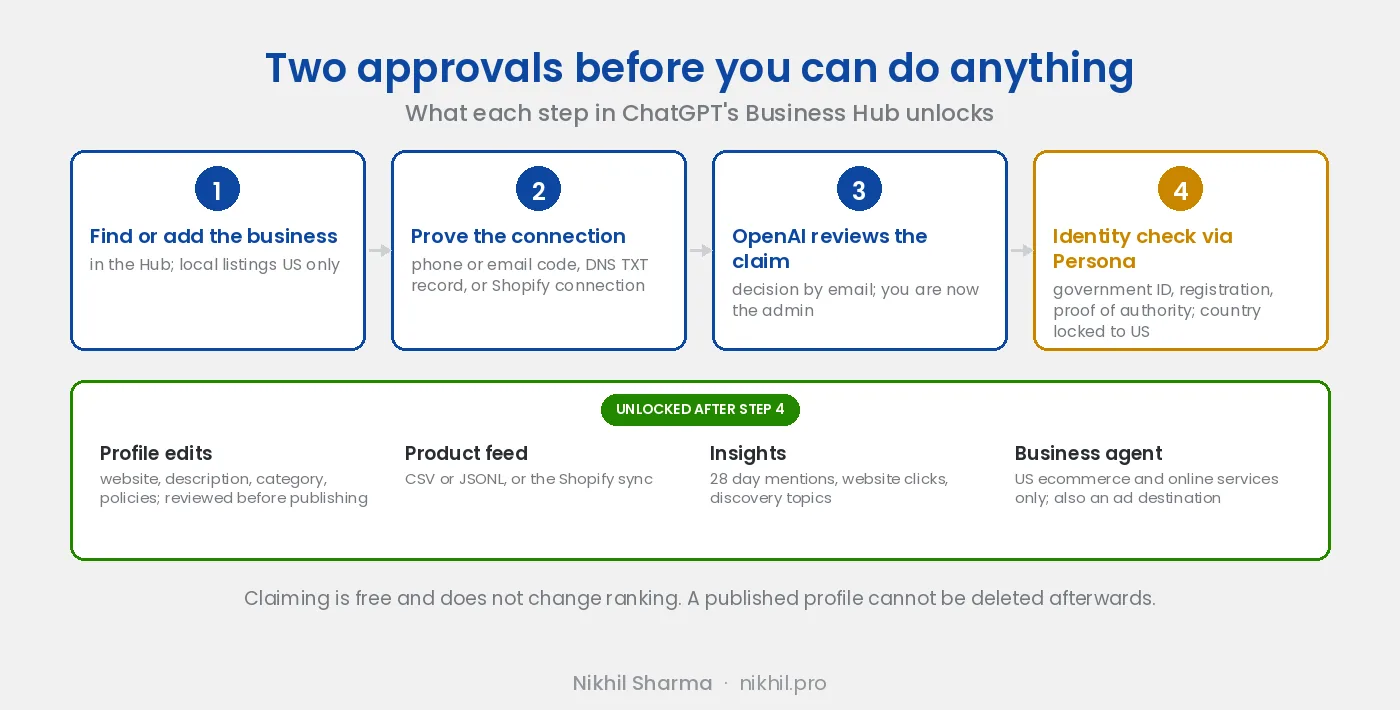
Short version: two approvals, not one. First you prove you are connected to the business and OpenAI reviews it. Then you prove who you are through Persona, and only after that can you publish edits, connect a feed, read Insights or build an agent. Claiming does not move your ranking. The owner should do it, not the agency.
Where it is and who can claim
Business Hub is in the ChatGPT sidebar on the web, or at chatgpt.com/business-hub. Owners or authorised representatives of a business with a website can claim it, wherever ChatGPT is available. Two limits apply today:
- Local stores and restaurants can only claim a listing ChatGPT already has, and only in the US.
- Business agents are only for eligible US ecommerce and online service businesses, and eligibility is reviewed separately from verification.
Brands are claimed one at a time. Claiming a parent brand does not claim its locations or sister brands, and there is no central view for a company with several.
Step one: prove the connection
Search for the business in the Hub and select it. An online business ChatGPT does not list yet can be added. The Hub then offers whichever of four methods apply:
- A code sent to the business phone, by SMS or automated call
- A code sent to the business email
- A TXT record on the website’s domain
- Connecting the Shopify store
OpenAI reviews the claim and emails a decision. Some claims come back with a request to contact support instead of a decision, and those sit in a queue; if that happens, the support thread is the only way forward.
Step two: the identity check
After the claim is approved comes the part people object to. Persona, the identity verification service OpenAI uses, may ask for a government issued ID, business registration details, and proof that you are authorised to represent the business, and the details must match official records. Until this passes you cannot publish profile changes, connect a product feed, see Insights or create an agent, and the verified badge does not appear.
Two things to know before starting it:
- The country is fixed to the US in the current flow and cannot be changed afterwards. Businesses outside the US have found themselves locked at this step with no way back.
- On what happens to the ID: Persona’s own policy says ID and selfie data is destroyed when verification completes or within three years of the last interaction, subject to the retention period its customer sets. OpenAI has not published its setting.
The reason the step exists is the reason Google makes local businesses record a video: without an identity check anyone with a domain could claim a hundred businesses. Annoying, and the alternative is worse.
What a verified business can do
Edit the profile. Website, description, category, logo, cover photo, and delivery and return policies. OpenAI reviews edits before they publish.
Connect the product feed. Either the Shopify connection, which syncs the catalogue, or a CSV or JSONL file in OpenAI’s specification: 48 fields, 9 of them required. A plain file upload targets the US; other markets need OpenAI to confirm the integration first. Sale and availability dates in the feed do not schedule anything, so when prices change the file has to change with them. The feed makes products available; which ones ChatGPT recommends remains its decision.
Read Insights. The past 28 days, three numbers:
- Mentions. For an online business, the times ChatGPT referenced your website. The brand name on its own does not count. For a local business, the times a result was shown for the location, whether or not anyone opened it.
- Website clicks. Clicks through to the site.
- Discovery topics. The common themes in the answers that mentioned or cited you.
You never see the prompts or the chats, including chats with your own agent. The metrics stay blank until activity passes a reporting threshold, so a blank panel means “not enough yet”, not zero.
Create a business agent. US ecommerce and online service businesses only. The agent answers from your information and instructions in a separate, labelled conversation. It cannot complete a purchase, make a booking or look up an order. OpenAI reviews it on creation and on every update, can pause or remove it, and can restrict a business after repeated problems. A sponsored placement in Ads Manager can use the agent as its destination, which is the first ad format where the ad and the answer sit in the same place; the ChatGPT ads review covers the paid side.
What claiming does not do
OpenAI’s own wording: claiming does not guarantee higher placement or sales. ChatGPT shows information about a business whether or not it is claimed and continues to make its own recommendations, and advertising does not influence those answers. If a vendor sells you claiming as a ranking lever, that is the sentence to send them.
What claiming does change is who controls the description, whether the feed is connected, and whether you can see the numbers. Those are worth the afternoon.
Read these before you claim
Three things in the terms and the help documentation that matter more than the setup steps:
- The licence is perpetual. The basic information you submit for public display is licensed to OpenAI perpetually and irrevocably.
- There is a broad release. One section is a wide promise not to sue over your business data and website content, with a release of those claims. For a client’s business, have their lawyer read it before anyone clicks claim.
- Publishing is permanent. Once a profile is published, OpenAI Support cannot delete, unpublish or hide it. Only unpublished drafts can be removed. A new profile that passes review goes live automatically, with no separate publish step.
Who should claim it
Whoever claims becomes the admin, and the admin adds teammates or gives an agency access. Each person signs in with their own ChatGPT account. So the owner claims, passes Persona in their own name, and adds the people who will do the work. An agency that claims on a client’s behalf has put the client’s listing under the agency’s identity check and the agency’s account, which is the wrong way round for both of them.
Want the whole ChatGPT setup checked
Thirty minutes on a call
Crawler access, the feed, the files Shopify publishes for you, and now the Hub claim. You leave with the list in order.
Doing it yourself
The ChatGPT shopping checklist
Every fix for showing up in ChatGPT, Perplexity, Google AI and Gemini, free and printable.
This post is kept current as the Hub changes; the updated date at the top is the one to trust. The organic side of the same channel is in getting your products listed on ChatGPT, the files Shopify now publishes for every store are in the agentic commerce rollout, and the paid side is the ChatGPT ads review.
Frequently asked questions
How do I claim my business in ChatGPT?
Is claiming a business in ChatGPT free?
Does claiming my business improve how often ChatGPT recommends it?
What does the Persona identity check ask for?
What does Business Hub Insights show?
Can I connect a Shopify store to ChatGPT Business Hub?
What is a ChatGPT business agent?
Should an agency claim a client's business in ChatGPT?
Can I delete my business profile from ChatGPT after publishing?
Part of AI search and agentic commerce, where every guide on the subject is listed in reading order.
Get new posts in your inbox
Occasional notes on Shopify, paid ads, and what I learn. No spam.
Thanks. Check your inbox to confirm.

Nikhil Sharma
Nikhil Sharma runs data and operations for a DTC brand on Shopify and consults for Shopify brands on Meta and Google ads, conversion and AI automation. He writes case studies and implementation guides from accounts and systems he has run himself.