
I Connected Clover POS to ChatGPT. Here Is What It Can Answer
There is no official Clover MCP server, so I built one for the multi-location business I run ops for. The owner can now ask sales, item and tips questions in plain English and get live numbers back, instead of waiting for someone to open a dashboard and retype figures into a message. Here is what it answers, what it took, and the reporting problem it exposed that applies to you whether or not you ever build one.
What he can actually ask
This is the part worth your sixty seconds, because it is the only part that tells you whether this is useful for your own business.
Typed into ChatGPT, in plain English, answered from live data:
- How did we do yesterday, and which location did best
- How is this week tracking against the same days last week
- What is our busiest hour, and which weekday is weakest
- Card or cash, and has the mix moved
- What sold best this weekend, and does that differ by location
- How many of one specific item did a given store sell
- What is rising and what is falling over the last month
- What is not selling at all and should probably come off the menu
- What do people buy together, and what does that do to basket size
- Tips by location, by shift, by role, by cashier
- Which team earns the most per hour on the floor, not just in total
- The largest order on a given day, and what was in it
Follow-ups work the way conversation works. Ask about yesterday, then ask “and the month so far”, then “just the two mall locations”, without restating anything.
What it is, in plain terms
The longer plain language version, for whoever has to approve one of these, is what is an MCP server, for store owners, and what Shopify itself ships is the companion for the store side.
Clover publishes an API, which is the technical door into your own sales data. MCP is a standard that lets an AI assistant use an outside system as a set of tools. The server I built sits between the two: it holds the credentials, exposes a fixed set of questions the assistant is allowed to ask, and does the counting itself before handing back an answer.
The owner adds it to ChatGPT once. After that it behaves like any other thing he can ask.
The part that applies to you even if you never build this
Here is the problem I hit two days in, and it is worth five minutes of your time regardless.
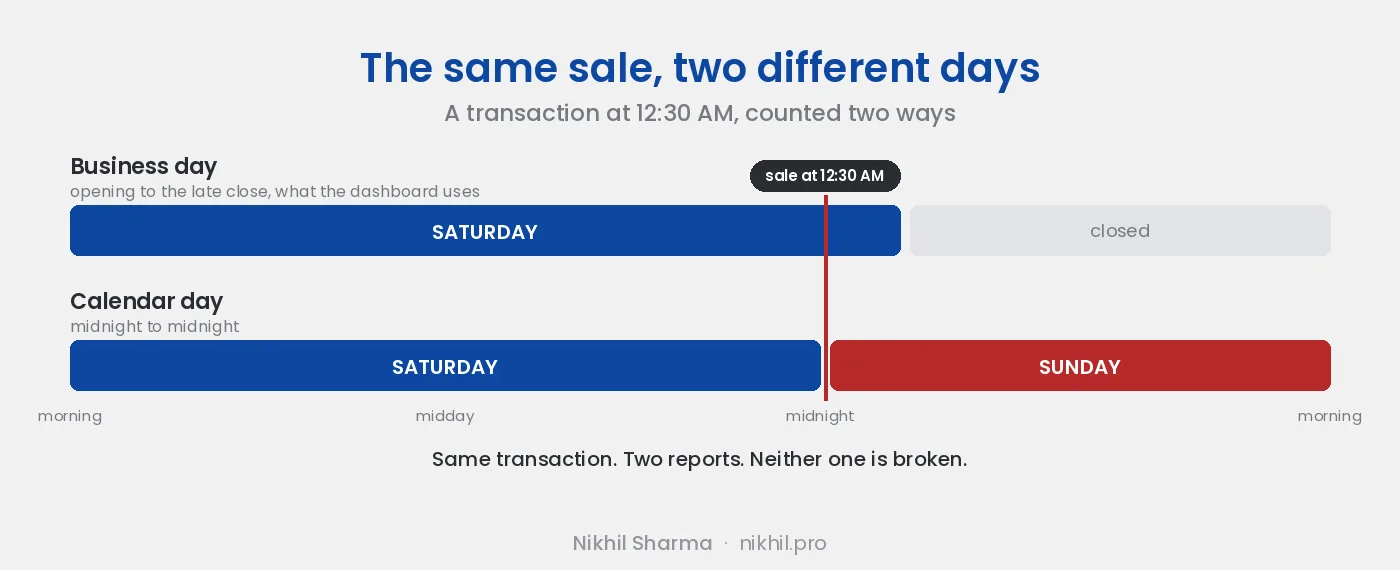
A day does not start at midnight.
Some locations stay open late. A customer buys at 12:30 AM. To the raw data that sale belongs to the next calendar date. To everyone who worked that shift it belongs to the night before, and that is how Clover’s own dashboard reports it, and that is how the team’s daily message has always counted it.
So the server had to run on a business day that ends in the early hours of the next morning. Not midnight to midnight.
If I had shipped calendar days, nothing would have looked obviously broken. The totals would simply have been quietly different from the dashboard, every single day, by an amount nobody could explain.
The same trap sits under the words themselves. Net sales has a specific meaning in your dashboard: it nets out discounts and refunds, handles tax a particular way, and treats tips as separate from sales. Any other report that uses the phrase has to mean exactly the same thing, or two people reading two reports will disagree about the business and both will think the other is wrong.
What it cost and how long
Straight answers, because this is what gets left out of posts like this.
| Reality | |
|---|---|
| Getting data out of the API | A weekend |
| Making the numbers trustworthy | Months, on and off |
| Hosting | A few dollars a month |
| Clover API charges for reading your own data | None |
| AI subscription | Whatever the person asking already pays |
| Do you need a developer | Yes |
That weekend-to-months ratio is the honest shape of this kind of project, and it is why I would push back on anyone selling it as an afternoon of work. The code that fetches the data is easy. Making every answer agree with what people already believe is the job.
Who this is worth it for
Worth it if you run several locations and comparing them is a recurring chore, or someone on your team spends real time each week assembling numbers into a message, or you regularly want answers your dashboard cannot express, like which cashier’s payments get tipped least often relative to their store.
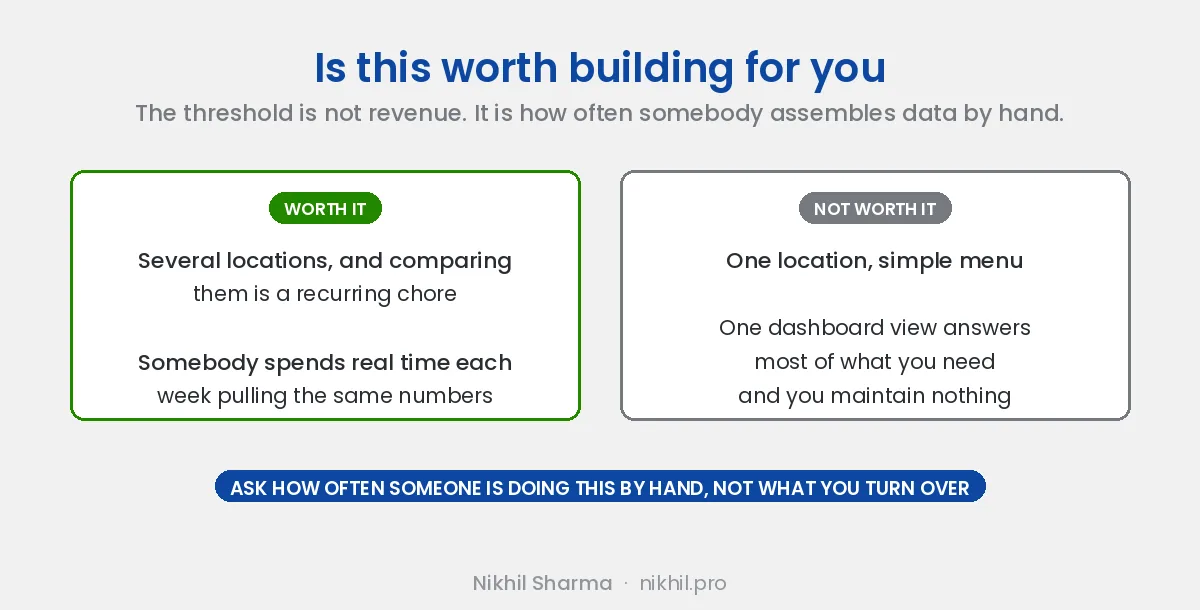
Not worth it if you run one location with a simple menu. One dashboard view will answer most of what you need, and you will have spent developer money to replace a page you could have bookmarked.
The threshold is not revenue. It is how often somebody is doing data assembly by hand.
What to be careful about
Who can see it. It reads live sales and cashier-level tips. Give it to the people who already have that visibility, not the whole floor.
Stale answers. We cached answers early on and I took that out. A cached figure and a live figure look identical on screen, so nobody can tell which one they are reading. Every number is now fetched live, and slower is a fair price for a figure you do not have to interrogate. Plenty of other things are still cached, just never the answers, which I go into below.
Invented figures. This gets used for financial planning, so the one unacceptable failure is a plausible number that is not real. If a period is incomplete the answer says so. If the question cannot be answered from what Clover holds, the answer says that instead of producing something shaped like an answer.
Dependence on one person. If one developer built it and nobody else understands it, that is a risk you are taking on. Ask for documentation up front.
For the technical reader
Three decisions that mattered more than the rest.
One tool per question, not one per endpoint. The obvious build mirrors the API: list orders, list payments, list items. That forces the model to do arithmetic over thousands of raw rows, which is slow and occasionally wrong in a way that looks completely plausible. Instead each tool answers a whole question and does its counting in code, so the same question returns the same number every time.
The statistical judgement belongs in the tool. If someone asks on a Wednesday how the week is going, comparing three days against a full previous week makes this week look like a disaster. The default compares the same days, Wednesday against Wednesday. Tips are reported per active hour as well as in total, because comparing raw tips between people who worked different amounts tells you who worked more, not who earns more on the floor. Anything you rely on a model to remember every time is something it will eventually forget.
Most of the instruction file is vocabulary, not documentation. Nobody types a store’s full legal name, so the nicknames are in there. Our floor team is bilingual, so the real phrasings are in there in both languages. “How did we do yesterday” wants a table by location and then a total, because that is the shape the team has read in their daily message for years, so the expected answer format is in there too. That file took longer to get right than the endpoints did.
No cache does not mean no Redis
I said above that we removed caching. That is true of the answers and false of everything else, and the distinction is most of the architecture.
The server is stateless on purpose, so it can restart and scale without any one instance holding something another would need. Whatever has to be shared lives in a short lived store such as Redis instead.
What belongs there, in general terms:
Credentials and sessions. Access tokens expire and conversations outlive a single request, so both need a home outside the process, with an expiry set below the real one.
Rate limit counters. The API has limits, and several instances can collectively blow past them while each one individually looks well behaved. A shared counter is the only way separate processes respect a single limit.
Reference data, briefly. The store list and timezone config change approximately never. Categories change occasionally. Those can sit in a cache for minutes or hours with nobody at risk.
That last one points at the rule the whole cache layer follows:
Cache what describes the business. Never cache what measures it.
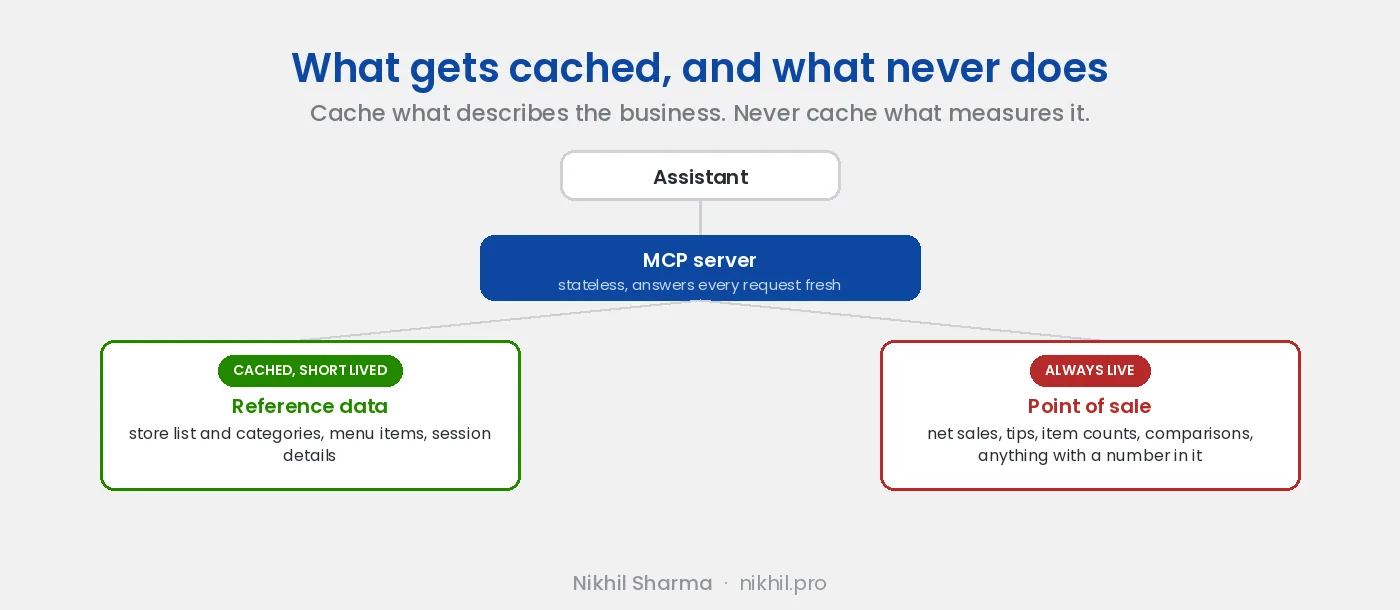
Store names, category lists, opening hours: describing. Net sales, tips, item counts, averages, comparisons: measuring. The first set can be an hour old and mislead nobody. The second cannot be a minute old without becoming a liability.
On the model side there are two kinds of caching, and only one of them belongs here.
Prompt caching is safe and worth turning on. The tool definitions and the instruction file are long and get sent on every single turn. Anthropic and OpenAI will both cache that prefix and charge less for it. You are caching the input, so nothing can go stale in a way that misleads anyone.
Semantic answer caching is the one to refuse. The idea is to notice that a new question resembles one you already answered and hand back the old answer. For a financial tool that is a trap, because “sales yesterday” and “sales yesterday at the mall store” sit very close together in meaning and nowhere near each other in answer. A semantic cache that conflates the two returns a confident wrong number, which is the precise failure this entire design exists to prevent.
One rule to build in from the start: the service has to work with an empty Redis. Flush it and everything should still answer correctly, just slower, re-authenticating and refetching as it goes. The moment Redis becomes a source of truth rather than a convenience, an eviction stops being a slow request and becomes either an outage or a wrong answer.
The short version
Getting data out of Clover is easy. Making an AI answer agree with the dashboard, the daily message and the accountant is the actual work, and most of it is not AI work at all. It is deciding when a day ends, what a word like net means, and writing down how your own team talks.
The same lesson keeps showing up in every one of these builds, which is why I wrote a book about it: AI Workflows for Shopify. The other two connectors in this series cover Google Analytics and Google Ads. If you want the version of this argument that has nothing to do with a POS, I wrote about the most useful AI I built not being customer facing.
And if you take one thing from this and build nothing: go check whether two of your existing reports agree about last Saturday.
I’m Nikhil Sharma. I run data and operations engineering for a DTC brand and write about the systems underneath retail and ecommerce. If you want help wiring your POS, ads or analytics into something your team can query, this is what that looks like, or book a call.
Frequently asked questions
Does Clover have an official MCP server?
Can you connect Clover POS to ChatGPT?
Do I need a developer to build this?
What does a Clover MCP server cost to run?
Is it safe to connect POS data to an AI assistant?
Why do my Clover numbers not match between reports?
What is a business day in POS reporting?
Can staff use it, or only the owner?
Should an AI reporting tool cache its answers?
Do you need Redis for an MCP server?
What should an AI reporting tool cache, and what should it never cache?
Is prompt caching safe for an MCP server?
Is this worth it for a single-location business?
Get new posts in your inbox
Occasional notes on Shopify, paid ads, and what I learn. No spam.
Thanks. Check your inbox to confirm.

Nikhil Sharma
Nikhil Sharma runs data and operations for a DTC brand on Shopify and consults for Shopify brands on Meta and Google ads, conversion and AI automation. He writes case studies and implementation guides from accounts and systems he has run himself.