Why Are My Shopify and Klaviyo Emails Going to Spam?
Another year, another set of requirements from another provider. That is how it feels when the deliverability rules change, and in 2024 they changed in a way that moved a lot of Shopify and Klaviyo email into spam at once.
Starting 1 February 2024, Gmail and Yahoo began enforcing requirements for bulk senders. Microsoft followed with the same set for Outlook and Hotmail in May 2025. If your marketing emails went from the inbox to the junk folder around either date, this is almost certainly why.
What the requirements are
For anyone sending 5,000 or more messages a day to Gmail addresses, and in practice for everyone who wants reliable delivery:
- Authenticate the sending domain with SPF, DKIM and DMARC. All three.
- Keep the spam complaint rate under 0.3 percent, as measured in Google Postmaster Tools. Google says to aim for 0.1 percent.
- Support one-click unsubscribe, with a List-Unsubscribe header in every marketing email, and process the unsubscribe within two days.
- Do not send from a free domain. Mail from an @gmail.com address through a bulk sender fails DMARC alignment by design.
Miss any of them and Gmail starts routing to spam, then rejecting outright. There is no warning email.
Why Shopify and Klaviyo stores are hit
Two reasons. Shopify stores send a lot of email: order confirmations, shipping updates, abandoned checkout flows, campaigns. A modest store crosses 5,000 a day during a sale without noticing. And most stores set Klaviyo up in a hurry, with a shared Klaviyo sending domain and no DMARC on their own, because it worked at the time.
It worked because nobody was checking. Now they are.
How to fix it
Set up a dedicated sending domain
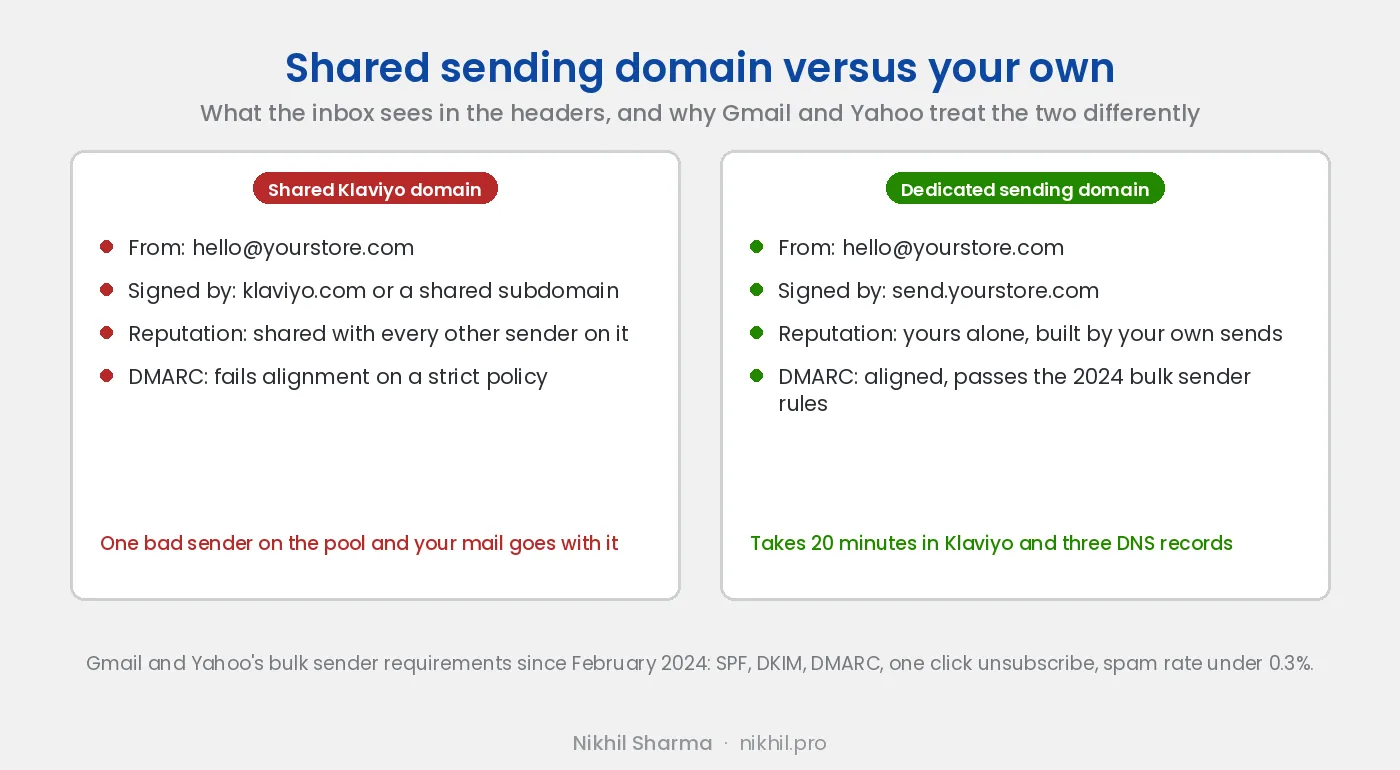
A dedicated sending domain, also called a branded sending domain, means your marketing email is signed by your own domain rather than by Klaviyo’s shared one. Klaviyo creates it as a subdomain, usually something like send.yourstore.com, and gives you a set of DNS records to add at your registrar: GoDaddy, Namecheap, Cloudflare, wherever the domain lives.
The three records that matter:
- SPF, the list of servers allowed to send for the domain.
- DKIM, a signature on each message that proves it was not altered and came from an authorised sender.
- DMARC, the policy that tells receiving servers what to do when SPF or DKIM fail, and where to send reports.
Klaviyo’s settings page shows each record as verified or not. Do not send a campaign until all of them are.
Add a DMARC record on the root domain
Klaviyo handles SPF and DKIM for the sending subdomain. DMARC has to exist on your root domain, and it has to be you who adds it. The minimum that satisfies the requirement is:
_dmarc.yourstore.com TXT "v=DMARC1; p=none; rua=mailto:[email protected]"Start at p=none. It reports and blocks nothing. After a few weeks of reports showing only your real senders passing, move to p=quarantine. Going straight to p=reject with something misconfigured drops your own order confirmations silently.
Authenticate Shopify’s own emails too
Shopify sends order and shipping notifications, and Shopify Email campaigns, from the sender address in your store settings. Under Settings, Notifications, Shopify asks you to authenticate that domain and shows the records to add. Stores skip this because the marketing was in Klaviyo. Then the order confirmations start going to spam, which is worse.
Send from your own domain, never a free one
If the from address is still @gmail.com or @outlook.com, change it to @yourstore.com. The requirement is not negotiable: a bulk sender using a free domain cannot pass DMARC alignment, because the free provider’s policy does not authorise Klaviyo to send for it.
Keep the unsubscribe link, and the header
Every marketing email needs an unsubscribe link in the body and a List-Unsubscribe header so Gmail and Yahoo can show their own unsubscribe button at the top. Klaviyo and Shopify Email add both automatically. If you use a custom template, check that the link is still there. An email without a way out gets marked as spam instead, and the spam mark is what hurts.
Watch the complaint rate
Verify your domain in Google Postmaster Tools and look at the spam rate chart once a week. Under 0.1 percent is healthy. Over 0.3 percent and Gmail starts filtering. The usual causes of a high rate are a list that was built from discount popups rather than from customers, and sending to people who have not opened anything in a year. Suppress the inactive segment before the next campaign.
Only send what the list wants
Authentication gets you in the door. Content keeps you there. A list of customers who opted in at checkout opens because they bought. A list of strangers who wanted 10 percent off marks you as spam when the discounts stop. The Klaviyo section of the marketing checklist has the flow order I use.
Once the mail is landing, the five flows that earn most of the email revenue are the next thing to build, in that order.
How to tell whether you are passing
Send a campaign to a Gmail address you control, open the message and choose Show original. The top of the page lists SPF, DKIM and DMARC with PASS or FAIL beside each. All three should pass and the signing domain should be yours, not Klaviyo’s. If any of them fails, the records are wrong or not yet propagated, and the fix is above.
Video of the Article
If the records are set and the mail still lands in spam, book a call. The next things to check are the list source and the sending pattern, and both take longer to fix than DNS.
Frequently asked questions
Why are my Shopify or Klaviyo emails going to spam?
What are the Gmail and Yahoo sender requirements?
Do the requirements apply if I send fewer than 5,000 emails a day?
What DNS records does Klaviyo need?
Does Shopify Email need the same setup?
What DMARC policy should I use?
How do I check my spam complaint rate?
What is one-click unsubscribe?
Get new posts in your inbox
Occasional notes on Shopify, paid ads, and what I learn. No spam.
Thanks. Check your inbox to confirm.

Nikhil Sharma
I run data and operations for a DTC brand on Shopify, consult on Meta and Google Ads, and build AI automations for ecommerce teams. I write about what I build and run.