AI Pre-Call Briefing Tool: How I Prep Support Agents Before Every Call
A pre-call briefing tool is an internal AI system that reads a customer’s context, order history, prior tickets, call notes and order notes, before a support call and generates a short brief for the agent. It replaces the manual scramble of digging through tabs at the start of every call, so the conversation opens informed instead of fumbling.
I build back-office AI tools for a DTC ecommerce brand on Shopify. This is a concept-level write-up of one of them: a pre-call briefing tool, sometimes called pre-call intelligence or agent assist. It is one of the highest leverage and least glamorous pieces of AI I have shipped, and it is the one I would build first for any store that still phones its customers.
The problem: agents waste minutes scavenging before every call
Before a support agent calls a customer, they spend a few minutes searching across systems to answer basic questions: what did this person order, did something go wrong, have they contacted us before. That prep time, multiplied across every call, is a real cost, and it pushes agents to improvise through the opening of the conversation.
The person making the call is good at talking to people. They should not be spending that time acting as a search engine. Across a day of calls the lost minutes add up, and call quality suffers because the agent is piecing context together live instead of listening.
The part that is harder to see on a timesheet is what happens when the search is cut short. An agent with four tabs open and a customer on the line will stop at the first order they find, which is not always the right one, and open the call with a question the customer has already answered in a ticket last month. The customer hears a business that does not remember them. For a brand that sells on being personal, that is the expensive failure, not the three minutes.
What goes into the brief
The brief pulls from four places: the order system for what was bought and where it went, the helpdesk for prior tickets and how they ended, the call log for past calls and their outcomes, and the order notes field, which is where customers write the human details. Each source is trimmed to the last twelve months and ordered by recency before the model sees it.
The order of sources matters more than it looks. Shopify knows the orders. The helpdesk knows the complaints. The phone system knows the calls. None of them agree on who the customer is: the same person is an email address in one, a phone number in another, and a name with a typo in the third. The first version of the tool matched on email alone and silently missed a third of the call history. Matching on email, then phone, then a fuzzy name and address check, fixed that, and it was the single biggest improvement to the brief’s accuracy, before the model was involved at all.
The order notes field earns its place. It is where a customer types “birthday gift for my mom” or “please leave with the neighbour” or “second time ordering, the last one was perfect”, and nobody on the team reads it unless something goes wrong. Feeding it to the brief turned a field that existed for the warehouse into the warmest thing on the agent’s screen.
What stays out: marketing events, email opens, abandoned carts, browsing. The model will happily summarise all of it and the brief becomes a report. The test for every field was whether an agent would say it out loud on the call. If not, it was noise.
What the brief looks like
The output is six lines. Four are facts read from a system: who the customer is, their last order, their prior contact, and any note they left. Two are the model’s inferences: the likely reason for the call and a suggested opener. The agent reads the whole thing in about five seconds.
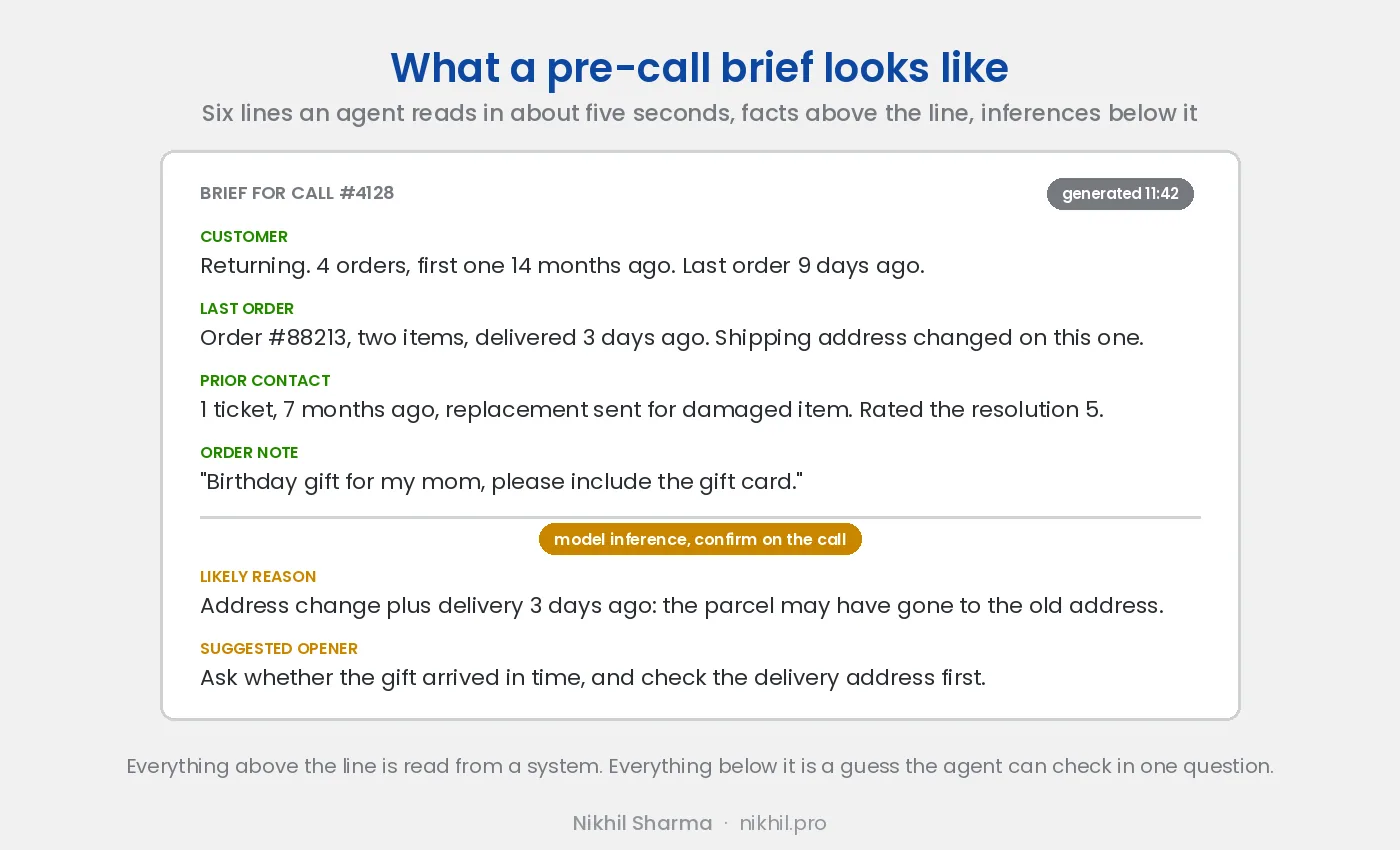
Six lines was not the first design. The first version was a paragraph, and agents skimmed it and missed the one detail that mattered. The second was a bulleted dump of everything, which they stopped reading within a week. The format that stuck has a fixed slot for each thing, in the same place every time, so an agent’s eye learns where the order note is and goes there first. Fixed structure beats fluent prose for anything that has to be read in five seconds, which is a lesson I have since applied to every internal tool I have built.
The “likely reason” line is the one agents valued most and the one that caused the most trouble, which is covered below.
The model: cheap and fast, on purpose
The tool runs a language model over each customer’s context before the call and produces the brief. I used a fast, inexpensive model tier deliberately, because it runs on every single call, and a model that is good enough and costs almost nothing per run beats a smarter, pricier one you cannot afford to call constantly.
A brief costs well under a cent to generate. At that price nobody has to decide whether a call deserves one, which is the whole point: the tool only works if it runs on every call without anyone thinking about it. The same brief on a top tier model would cost ten to thirty times more, be slower, and read about the same, because summarising a few hundred words of structured data into six lines is not a hard problem for any current model.
The tier is Gemini Flash, the same one that scores the calls, and the two tools have moved together: 2.5 Flash when they were built, 3.5 Flash since Google retired 2.5 in October 2026. The brief is text in and text out, so unlike call scoring it does not need Gemini’s audio input, and it would run on Claude Haiku 5.5 or GPT-5 nano for a similar or lower cost. I keep it on Gemini because one provider, one key and one billing line is simpler for a two tool system, and because the swap test I ran for the call scoring tool covered this one at the same time.
For high frequency internal AI tools, cost per run is often a bigger factor in whether the tool ships than raw model quality. The expensive models earn their price on the call scoring tool that reads a full transcript and has to judge tone. For the brief, the fast tier is the right tool, and I would pick it again.
The prompt is short. It names the six slots, tells the model to leave a slot blank rather than guess when the data is missing, and tells it to put anything it is inferring below the line. The second instruction is the one that did the work; see the section on where it broke.
How it is built: the plumbing, not the model
The language model was the easy part. The hard part was data engineering: pulling context from four systems, matching customers across them, deciding what belongs in a brief versus what is noise, and getting the output onto the agent’s screen before the call connects. The model was a small fraction of the work; integrating it into a real workflow was the rest.
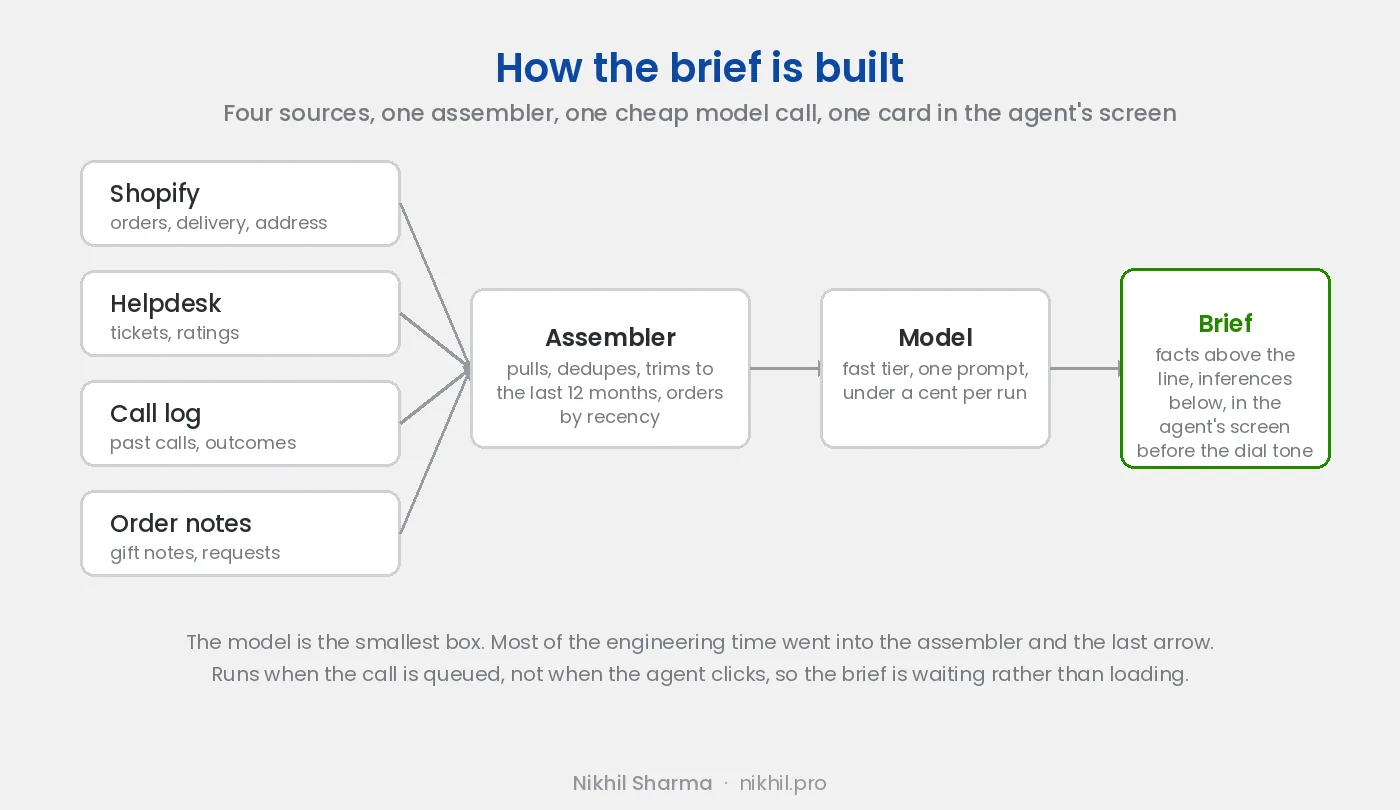
The trigger is the call entering the queue, not the agent clicking a button. Outbound calls are scheduled, so the brief can be generated when the call is queued and cached until the agent picks it up. For inbound, the brief is generated on ring, which gives it a few seconds. Either way the agent never watches a spinner, and that turned out to matter for adoption: a brief that is already there gets read, a brief that is loading gets skipped.
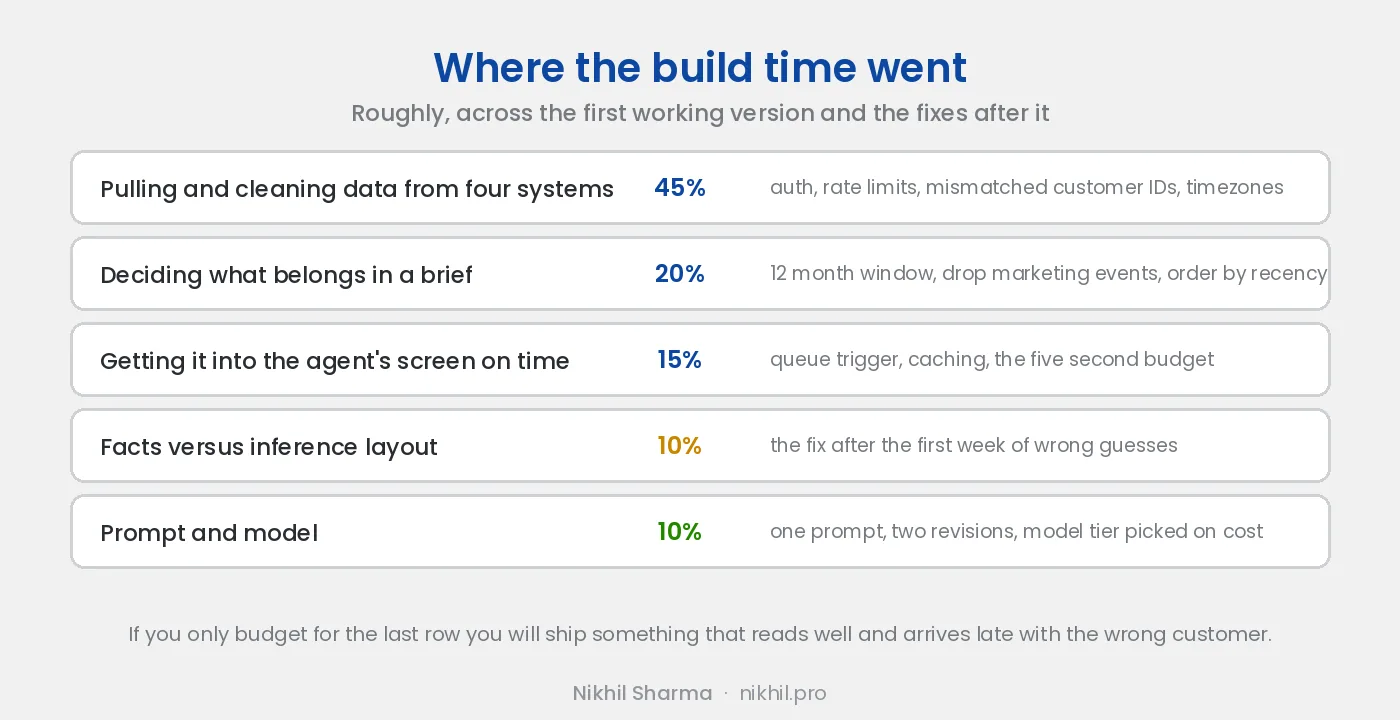
Roughly half the time went into getting the data out of the four systems and agreeing on who the customer was. A fifth went into deciding what belongs in a brief, which sounds like a product question and was mostly a data question: which events are signal, how far back to look, what to do with a customer who has forty orders. The prompt and the model took about a tenth. If you are scoping one of these and have budgeted for the last row only, you will ship something that reads beautifully and arrives late with the wrong customer on it.
This is the general lesson across the internal AI tools I have built. Getting a model to produce a decent summary is close to trivial now. Getting the right inputs to it, and getting its output in front of the right person at the right moment in a form they can act on, is where the actual engineering lives.
Why it is worth building: time, and then warmth
The obvious benefit is time saved per call. The larger benefit is warmth: order notes contain human details, like an order being a birthday gift, that no agent has time to surface live. When the brief surfaces them, the agent can open with personal context, which turns a transaction into a good customer experience.
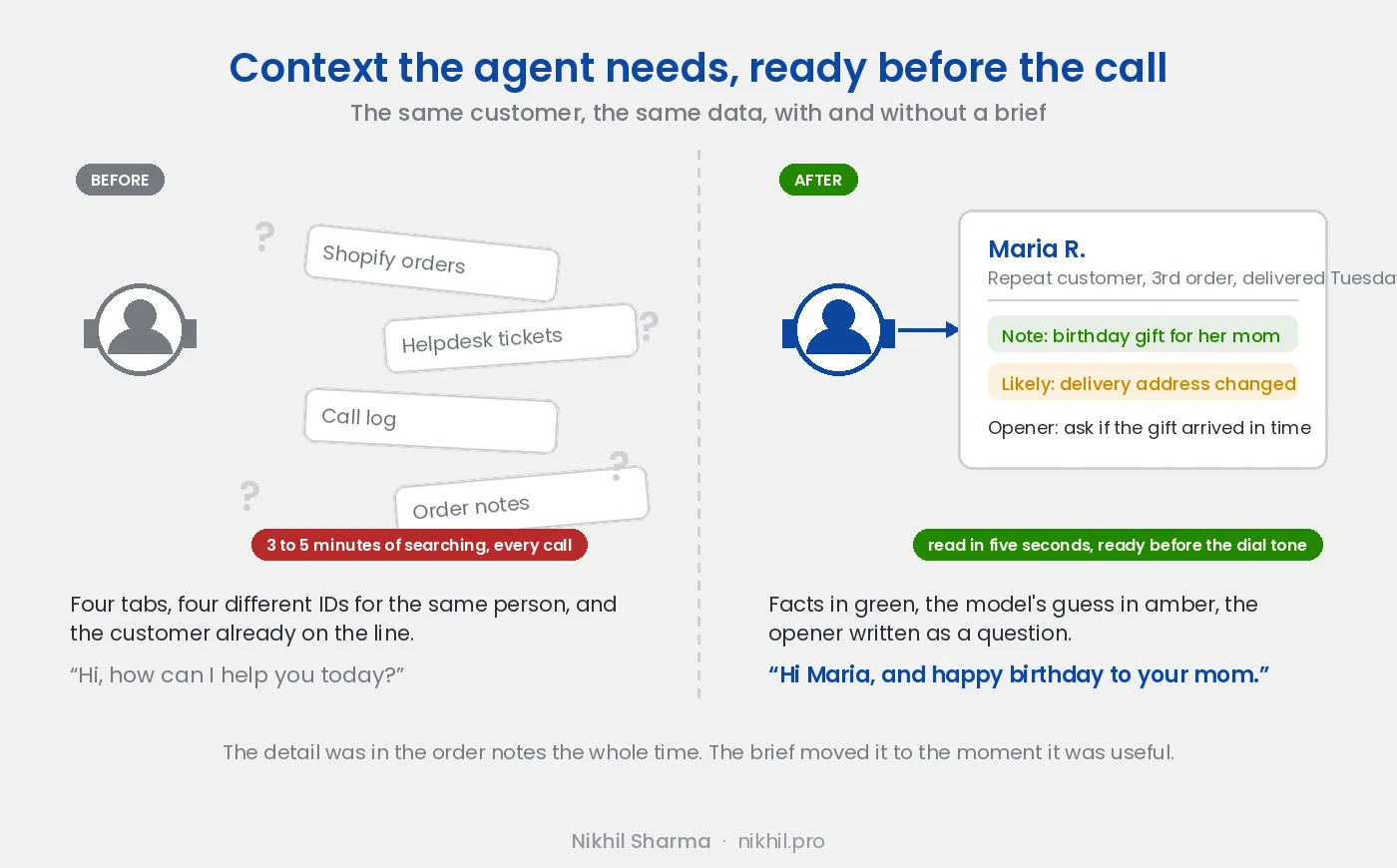
A note might say an order is a birthday gift for the customer’s mom. The brief surfaces it, so the agent opens with “and happy birthday to your mom” instead of a flat “how can I help you.” That detail was in the data the whole time. The agent just could not dig it out fast enough on their own.
Here is how small that detail is, and how much it changes. A customer places her third order, a box of cookies shipped to a different address from the previous two, with “birthday gift for my mom” typed in the notes. The parcel is delivered. Two days later she calls. Without the brief, the agent finds her by phone number, sees the latest order, and opens with “how can I help you today”. She explains that her mom did not get it. The agent asks for the order number, finds the address change, and spends the next two minutes establishing what the brief would have told them before the ring.
With the brief, the agent sees the gift note above the line and the address change flagged below it, and opens with “Hi Maria, and happy birthday to your mom, did the box reach her alright?” The customer’s first sentence is “no, actually”, the agent already has the delivery scan open, and the call is about fixing it from the first ten seconds. Same agent, same data, same customer. The difference is whether a line she typed into a box three weeks earlier reached the person talking to her.
Multiply that by the share of orders that carry a note, a gift message, a second address or a prior ticket, which for a gifting heavy store is most of them, and the warmth stops being a nice touch and becomes the thing customers mention in reviews.
This is the part most teams underrate. Agent assist AI is usually pitched as efficiency, and the efficiency is real: minutes of prep per call became seconds. But the higher value outcome is a better conversation, because the context that makes a customer feel known was always sitting in the order notes and the ticket history, unused. The tool did not create anything. It moved what the business already knew to the moment it was useful.
Where it broke, and how I fixed it
The tool would sometimes state a guess as confidently as a fact. A wrong assumption about why the customer was calling appeared in the same tidy tone as the verified order details, and an agent who trusted the brief could open the call mis-oriented. The fix was to separate facts from inferences in the brief, in the prompt and on the screen, so the agent knew which parts were solid and which to confirm.
In the first week, the “likely reason” line was right often enough that agents started treating it as fact. Then it was wrong on a call where it mattered, the agent led with the wrong assumption, and the customer had to correct them. One incident like that and the team’s trust in the whole brief dropped, including the four lines that were always right.
The fix was two changes. In the prompt, the model was told to put anything it was inferring below a marker and to say nothing in the fact slots that it could not point to in the data. On the screen, the fact lines are green and sit above a rule; the inference lines are amber, sit below it, and carry a label that says to confirm on the call. Agents now read the top for what is true and the bottom for a head start, and the suggested opener is phrased as a question for the same reason: “ask whether the gift arrived in time” cannot embarrass anyone, “the gift arrived late” can.
A confident model is not a careful one. The design had to account for that rather than pretend it away. Keeping the human able to tell verified data from model inference was the difference between a tool agents trusted and one that occasionally embarrassed them, and it is now the first thing I design into any tool where a model’s output lands in front of a customer facing person.
Rolling it out and how to judge it
The tool went to two agents first, with a weekly five minute check on whether the briefs were right and useful. The measures that matter, in order: is the first line correct, how often is the inference confirmed on the call, prep time per call, how many calls open with a personal detail, and cost per brief.
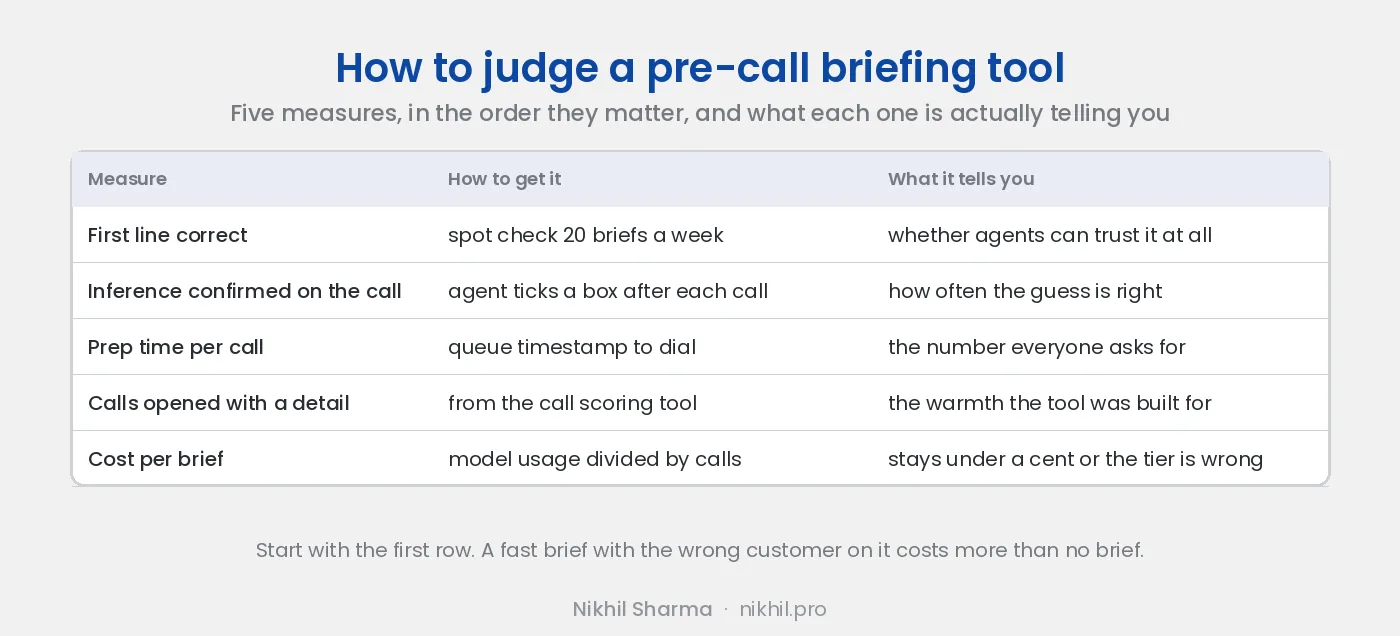
The first measure is the one to start with. A spot check of twenty briefs a week against the systems they were built from catches the customer matching errors that no model metric will. The second needs one tick box in the agent’s screen after each call: was the likely reason right. That number is the honest accuracy of the inference layer and it decides whether the amber lines stay in the brief at all.
Prep time is the number everyone asks for and it is the least interesting, because it drops to almost nothing the day the tool goes live and never moves again. The one that mattered to the team was the first line being right every time, and the one that mattered to the business was the call scoring tool showing more calls opening with a detail from the customer’s own history.
Cost per brief should stay under a cent. If it does not, the tier is wrong or the context is too long, and the fix is trimming the input rather than paying for a bigger model.
The recording, and why disputes got easier
Every call is recorded with the customer’s consent, announced at the start, and transcribed. The transcript is attached to the customer and feeds the brief for the next call. It also turned out to be the thing that settles chargebacks, “but you promised” calls and complaints about agents, because the record of what was said is no longer whoever remembers it loudest.
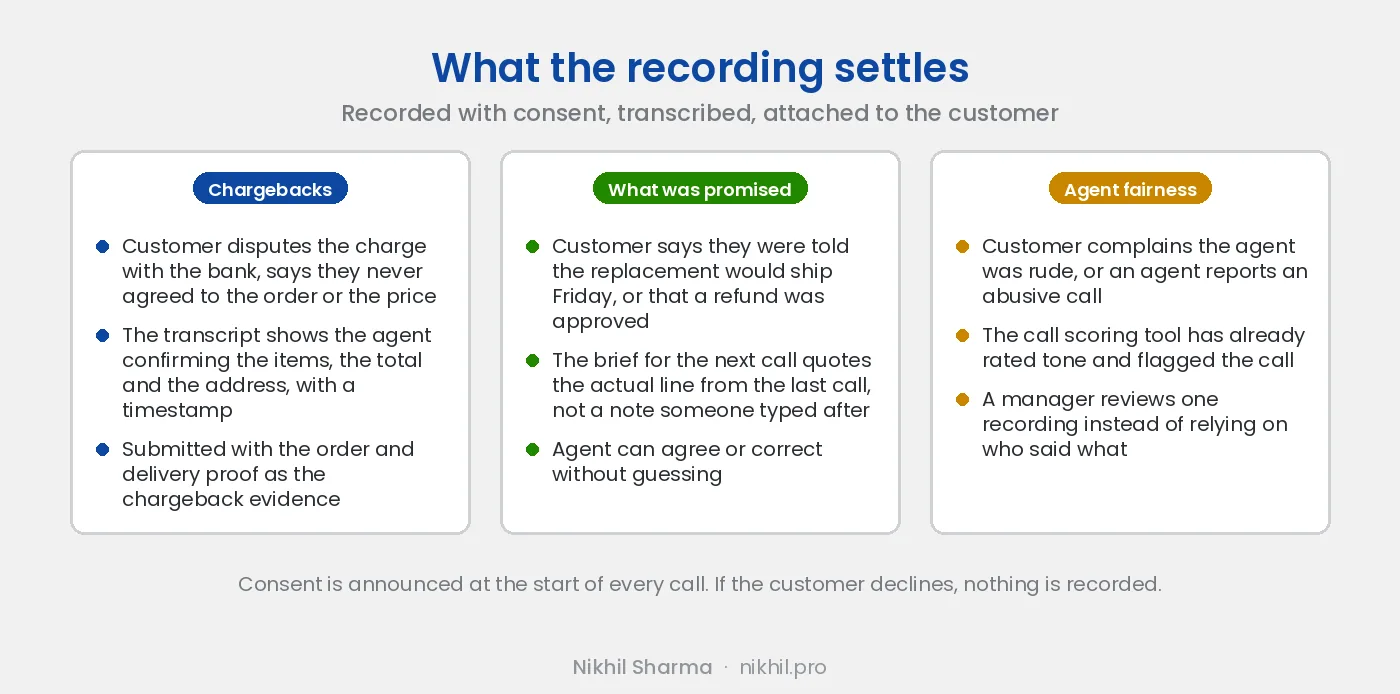
The recording was built for the call scoring tool, not for disputes. The dispute use came on its own. A customer files a chargeback saying they never authorised the order; the transcript has the agent reading back the items, the total and the shipping address, and the customer saying yes, with a timestamp, and that goes to the bank with the delivery scan. A customer calls to say they were promised a refund last week; the brief for that call quotes the line from the last call, so the agent can honour it or correct it without guessing. A customer says an agent was rude, or an agent reports a call that turned abusive; a manager listens to one recording rather than arbitrating two accounts.
None of that works without consent, and the consent has to be real. The recording notice is read at the top of every call, in the customer’s language, and if the customer says no the recording stops and the brief for future calls runs on order data alone. The transcripts sit under the same access rules as the helpdesk, they are not sent to any model provider that trains on inputs, and the brief carries only what a customer would reasonably expect the business to remember about their own orders. A customer who learns the business kept a recording they did not agree to has a bigger complaint than the one they called about.
What it does not do
The brief does not talk to the customer, does not write the ticket, and does not decide anything. It reads, summarises and hands over. That boundary was deliberate. The agent stays responsible for the call, the model’s guesses are labelled as guesses, and when the brief is wrong the cost is one awkward question rather than a wrong refund. The tools that get into trouble are the ones where the model’s output goes to the customer without a person between them; the reasoning for keeping it internal is in the most useful AI I built was not customer facing.
It also does not replace the helpdesk search. For a complicated case the agent still opens the tabs. The brief handles the ninety percent of calls where the context fits in six lines, so that the agent’s attention goes to the ten percent that do not.
What this cost and what it would take to build yours
This is a concept-level case study of an internal tool I built. It describes the approach and lessons, not proprietary implementation details. The version described here is a few hundred lines of code, four API integrations, one prompt and one small screen inside the agent’s existing tools. The first prototype, before any of that, was a spreadsheet export and a prompt pasted into a chat window, and it was enough to show the team what a brief could look like and get them to want one.
This tool is one half of the support work. The other half, scoring every call after it happens, feeds the brief with what the last call was actually about. Both sit in the wider set of AI workflows I run on a Shopify store, and the AI customer support post covers where a brief fits against chatbots and ticket triage. If you want one built for your own support team, the automation page covers scope and cost, or book a call and bring a recent call that went badly.