Google Performance Max Best Practices for Shopify Stores
Set up Google Ads on a new Shopify store and the interface will steer you to one campaign type. Performance Max, with the promise that Google’s AI will find your customers across every surface it owns. It will. The question is whether you will like where it found them.
What Performance Max actually does with your budget
PMax takes your Merchant Center feed, your images, your headlines and whatever video you give it, and runs ads across Search, Shopping, YouTube, Display, Gmail, Discover and Maps. You set a budget and a target, and the campaign decides the mix.
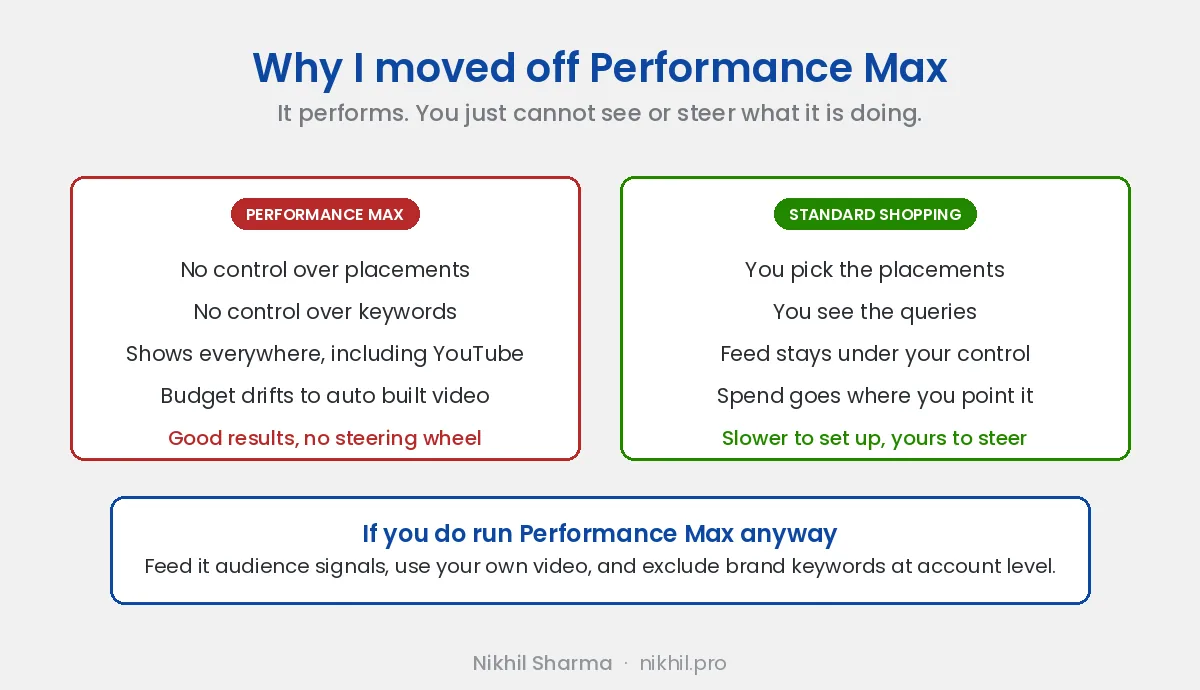
That sounds fine until you look at where the money went. On the first PMax campaign I ran for a store, a large share of the spend had gone to YouTube. I had not uploaded a video, so Google built one: a slideshow of my product pictures with a stock transition between each. It ran at a 0.4 percent click through rate and I had no way to turn that placement off without turning the campaign off.
The second thing you lose is the search terms. In a Standard Shopping campaign you can see what people typed, add negatives, and move budget to the products that convert. PMax gives you search term insights grouped into categories, which is better than it was, but it is not the same as seeing the query.
When Standard Shopping is the better choice
For a new store, nearly always. Standard Shopping runs your product listings on Shopping and Search, you see every query, you set the bids, and you decide which products get the budget. It is the campaign type that teaches you what your store sells on Google, and that knowledge is worth more in the first six months than any automation.
The practical sequence I use:
- Standard Shopping on the whole feed, manual or maximise clicks bidding, until the account has around thirty purchases.
- Read the search terms. Add negatives. Note which products convert and which just get clicks.
- Then add PMax alongside it, fed with the audience signals the Shopping campaign has just earned, with the settings below.
Shopping and PMax will overlap on Shopping placements, and PMax takes priority when they do. That is fine once PMax has something to learn from. It is not fine on day one.
If you run PMax anyway, these settings matter
Exclude your brand. Brand exclusions sit in the campaign settings. Without them, PMax bids on people searching your store name, who were going to buy regardless, and reports that as a conversion it earned. The reported ROAS goes up and the real return does not. Run brand on a cheap Search campaign instead, where you can see it.
Upload your own video. Even a thirty second phone clip of the product in use beats the slideshow Google builds. If you do not give it video, it will make one, and it will spend on it.
Give it audience signals. Your Shopify customer list, purchasers from the last 180 days, add to cart visitors, and a custom segment built from the search terms that convert in Shopping. These are hints rather than targeting, but they cut the learning period.
Add negative keywords. Campaign level negatives reached all accounts in 2025. Use search term insights to find the categories that have nothing to do with your products and exclude them.
Turn on the new customer acquisition goal only if you mean it. It tells PMax to bid more for people who have never bought. Useful once the brand campaign is separated out. Misleading before, because it lets PMax count brand searchers as new.
Check the channel performance report monthly. It breaks spend out by Search, Shopping, YouTube, Display, Discover, Gmail and Maps. If video is taking more than you would have chosen and the conversions are not following, that is the signal to pull the campaign back to feed only, which you can do by removing all assets except the products.
How this fits the rest of the account
Google is the channel that catches demand you created elsewhere. Someone sees the product on Instagram, searches it a day later, and Shopping is where that search lands. That is why I run Google alongside Meta on every store, and why the $700K beauty brand account and the $1 million D2C account both had a Shopping campaign under the Meta spend.
The Merchant Center feed matters more than the campaign type. A feed with weak titles, missing GTINs and disapproved products will underperform in both Shopping and PMax. The Shopify store marketing checklist has the Merchant Center section if you have not set it up yet.
If you want someone to look at a Google Ads account that is spending without clear results, book a call. The first thing I will check is where PMax is putting the money.
If you would rather have the feed, the structure and the reconciliation handled, the Google Ads page is what that looks like and what it costs.