I Tried Shopify Rollouts A/B Testing. It's Not Ready Yet
Shopify shipped native A/B testing. It’s called Rollouts. It lives under Markets > Rollouts in your admin. It’s free.
I run a Shopify store. I’ve been paying for Convert.com on it. When Rollouts showed up on my plan, I figured I’d try it on a homepage test I’d been planning. I closed the tab without launching the test. Here’s why.
What it does
Rollouts is two things stitched together: scheduled deployment and A/B testing.
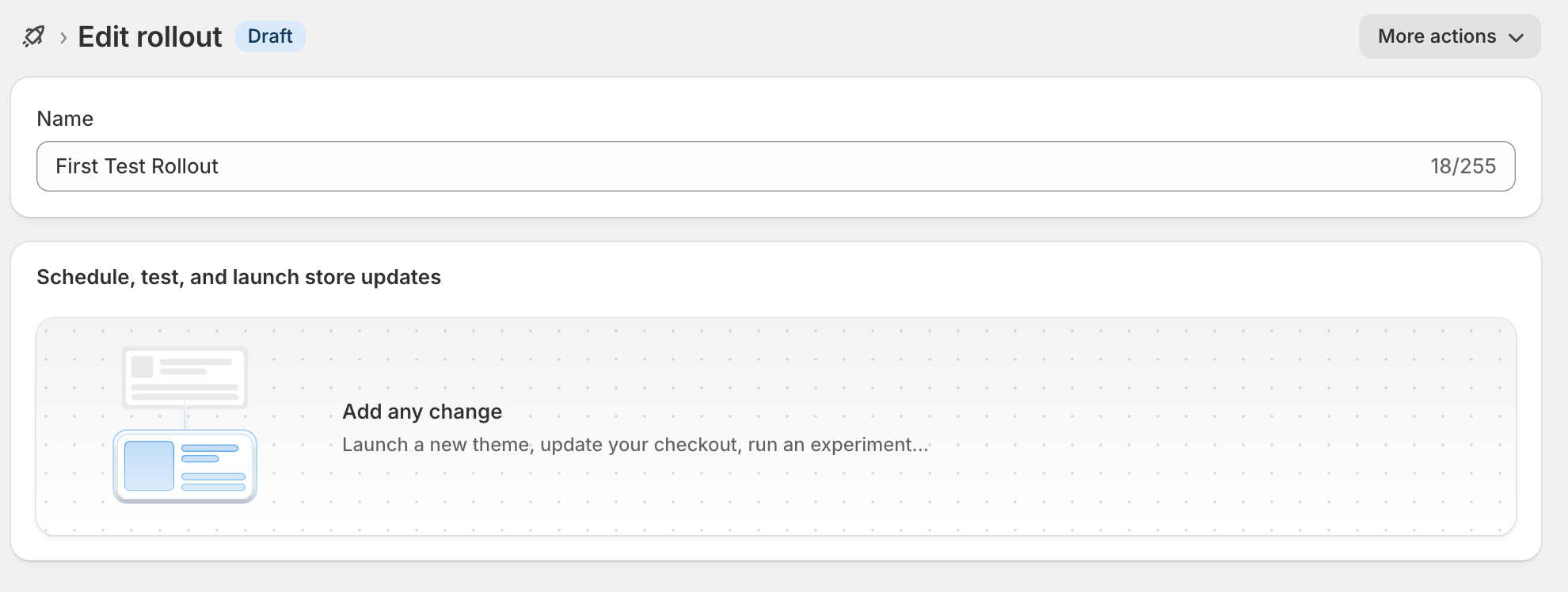
The deployment part is the boring useful one. You make changes to a copy of your theme, decide what percent of traffic sees them, and Shopify handles the split server-side. No JavaScript flicker, no anti-flicker snippet, no app overhead. You can schedule it to start at a date, end at a date, and auto-rollback when it ends. So if you want to push a Black Friday homepage on November 25 and let it expire on December 1 without anyone touching anything, you can.
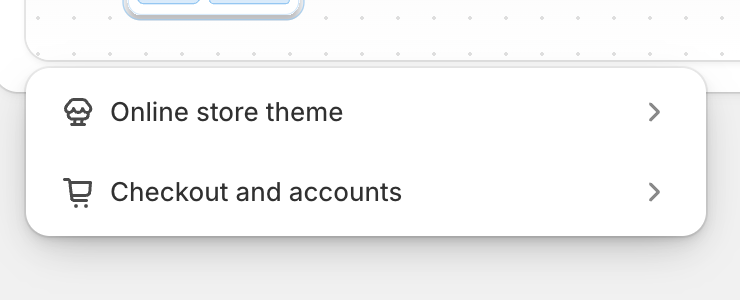
You can do this for two things: your theme, or your checkout and accounts pages.
The A/B testing part is called an Experiment. You set up a control (your live version) and a treatment (your variant), split traffic between them, and Shopify reports which one converts better.
I’m on Grow. I had access. I planned a test. Then I read the actual feature.
What it doesn’t do
Two things. Both are dealbreakers for the kind of testing I actually want to run.
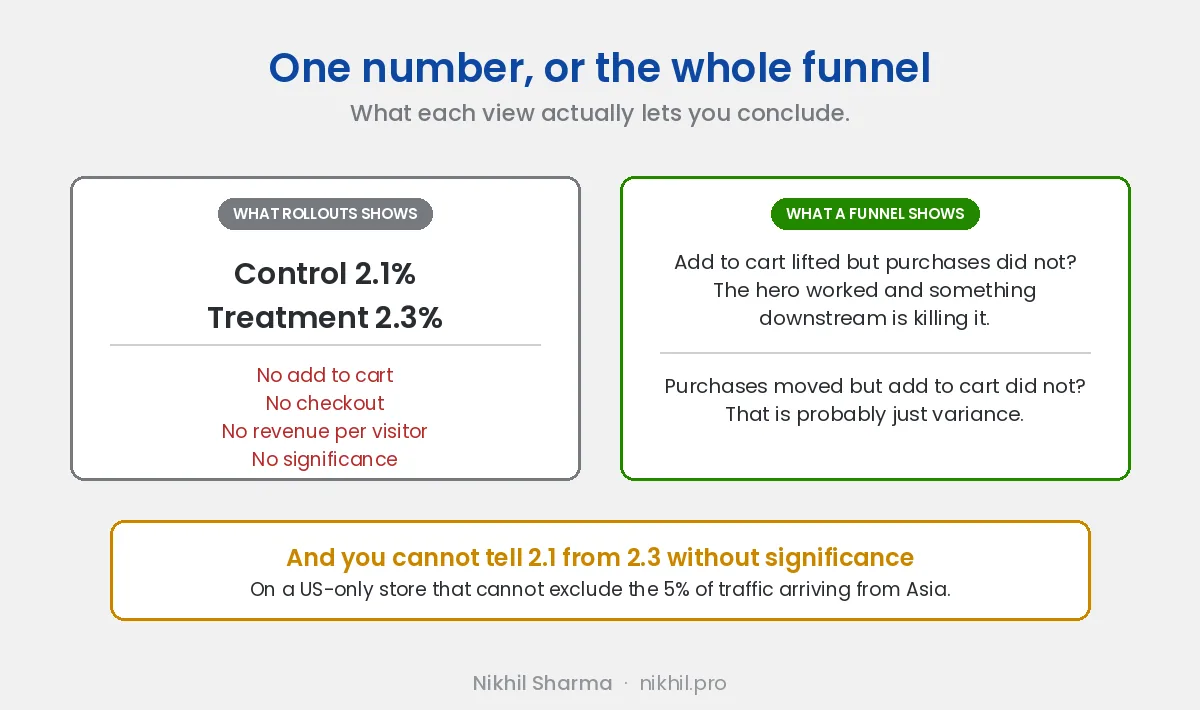
It can’t exclude countries at the test level. The store I run is US-only. About 5% of our traffic comes from Asia, people who land on the site through who-knows-what, browse for a minute, and leave because we don’t ship there. Convert lets me exclude that audience from the test. Rollouts doesn’t.
It lets me target a Shopify Market, which is a different thing. If I’d configured an Asia market, I could exclude that market. But our Asia traffic isn’t shopping a configured market. It’s incidental traffic landing on the US store, and there’s no way to keep them out of the test.
The reporting is thin, and it is a moving target. When I ran my test, a theme experiment gave me one number. “Control: 2.1%. Treatment: 2.3%.” No Add to Cart, no Checkout, no revenue per visitor.
As of October 2026 that appears to have improved for theme experiments, with bounce rate, add to cart rate and reached checkout rate now reported alongside conversion rate. Checkout and accounts experiments still return a single conversion number. I have not re-run a test since, so check your own admin before taking my word for it, and treat any blog post about this feature, including this one, as perishable.
What has not changed is the part that matters most.
Rollouts still does not show statistical significance, and Shopify’s documentation does not describe how it would be shown.
If I run a homepage test in Convert, I see whether the variant moved Add to Cart, moved Checkout, moved purchases, or moved none of them, and whether the gap is real:
- Add to Cart up, purchases flat: the hero worked and something downstream is killing it.
- Purchases up, Add to Cart flat: probably variance.
Rollouts collapses all of that into one number, and the only thing I can do with one number is shrug. Without funnel data, you don’t know why anything happened. You just know it happened. CRO without why is just guessing.
The October addition: discount testing
On 2 October 2026 Shopify extended Rollouts to discounts, which is the first time the feature has reached past themes and checkout.
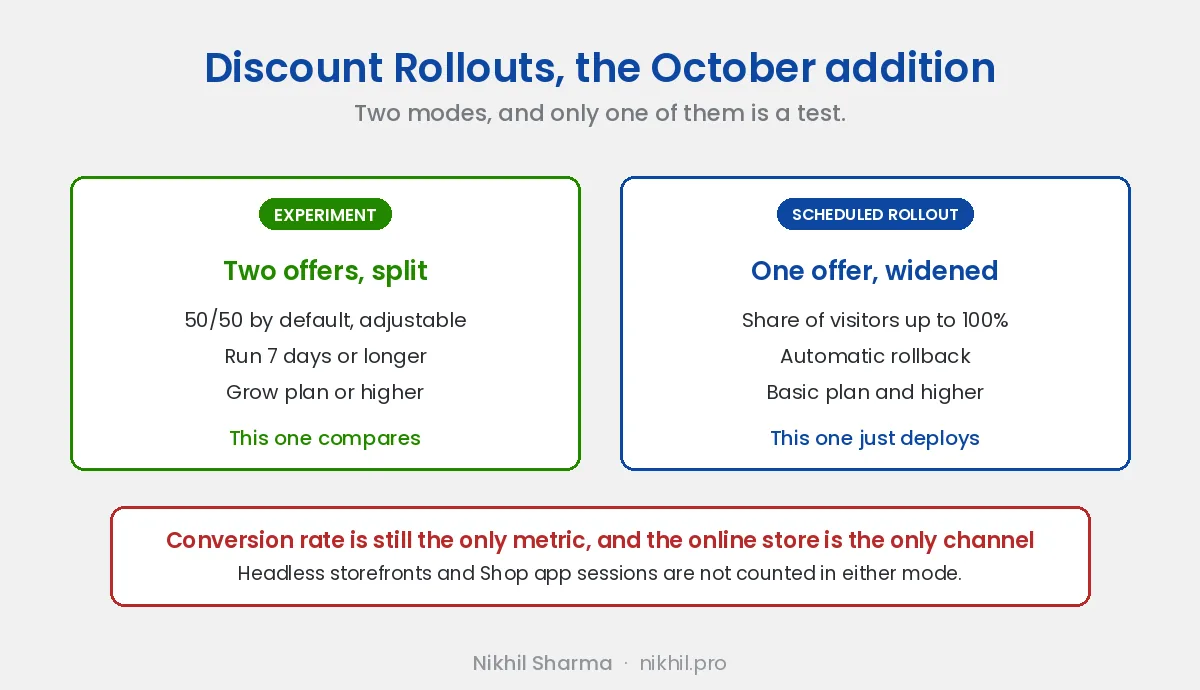
There are two modes and only one of them is a test.
Experiment splits traffic between two different offers, defaults to 50/50, and wants seven days or more to collect enough conversions. This needs the Grow plan or higher, same as theme experiments.
Scheduled rollout takes one offer and widens it from a share of visitors up to everyone, with automatic rollback. That is deployment, not comparison, and it runs on Basic and above.
Two caveats before you plan a Black Friday around it:
- Conversion rate is still the only metric, so a discount that converts better but destroys your margin will be reported as the winner.
- Online store channel only. Headless storefront and Shop app sessions are not in the numbers at all. Easy to miss, and it quietly invalidates the test if a meaningful share of your traffic is on Shop.
How to actually use it
If you want to try it anyway:
- Go to Markets > Rollouts
- Create rollout
- Pick what you’re changing, theme or checkout
- Edit the variant in the theme editor
- Set start and end dates
- For a deployment: set Launch reach (what % of traffic sees it)
- For an experiment: set control vs treatment split
- Pick which Markets it applies to
- Launch
Where I’d actually use it
Honestly? Two scenarios.
Big visual changes you’re nervous about. You redesigned the homepage. You want to push it but you’re not sure. Roll it out to 10% of traffic for a week. Watch your real conversion rate (in Shopify, not in Rollouts). If it tanks, roll it back. This isn’t A/B testing, it’s a safety net for deployment. Rollouts is great for this.
Scheduled campaigns with auto-rollback. Seasonal sale, holiday landing page, BFCM hero. Push it on the start date, let it expire on the end date. You don’t have to remember to switch anything back.
For actual A/B testing, the kind where you have a hypothesis, want to know if it worked, and want to know why, Rollouts isn’t ready. Maybe in a year.
What I’d want Shopify to add
Three things, in order of importance:
- Country-level exclusion at the test level, not just Market targeting
- Funnel metrics, Add to Cart, Checkout, Purchase as separate numbers
- Confidence intervals on the results so you know if 2.1% vs 2.3% is actually different or just noise
The third one is the most embarrassing omission, honestly. Every other testing tool shows you whether the difference is statistically significant. Without that, “Treatment won by 0.2%” is a coin flip you’re treating like a result.
The comparison, with names on it
The honest version of this comparison is not Rollouts against “a dedicated testing tool”. It is Rollouts against a specific tool that costs a specific amount and does a specific job.
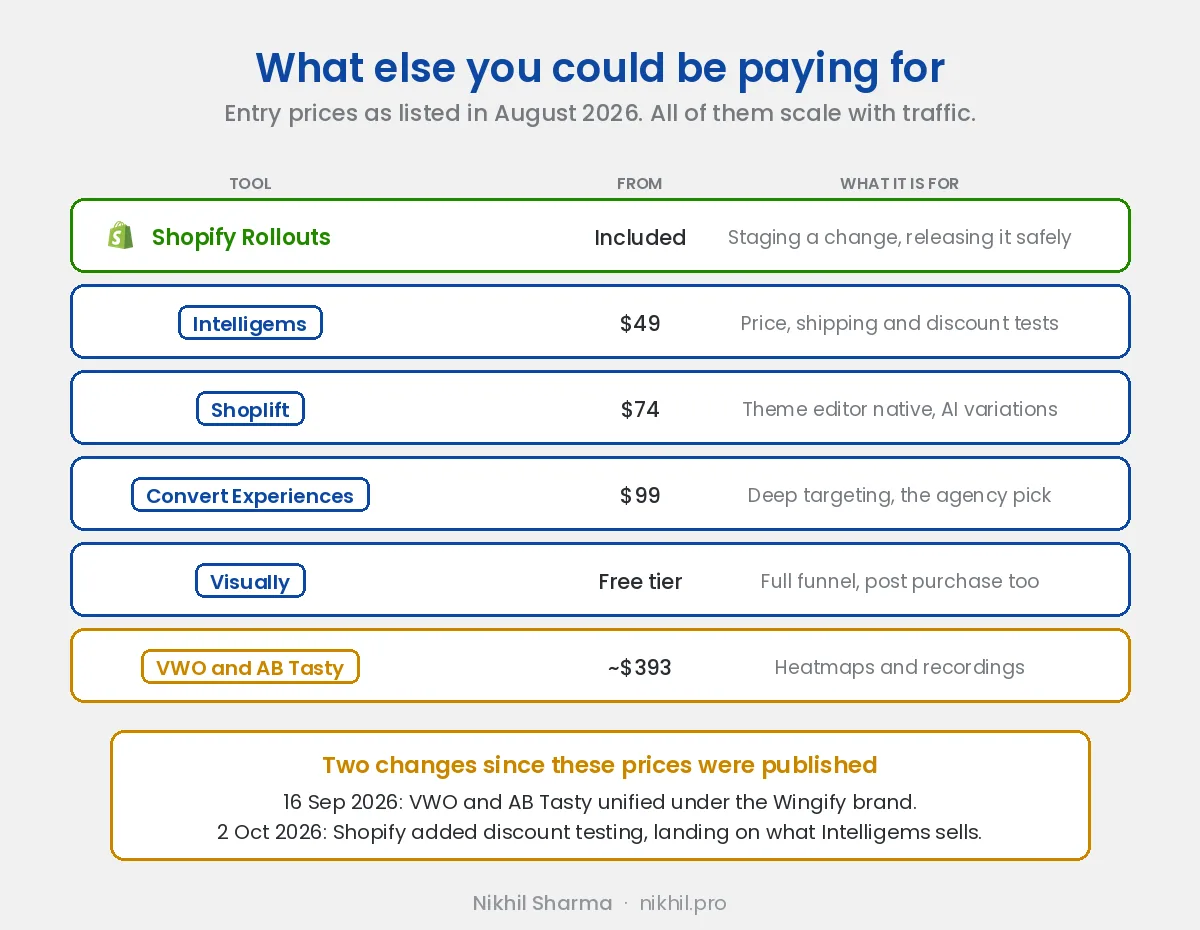
| Entry price | What it is actually for | |
|---|---|---|
| Shopify Rollouts | Included, Experiments need Grow+ | Staging a change and releasing it safely |
| Intelligems | from $49 a month | Price, shipping and discount testing, with cost of goods in the reporting |
| Shoplift | from $74 a month | Theme editor native tests and AI generated variations |
| Convert Experiences | from $99 a month | Deep targeting and goal configuration, common at agencies |
| Visually | Free tier, paid scales | Full funnel, homepage through post purchase upsell |
| VWO, now part of Wingify | Free tier, paid from roughly $393 | Testing plus heatmaps, recordings and on-site surveys |
Prices are entry tiers as listed in August 2026 and every one of them scales with traffic, so treat them as a starting point rather than a quote.
Two things that table makes obvious.
Intelligems is the one with a problem. Its core pitch is price and discount testing with margin-aware reporting, and Shopify just shipped discount testing for free. Intelligems still wins on the part Shopify ignored, which is profit: it knows your cost of goods, so it can tell you a discount that lifted conversion and lost you money. Rollouts cannot. But the gap is narrower than it was on 1 October.
VWO is priced for a different buyer, and it is no longer VWO exactly. On 16 September 2026, VWO and AB Tasty unified under a single brand, Wingify, which was already the company behind VWO. The combined business announced itself at more than $100 million in revenue, 4,000 customers and 700 staff across 11 offices.
Worth knowing if you are mid-contract or facing a renewal, because merged platforms tend to mean migrated accounts and re-priced tiers eventually. Around $393 a month against Convert at $99 is not a small difference, and most Shopify stores running a handful of tests a quarter are not the customer that pricing is built for. The heatmaps and session recordings are the reason to pay it. The split testing is not.
Who owns what: Wingify covers VWO and AB Tasty, Convert Experiences is run by Convert, and Intelligems, Shoplift and Visually are each independent. Convert is the only one to have published an analysis of this consolidation, worth reading if you are choosing a tool you want to still exist in two years.
The row that decides it for most people is not in the table: when a variation loses, “it lost” is not a finding. Tools that pair the result with heatmaps or session recordings tell you why. Rollouts tells you that it happened.
Rollouts against Convert, specifically
The six-tool table is useful if you are choosing from scratch. It is not the comparison I actually ran. I was already paying for Convert on this store, so the real question was whether I could stop.
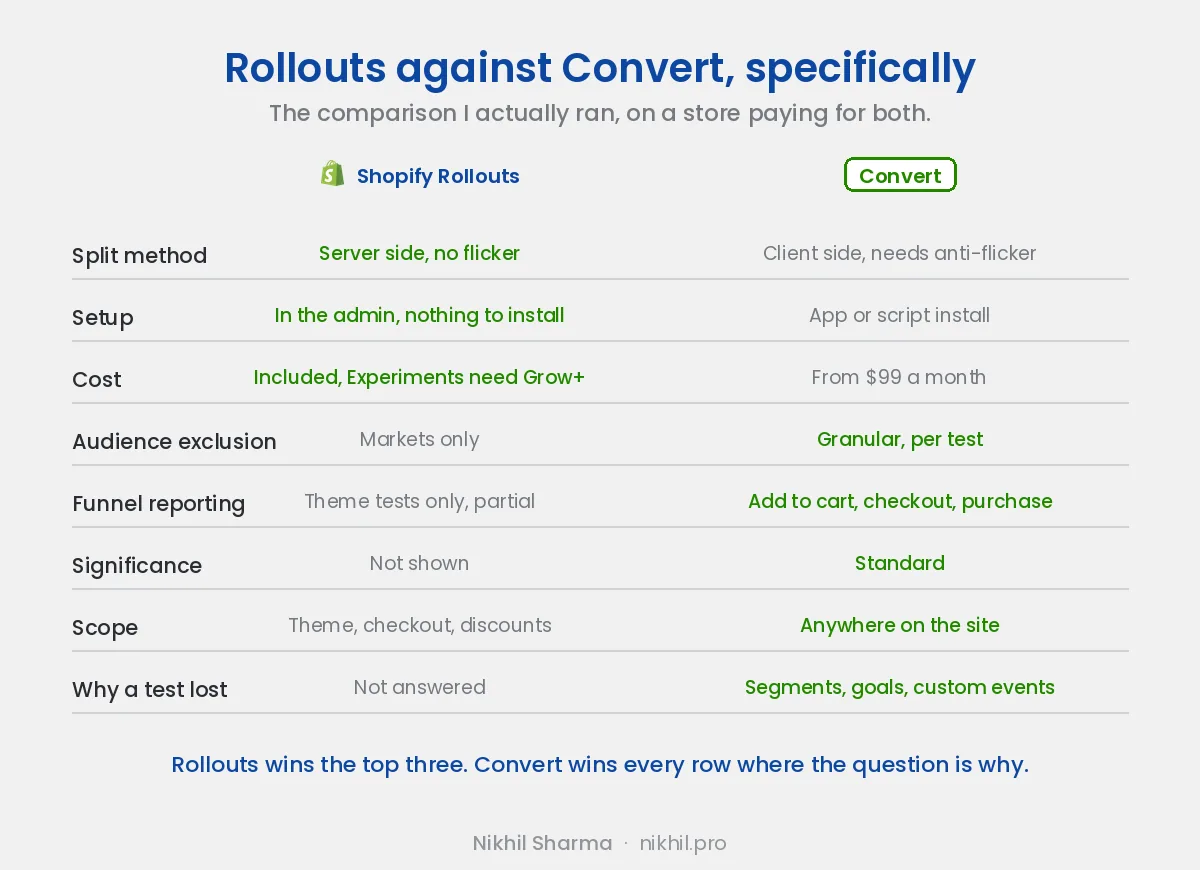
Rollouts wins the first three rows and it wins them clearly. The server-side split is better engineering than what a client-side tool does, there is nothing to install, and it costs nothing on top of a plan I already pay for. If those three were the whole question, Convert would be cancelled.
They are not the whole question, because every remaining row is some version of why did this happen.
Audience exclusion. Markets targeting is not test-level exclusion. I cannot drop 5% of noise traffic from a single experiment without changing how the store serves an entire region.
Funnel reporting. Convert tells me whether the variant moved add to cart, moved checkout, moved purchases, or moved none of them. That distinction is the entire lesson of a test. Rollouts has started reporting some of this on theme experiments, which is real progress, but it is not the same as choosing a goal and segmenting the result.
Significance. Convert shows it. Rollouts does not, and Shopify does not document how it would.
Scope. Convert tests things that are not the theme. Pricing, product page elements, anything the theme editor does not own.
One more thing, and it cuts against the tool I pay for rather than for it. Convert’s own published research is where the one-in-five significance number above comes from. A vendor publishing the statistic that most tests on their own platform are inconclusive is not the usual marketing instinct, and it is a better argument for taking testing seriously than any feature list.
Two Shopify-specific things worth knowing
These apply regardless of which tool you pick, and they cost people real money.
Uninstalling an app may not remove its code. Shopify’s own docs warn that some apps inject code into your theme that isn’t automatically removed on uninstall. If you’ve cycled through testing tools, there may be dead snippets in your theme right now. Tools that install via an app embed block instead of theme file injection avoid this entirely, because there’s nothing of theirs in the theme to leave behind or to clash on a theme update.
Shopify’s pixel sandbox constrains what any tool can track. App pixels run in a web worker with no window and no document, which means a testing tool can’t just read the variation off the page. It has to be handed that information deliberately, through first-party storage or cart attributes. Worth knowing when you’re comparing what different tools can and can’t measure on Shopify. It’s a platform constraint, not a vendor shortcoming.
Should you cancel the tool you are paying for?
If you’re paying for a testing tool and the only thing you use it for is splitting theme traffic 50/50 on the homepage, yeah, you could probably cancel and use Rollouts. Most stores I’ve seen using Convert use about 5% of what it does. They’re paying for features they never touch.
That’s a real criticism of how these tools get sold, not just of the buyers. Nobody needs six SDKs and a feature flagging layer to test a hero image.
If you’re running structured tests with audience exclusion, funnel analysis, custom events, or you’re testing anything outside the theme editor, pricing, product page elements without a theme variant, app behavior, keep paying. Rollouts won’t replace it. Not yet.
If you are on Intelligems specifically, the October discount release is worth a closer look than the others. Shopify now does the splitting part for free, so the question becomes whether you are using the margin side, the part that knows your cost of goods and can tell you a discount won on conversion and lost on profit. If you are, keep it. If you have only ever used it to split two codes, Rollouts covers that now.
Don’t cancel your testing tool the day Rollouts shows up in your admin. That’s what Shopify is hoping you’ll do, and what every “Rollouts replaces VWO” agency post is trying to sell you on. It’s premature.
Whichever tool you test with, judge the result on the numbers that survive a month, and if the store is converting under 1 percent, fix the eight things first before testing anything.
Sources
Shopify’s own documentation does not describe how significance is reported, so the claims above about what Rollouts shows are drawn from the following, all of which are secondary and all of which were accurate to their publication date rather than to yours.
- Shopify Rollouts discount A/B testing, Common Thread Collective, 3 October 2026, for the discount release and its two modes
- Shopify Rollouts, Charle, updated 12 October 2026, for the theme experiment metrics
- Best A/B split testing apps for Shopify, Charle, 5 August 2026, for the competitor prices
- AB Tasty and VWO unite under Wingify, PR Newswire, 16 September 2026, for the merger and the combined company figures
- VWO merges with AB Tasty, Convert, on what the consolidation means for buyers
- Shopify A/B testing in 2026, PulseCRO, April 2026, on targeting and significance limits
Want help figuring out whether Rollouts is enough for your store, or whether you need to keep paying for a dedicated tool? Book a Shopify CRO Audit. I’ll look at what you’re actually testing and tell you what fits.
Frequently asked questions
What is Shopify Rollouts?
Is Shopify Rollouts free?
Where do I find Rollouts in Shopify admin?
Can Shopify Rollouts replace Convert, VWO or Intelligems?
Can Shopify Rollouts A/B test discounts?
What are the alternatives to Shopify Rollouts?
Does Shopify Rollouts show statistical significance?
Can I exclude countries from a Shopify Rollouts test?
What is Rollouts actually good for?
Do most A/B tests reach statistical significance?
Get new posts in your inbox
Occasional notes on Shopify, paid ads, and what I learn. No spam.
Thanks. Check your inbox to confirm.

Nikhil Sharma
Nikhil Sharma runs data and operations for a DTC brand on Shopify and consults for Shopify brands on Meta and Google ads, conversion and AI automation. He writes case studies and implementation guides from accounts and systems he has run himself.