Which Task to Automate First: A One Page Method for Shopify Teams
The AI automation that gets pitched is the impressive one: the agent that handles the whole return, the chatbot that closes sales. The one that pays is the task someone on the team does by hand, ten minutes at a time, a hundred times a week, and has stopped noticing. Finding that task is the whole skill, and it fits on one page.
Step 1: list what is done by hand
Sit with the team for thirty minutes and write down everything that is done by a person, repeatedly, that does not involve talking to a customer. Not the big jobs. The small ones. Looking up an order to answer a ticket. Copying tracking numbers. Checking whether yesterday’s ads spent. Reading the call recordings, or not reading them. Typing the Monday numbers into a sheet. Counting what is on the shelf.
Most teams produce fifteen to thirty items and are surprised by half of them.
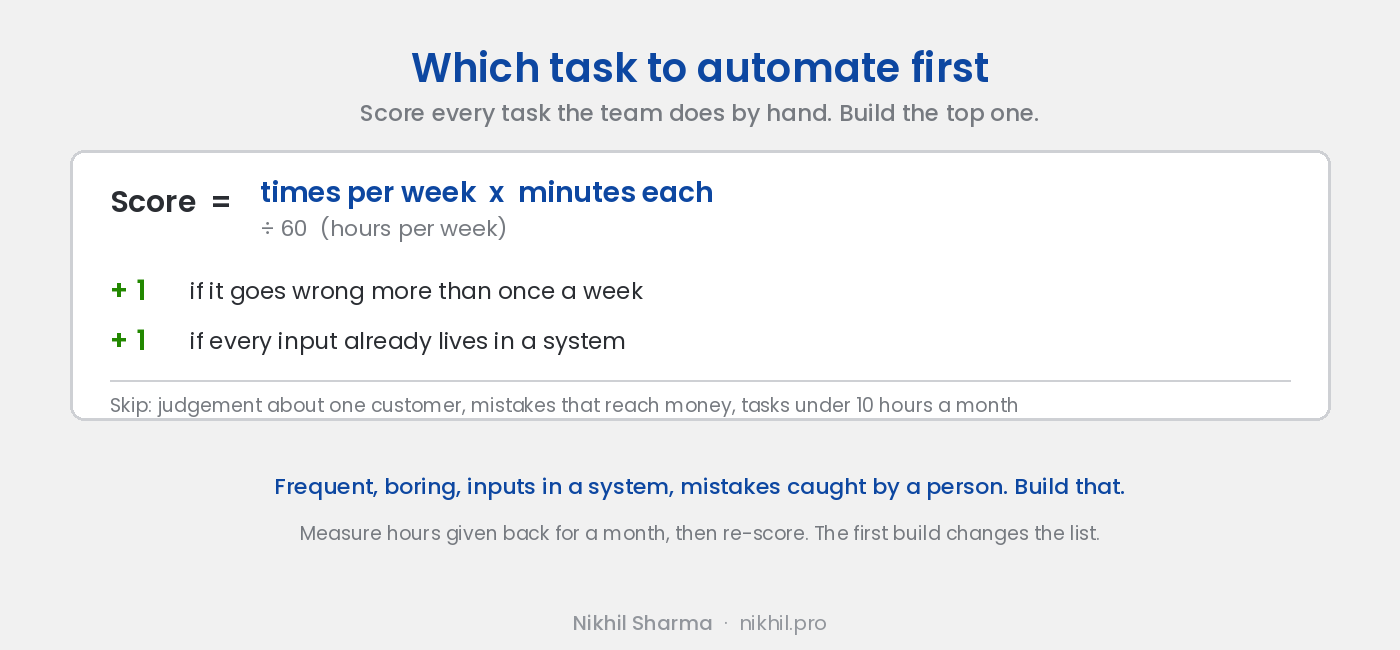
Step 2: score each one
Four numbers per task.
Times per week. Count it, do not estimate. A task that “happens all the time” is often twelve times a week; one that “happens occasionally” is sometimes forty.
Minutes per time. Time three of them.
Goes wrong. One point if a mistake happens more than once a week: a wrong tracking number, a missed call, a number typed into the wrong cell.
Inputs already in a system. One point if everything the task needs is already in Shopify, the helpdesk, the phone system or the ad account. Zero if a person has to gather something first.
Hours per week is times multiplied by minutes, divided by sixty. The score is hours plus the two points. Sort by score.
Step 3: read the top five
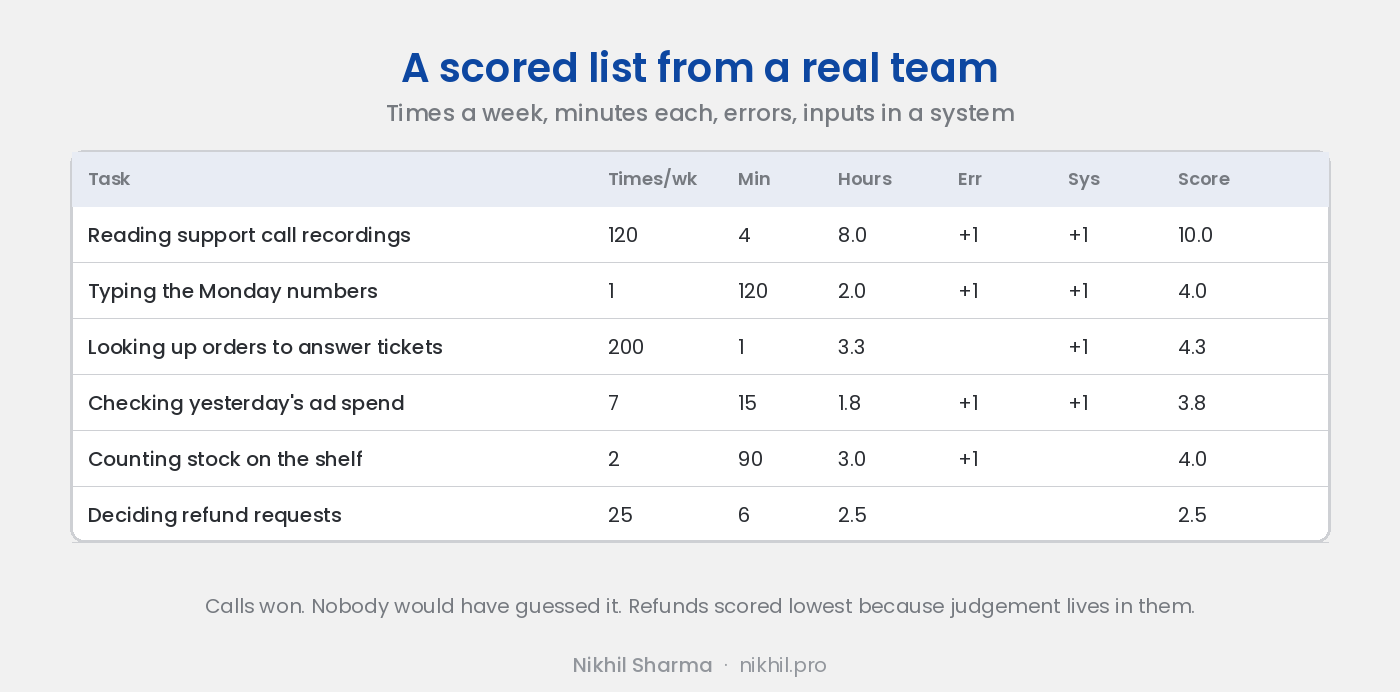
The top of the list is usually a surprise. On the team I run it was not the returns process or the chatbot. It was reading support calls, which nobody did because it took longer than the calls, and which scored high because the recordings were already in a system and the information in them was being lost a hundred times a week. That became the call analysis pipeline. Second was the ad report, which became a sheet that reads itself.
Three checks on the top five before building anything:
Does a tool you already pay for do it with a setting? Helpdesks now triage. Shopify now has Sidekick. Klaviyo now has an MCP server. Turn the setting on first; it is free and it moves the task off the list.
Is there judgement in it? If the task is “decide whether this customer gets a refund”, it stays human. If the task is “put everything the person deciding needs in front of them”, that is the automation, and it is a pre-call brief or a draft, not a decision.
Does a mistake reach a customer or money? If yes, it is not the first build. The first build should be one where a wrong output is caught by a person reading a sheet, so the team learns to trust the output before anything depends on it.
Step 4: build the top one, thin
Not a platform. A sheet the team already opens, a script that fills it, a model that reads it. The weekly report is that shape. The call scoring is that shape. Both shipped in a weekend and ran on real data from the first day, which is the point: the team starts catching the model’s mistakes in week one, and by week four the output is trusted.
Step 5: measure for a month, then re-score
Time the task before. Time it after, for a month. Hours given back is the only number that matters; if it is under ten hours a month for a small team, the next build is a better use of the effort.
Then re-score the list, because the first build changes it. The call scoring made the pre-call brief possible, since the brief’s best line is what the last call was about. The weekly report made the owner ask better questions, which made an MCP server over the store the obvious next one. The list is never finished; it is just always sorted.
The list, in one line
Frequent, boring, inputs already in a system, mistakes caught by a person. Build that. The impressive one can wait until the team trusts the boring one.
If you want the scoring done with you and the top build scoped, that is the call I start every automation engagement with. The six systems that came out of running it on my own team are in AI workflows for Shopify.
Frequently asked questions
How do I decide what to automate first in my Shopify store?
Why not automate the biggest task?
What makes a task a bad candidate for AI automation?
How do I measure whether it worked?
Should I build it or buy it?
What should the second automation be?
Get new posts in your inbox
Occasional notes on Shopify, paid ads, and what I learn. No spam.
Thanks — check your inbox to confirm.

Nikhil Sharma
I run data and operations for a DTC brand on Shopify, consult on Meta and Google Ads, and build AI automations for ecommerce teams. I write about what I build and run.