ChatGPT Ads Review: Targeting, Cost, Formats and What Is Missing
OpenAI’s Ads Manager opened to every US business in May 2026, without a minimum spend, after a pilot where the entry ticket was $200,000. I set up a conversion campaign in it for a DTC brand that ships gift boxes across Puerto Rico. This is what the platform looks like from inside, what you can and cannot do with it, and what it cost, written for the person who runs Meta and Google and is wondering whether to add a third tab.
Short version: the interface is cleaner than Meta’s, the options are a fifth of Google’s, targeting is a text box, and the reporting is aggregated by design. It is worth a small test if your customers ask ChatGPT questions your product answers. It is not yet a place to move budget.
ChatGPT Ads Manager in ten facts, as of the date at the top of this post:
- Self serve for US businesses since 5 May 2026. No account minimum, $25 minimum daily budget.
- Ads show inside answers to free and Go tier users. Plus and Pro users never see them.
- Two ad types: product ads from a feed, not available in every market, and text ads, available everywhere.
- A text ad is a title, a description, a Learn more button, and one square image or a four to six image carousel.
- Title warns at 32 characters, description at 54.
- Objectives: Reach, Clicks, Conversions. Conversion campaigns bid on a pixel event, Autobid or max bid, and are billed by impressions.
- Targeting is context hints, free text describing the conversations the ad belongs in. No interests, demographics or lookalikes.
- Customer lists can be uploaded, but only to exclude. Locations include and exclude; platforms can be picked.
- Creative enhancement is on by default and lets the platform rewrite and translate your copy without review.
- A pixel and a Conversions API feed a Conversions section with an event stream and an identifier coverage column. You see aggregated performance, never the conversations.
Where ChatGPT ads show, and how the platform got here
Ads appear inside ChatGPT answers for users on the free tier and the Go tier, next to a conversation the ad is judged relevant to. Paid Plus and Pro users do not see them. The timeline matters for reading any guide, including this one, because the product has changed monthly:
- January 2026: ad tests on the free and Go tiers
- February: pilot for agencies, $200,000 to $250,000 minimum
- 5 May: open self serve for US businesses, CPC bidding, minimum dropped
- 14 May: custom audiences
- 22 May: daily budgets, US geo targeting by state, DMA and ZIP
- 5 June: conversion optimised campaigns for accounts with a pixel event flowing
Everything below is as of the updated date on this post, and I revise it when the platform changes.
The portal still carries a Beta label, and there is a second way to run it: “Try Ads Manager in ChatGPT”, which lets you create and manage campaigns by talking to ChatGPT. I used the portal. The account had a promotion on it: spend $500 within the first couple of weeks and receive $500 in credit. If yours has one, that is your test budget.
How ChatGPT Ads Manager is structured
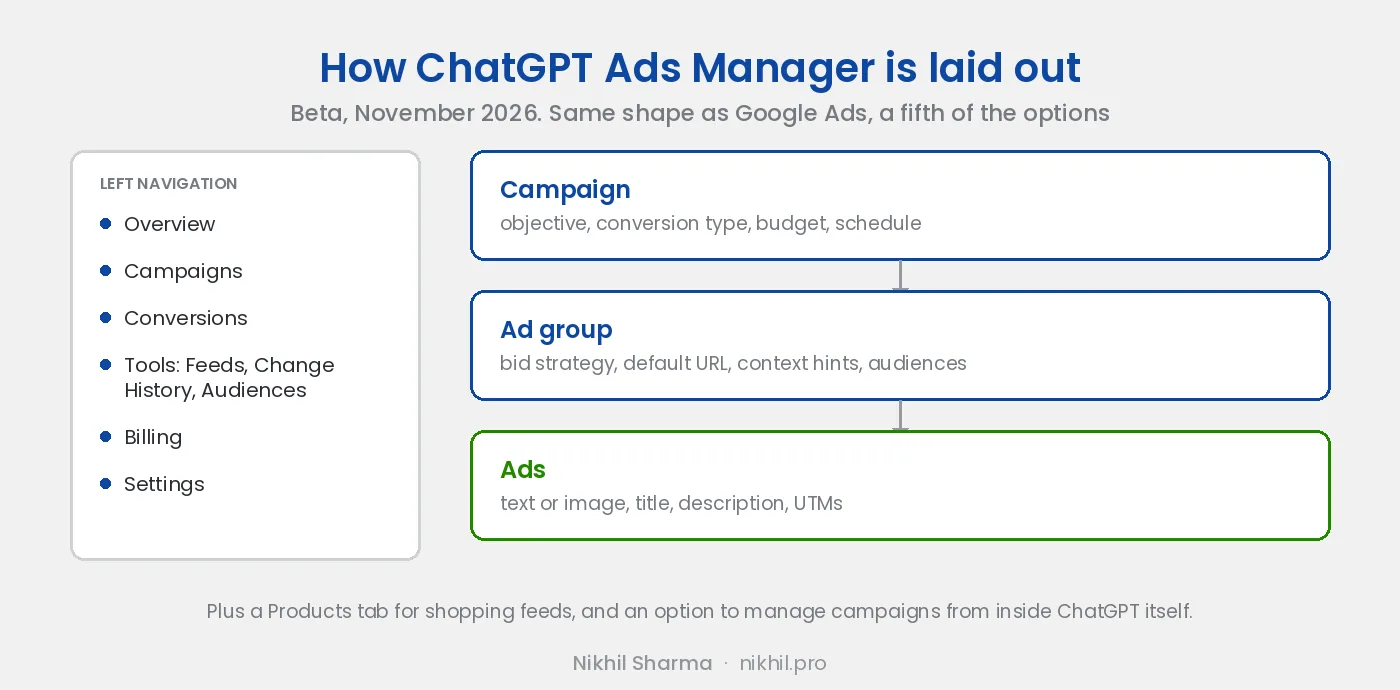
Campaign, ad group, ad. The same three tiers as Google, and the fields sit where a Google buyer expects them. The campaign holds the objective (Conversions, with Reach and Clicks also offered), the conversion type to bid on, budget and schedule. The ad group holds the bid strategy, a default destination URL that new ads inherit, the context hints and any audience. The ad holds the creative and its tracking.
Campaign creation is a full screen flow with a left rail stepping through Campaign, Ad groups, Ads and Review before launch, with Save as draft at every step. The campaigns table has what you would expect: Active, Name, Status, Type, Impressions, Clicks, Conversions, Spend, CTR, average CPC, average CPM, Budget, Start and End. Billing is in UTC and recent data is marked preliminary, which is honest and also means do not read yesterday’s numbers before lunch.
Setting up a ChatGPT ads campaign: the campaign screen
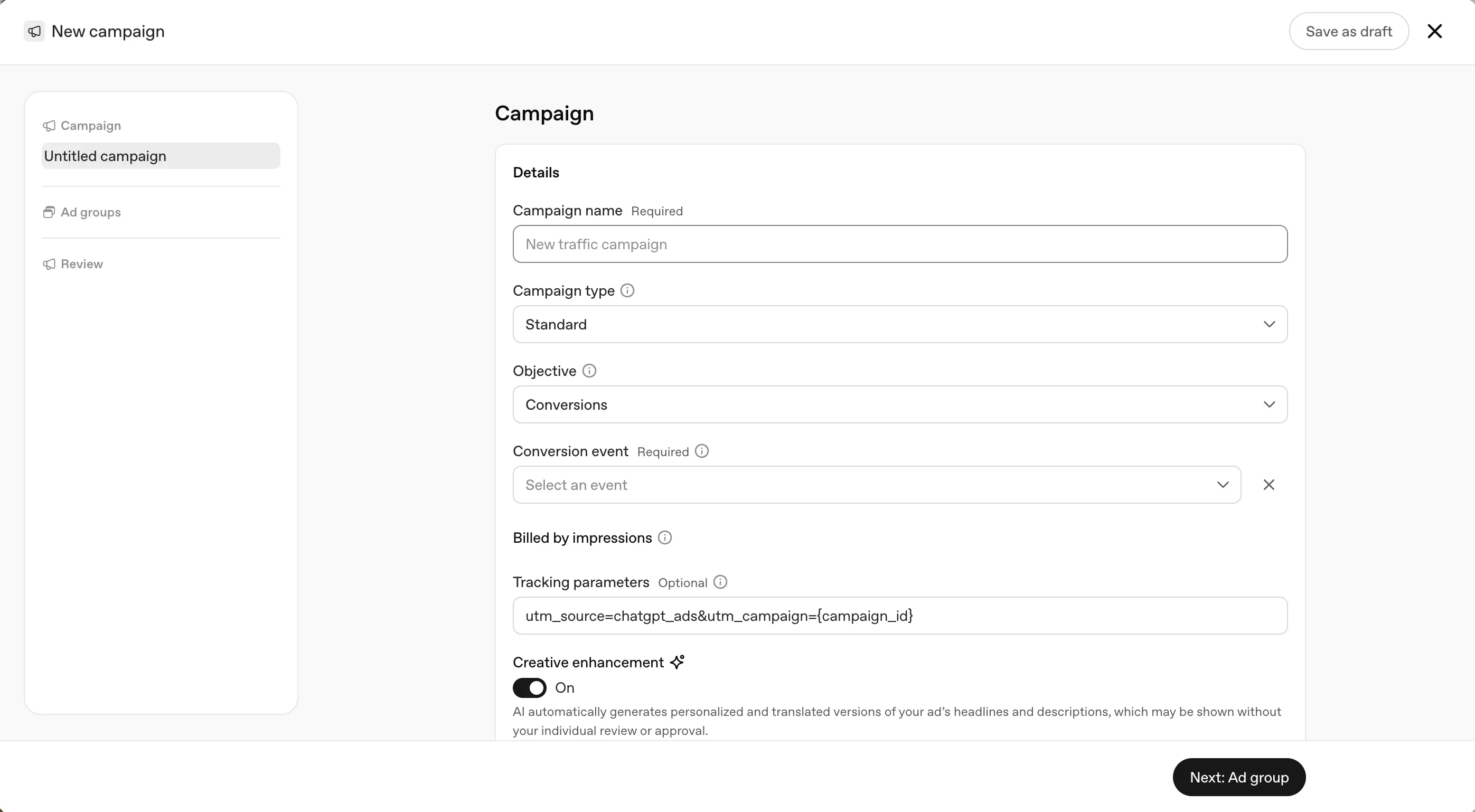
Name, type (Standard was the only option), objective, conversion event, tracking parameters, and one toggle that deserves its own paragraph. The objective dropdown offers Reach, Clicks and Conversions. Pick Conversions and a required conversion event selector appears, pulling from the pixel’s events.
Creative enhancement is on by default. The label under it reads: AI automatically generates personalised and translated versions of your ad’s headlines and descriptions, which may be shown without your individual review or approval. That is the platform telling you it will rewrite your copy, in languages you did not write it in, and show the result to people without asking. For a brand with a voice, a legal team, or claims that have to be worded a particular way, turn it off before you launch. I left it on for the test, because the market is bilingual and I wanted to see what it does, and because the claims in the ads are plain facts about shipping and packaging that survive any wording. I would not leave it on for a regulated product.
The tracking parameters field comes prefilled with utm_source=chatgpt_ads&utm_campaign={campaign_id}. I replaced it with the fuller string in the ad builder section below.
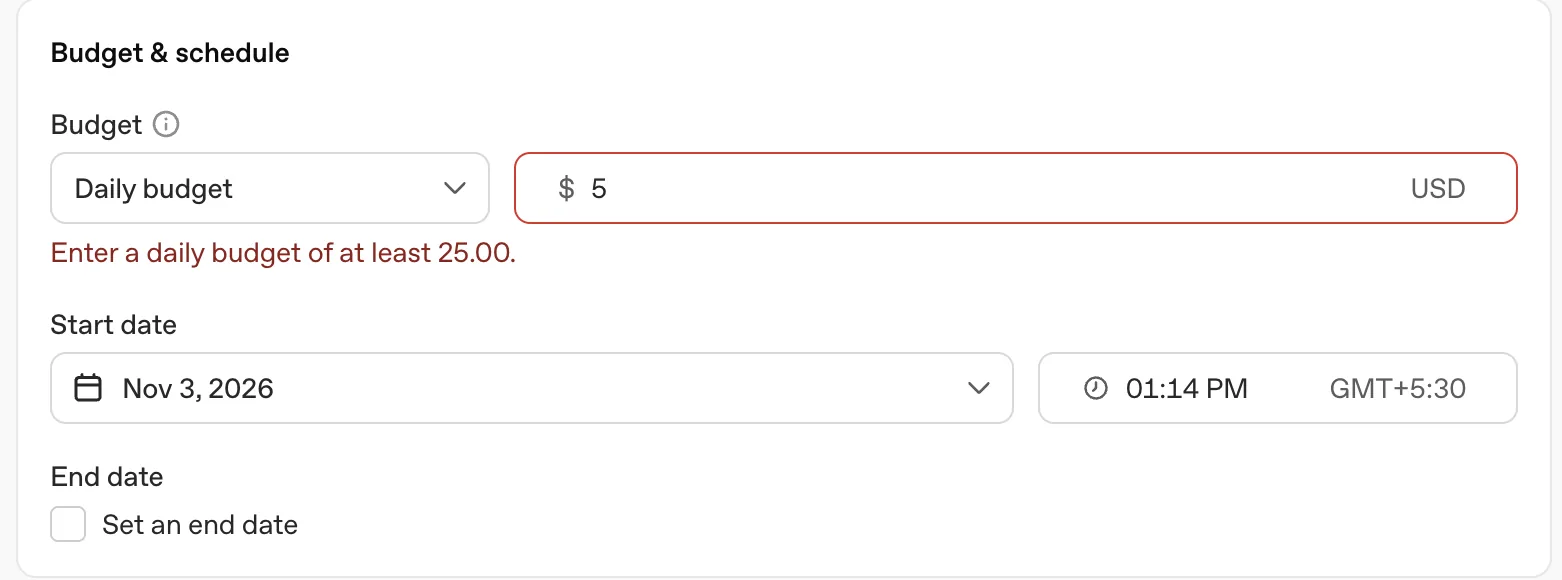
Budget. Daily or lifetime, and the daily minimum is $25. I typed 5 to see what would happen and the form said no. Start date and time default to now in your timezone; an end date is optional. So the real floor for a test is about $750 a month, which is where the $500 credit stops looking like a courtesy and starts looking like a plan.
ChatGPT ads bidding and what it costs
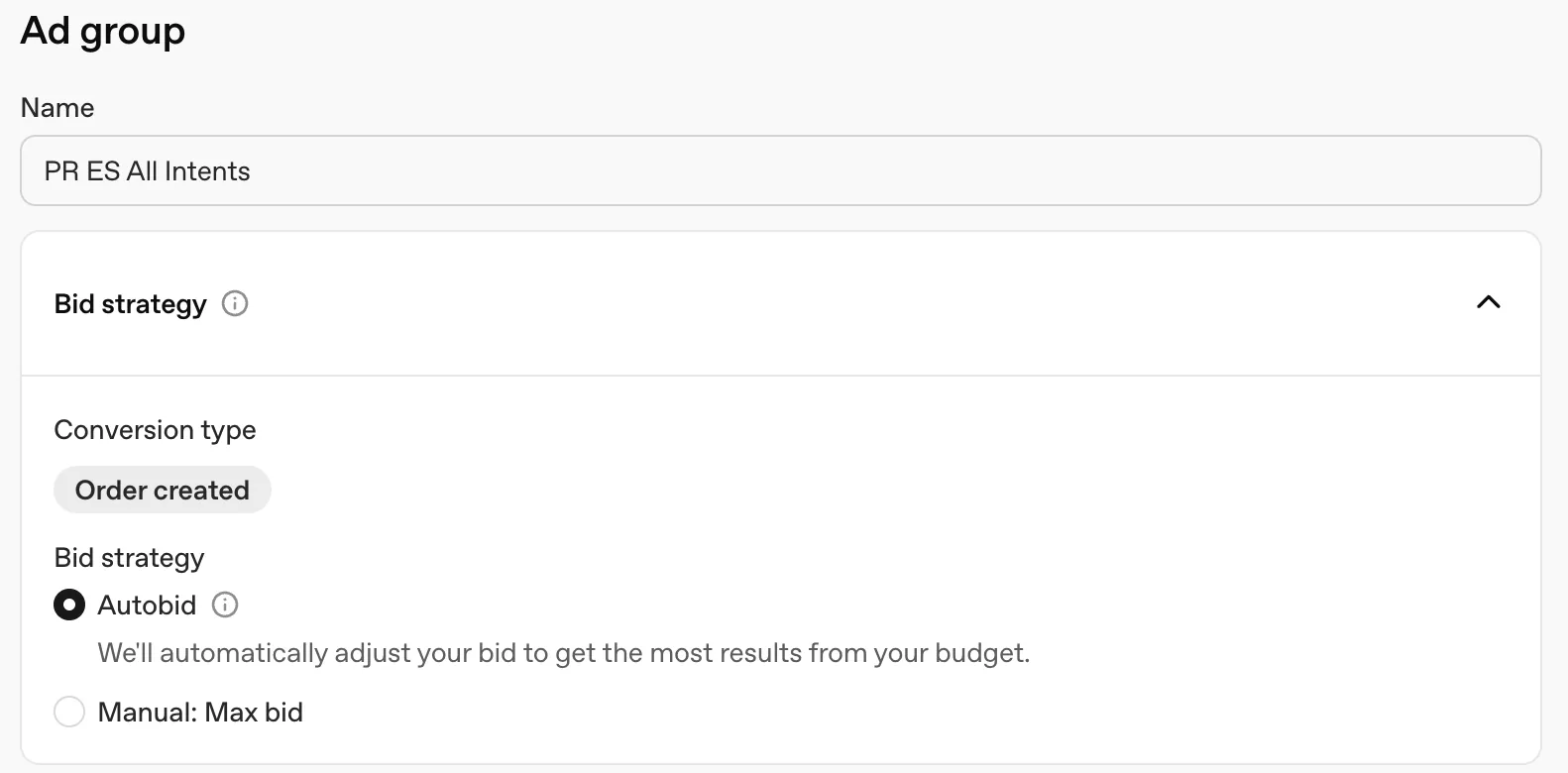
The campaign is billed by impressions even when the objective is Conversions; the note sits under the conversion event field. In the ad group, conversion type first, then Autobid or Manual with a max bid. I picked Order created as the conversion and Autobid, because with no history there is nothing to set a manual bid against. The reported guidance from OpenAI for CPC campaigns has been a $3 to $5 starting bid and a $60 default CPM, which tells you this is not cheap inventory; it is priced like search, not like Meta’s feed.
Conversion bidding needs the pixel. Accounts without a conversion event flowing were not eligible when it rolled out in June, and the Conversions section of the portal nagged me about events until the first order_created arrived. Set the pixel up before the campaign, not after.
ChatGPT ad formats and the ad builder
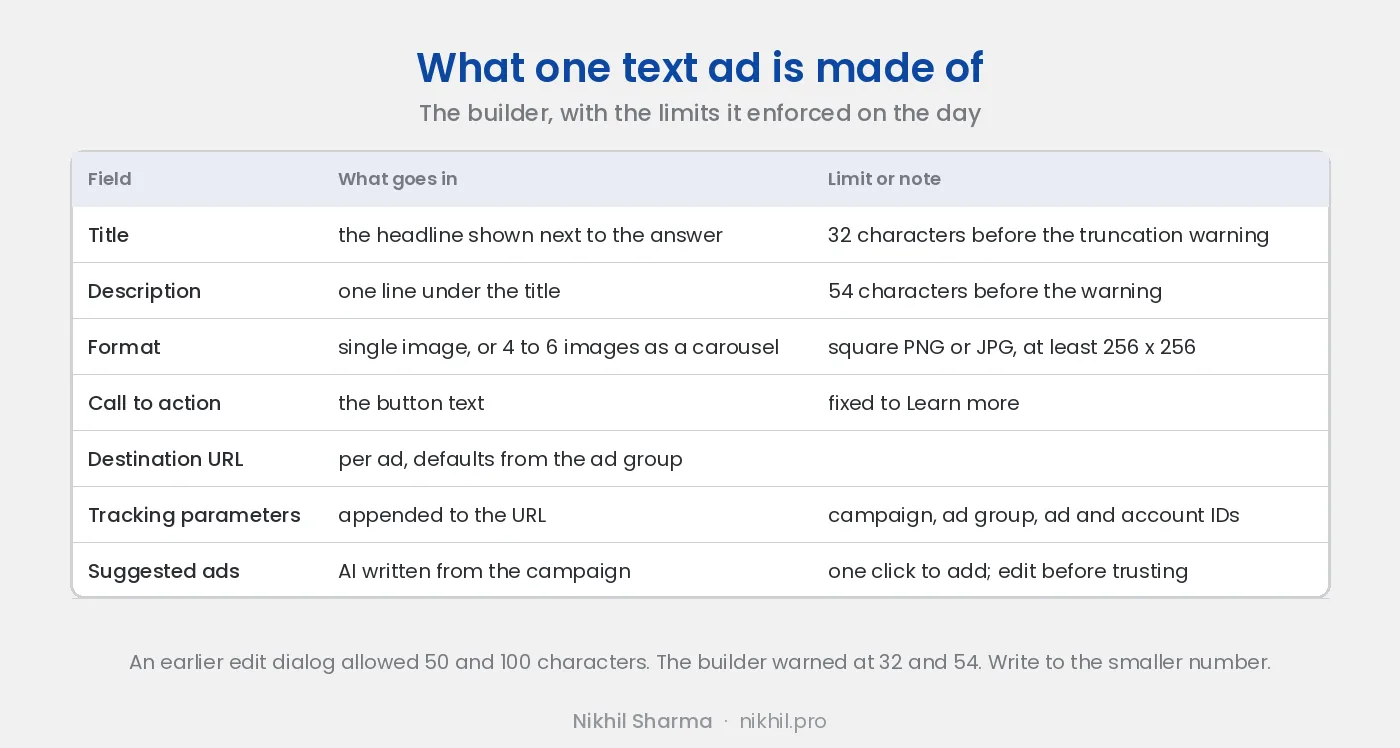
There are two kinds of ad. Product ads come from a feed uploaded under Tools, Feeds, and render as shopping results; they are not available in every market, and Puerto Rico was one where they were not. Text ads are what everyone can run, and they are what the builder below makes. Each has a name, a destination URL, tracking parameters, a format, a title, a description and images.
Two formats for a text ad. Single image previews as a horizontal card: image on the left, advertiser name, an Ad label, title and description. Multiple images, four to six square ones, previews as a carousel with the title, description and a Learn more button. The call to action was fixed to Learn more on every ad I built. Images are PNG or JPG, square, at least 256 by 256. A live preview shows the ad inside a ChatGPT answer as you type, which is the best part of the builder.
The character limits are the thing to know. The builder shows counters of 32 for the title and 54 for the description, with a warning that copy may be truncated in some placements. An earlier edit dialog on the same account showed 50 and 100. A 29 character title still triggered the warning, so the counter is not the rule; the placement is. Write to 32 and 54, check the preview, and expect a headline that reads like a Google Ads headline from 2010, because that is what fits.
Tracking parameters are appended to the destination URL and support five placeholders: {campaign_id}, {ad_group_id}, {ad_id}, {ad_account_id} and {oppref}. Mine is utm_source=chatgpt&utm_medium=cpc&utm_campaign={campaign_id}&utm_term={ad_group_id}&utm_content={ad_id} on every ad, so GA4 can tell the ads apart without any work in the portal. Do this before launch; the IDs are the only thing that will reconcile the portal’s numbers with Shopify’s.
Suggested ads are generated from the campaign and added with one click. They were competent and generic. Use them to see what the model thinks your product is, then write your own.
ChatGPT ads targeting: context hints, audiences, locations, platforms
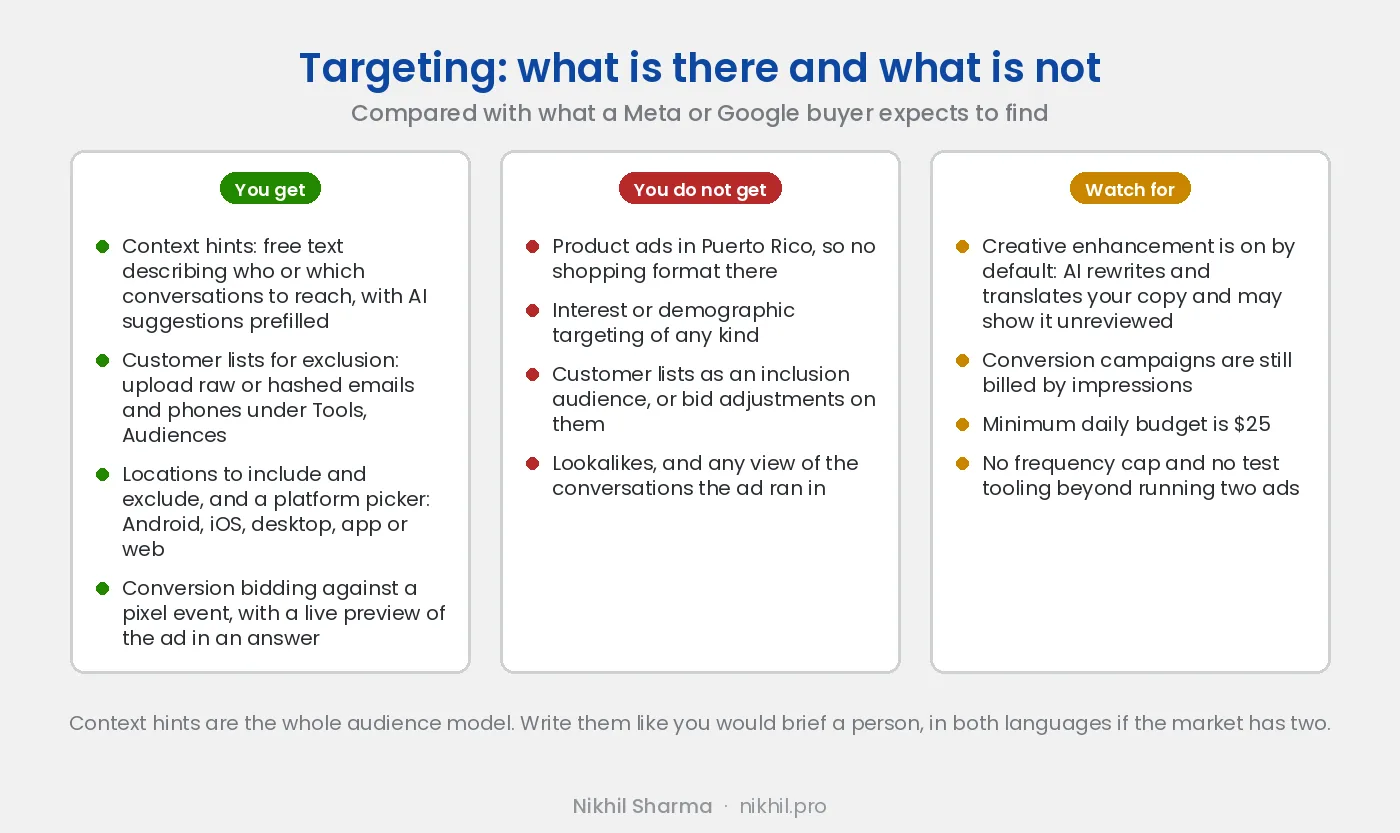
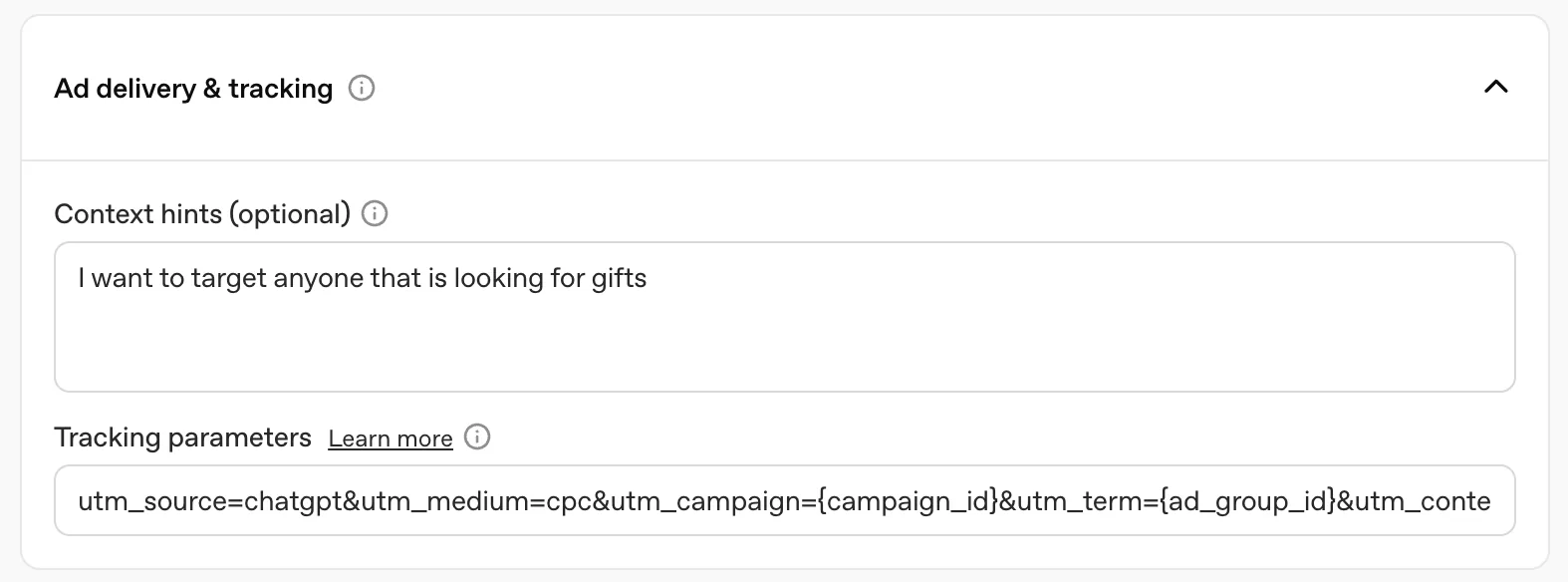
This is where a Meta or Google buyer stops and stares. There are no interests, no demographics, no lookalikes, no keyword lists. The ad group has an optional field called context hints: free text describing who you want to reach or which conversations the ad belongs in, with a few AI suggested hints prefilled. That field is the targeting model.
I wrote seven, in both languages because the market has two: a few for the moment someone is in, a few for the product category, and the same again in Spanish. The shape, with a made up store standing in for mine:
- People asking what to get a friend who just moved into a new apartment
- People looking for a houseplant that survives low light and forgetting
- Companies looking for a welcome gift for new hires in Austin
- Personas buscando un regalo de inauguración de casa en Texas
Each one is a conversation, not a demographic. The model reads what the person is talking about, reads the hints, and decides whether your ad belongs there, so write the hint as the thing they would be asking. There is no way to see which conversations it chose; OpenAI gives advertisers aggregated performance and nothing per conversation, which is the right call for users and a frustrating one for buyers used to search term reports.
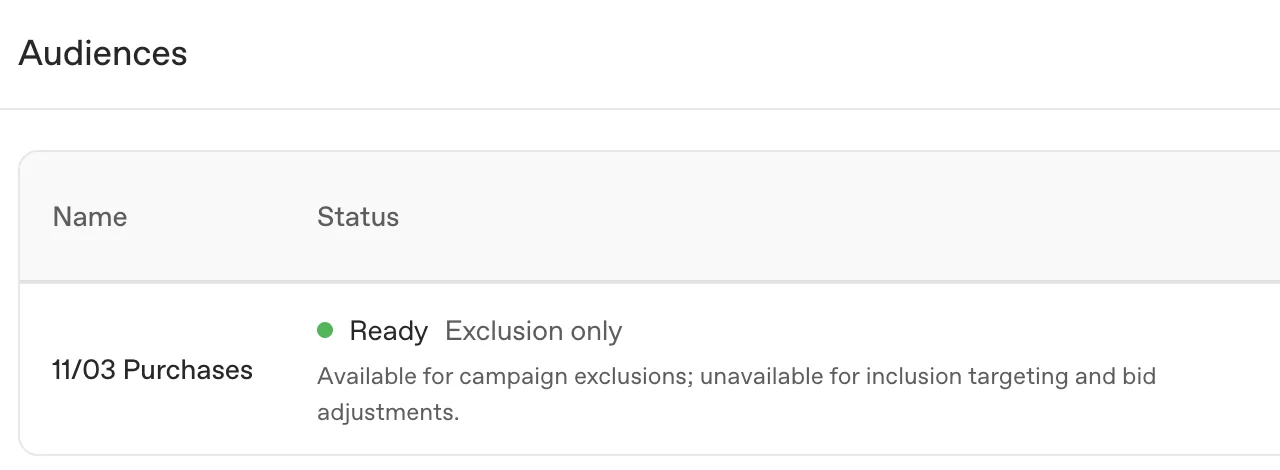
Customer lists are for exclusion only. Tools, Audiences, Create audience takes raw or hashed emails and phone numbers. The list sits in Processing for a while after upload, then comes back Ready with a label I had not expected: Exclusion only. Available for campaign exclusions; unavailable for inclusion targeting and bid adjustments. So you can keep the acquisition ad away from people who already bought, which is worth doing, but you cannot show a retention ad to your buyers, and you cannot bid more for them. No lookalikes either. The upload is there so the platform can stop wasting your impressions on your own customers, not so you can target them.
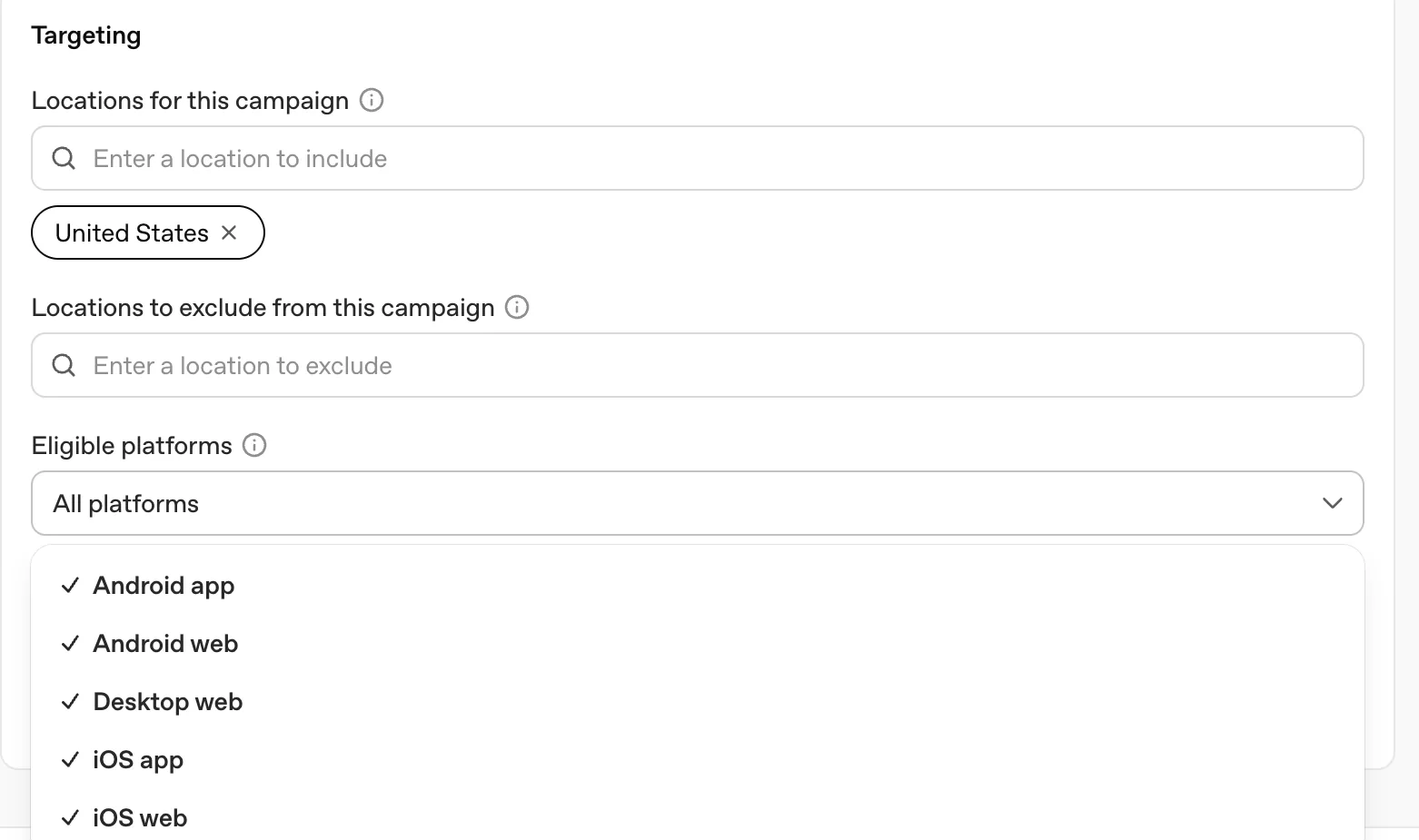
Location is a list of places to include and a list to exclude, at country level in my case, with state, DMA and ZIP available for the US. Eligible platforms is the one control a Meta buyer will recognise: Android app, Android web, desktop web, iOS app and iOS web, all ticked by default. Untick desktop if your checkout is bad on it; that is the closest thing to a placement control the platform has.
What ChatGPT Ads Manager does not have
The list a Meta or Google buyer will go looking for:
- Product ads outside the markets that have them. Puerto Rico did not. The Feeds tool is there regardless, so you can build the feed and wait, but check before you do.
- Any view into the conversations the ad ran in. Aggregated performance only.
- Interest or demographic targeting, and lookalikes.
- Customer lists as an audience to include or bid up. Exclusion only.
- A frequency cap, or any placement control beyond the platform picker.
- A testing tool. Two ads in one group and the table is what you have.
The whole thing is maybe forty fields. Google Ads has that many on one screen.
ChatGPT ads conversion tracking: the pixel and the event stream
Conversions has four tabs: Data Source, Conversion Events, Event Stream and Diagnostics, under three tiles for total events, conversion objective adoption and active warnings.
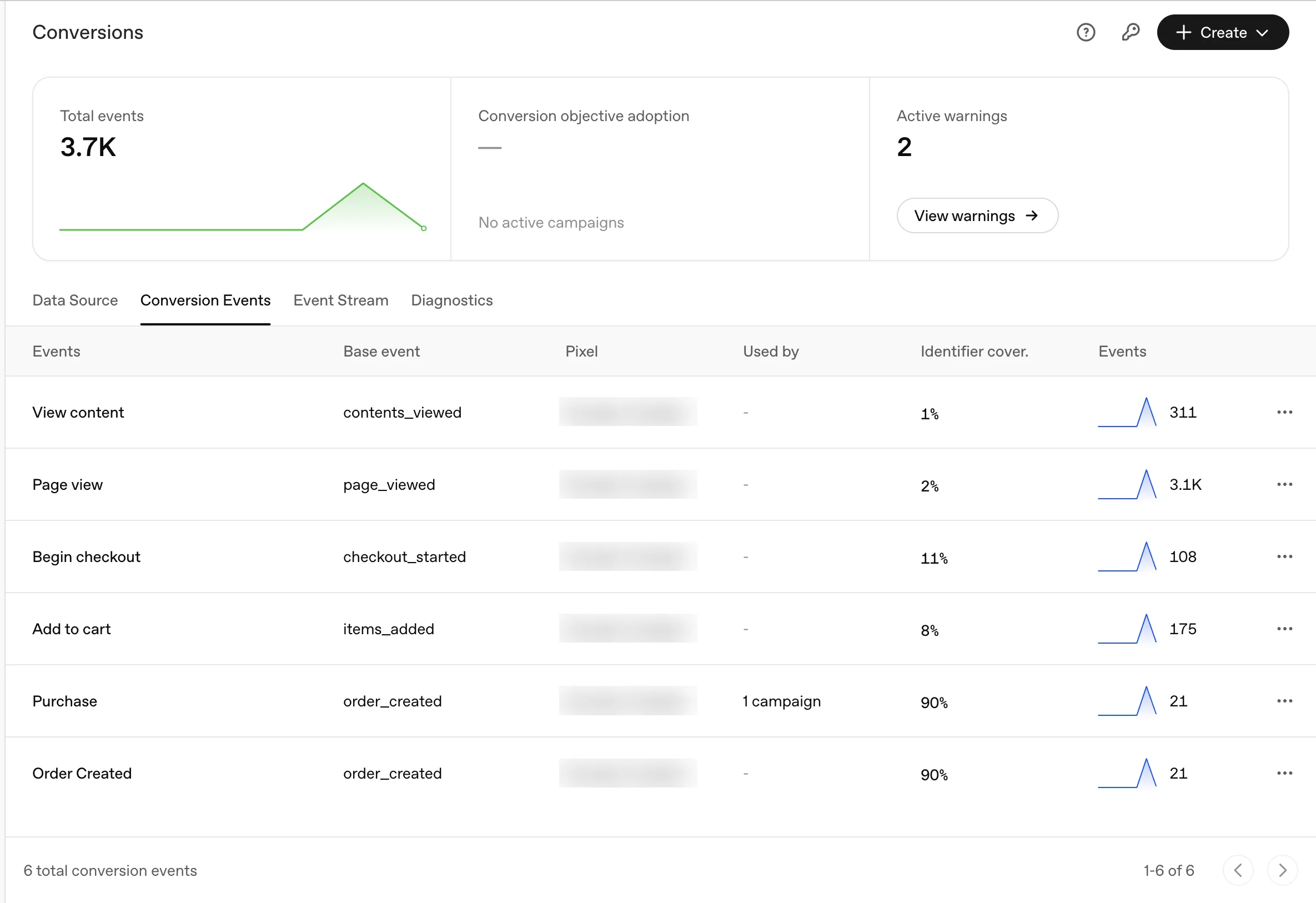
Conversion Events lists each event with its base name, the pixel, which campaign uses it, and an identifier coverage percentage: how many of those events arrived with an email, phone or external ID the platform can match to a ChatGPT user. On this account the purchase event had 90 percent coverage, because the order carries the customer’s email, while page views sat at 2 percent, because an anonymous visitor carries nothing. That column is the one to watch, since a conversion the platform cannot match to a user is a conversion it cannot learn from.
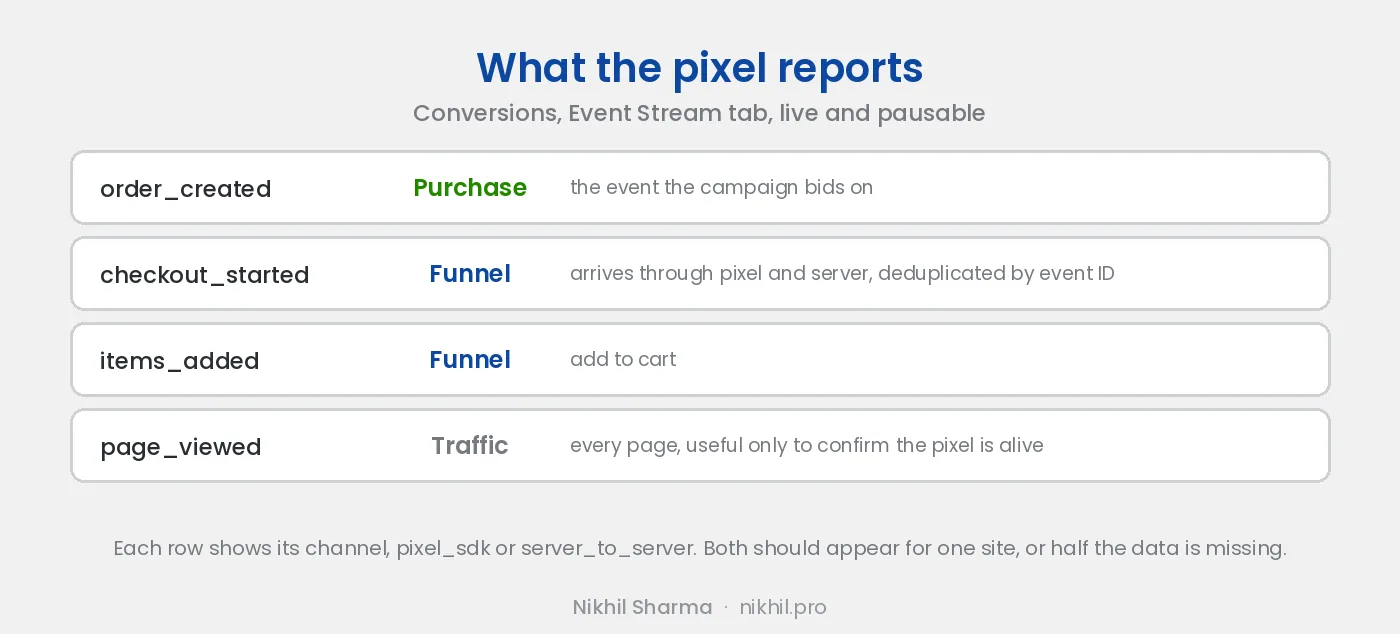
The event stream is a live, pausable table with search and a data source filter, showing each event’s type, custom name, source, received time, API channel and payload. The channel column is the useful one: pixel_sdk for the browser pixel, server_to_server for the Conversions API. For one site both should appear, deduplicated by a shared event ID and pixel ID. If only pixel_sdk shows, your server side is not firing and iPhone users with blockers are invisible to the campaign.
The events I saw: order_created, which is the purchase and the one the campaign bids on; checkout_started; items_added; page_viewed. OpenAI’s documentation says the server API must never be called from browser code, and the community Tag Manager template for the pixel was still waiting for gallery approval when I looked, so the browser side went in by hand. The same discipline as Meta’s pixel and Conversions API applies: one event ID across both channels, or you double count.
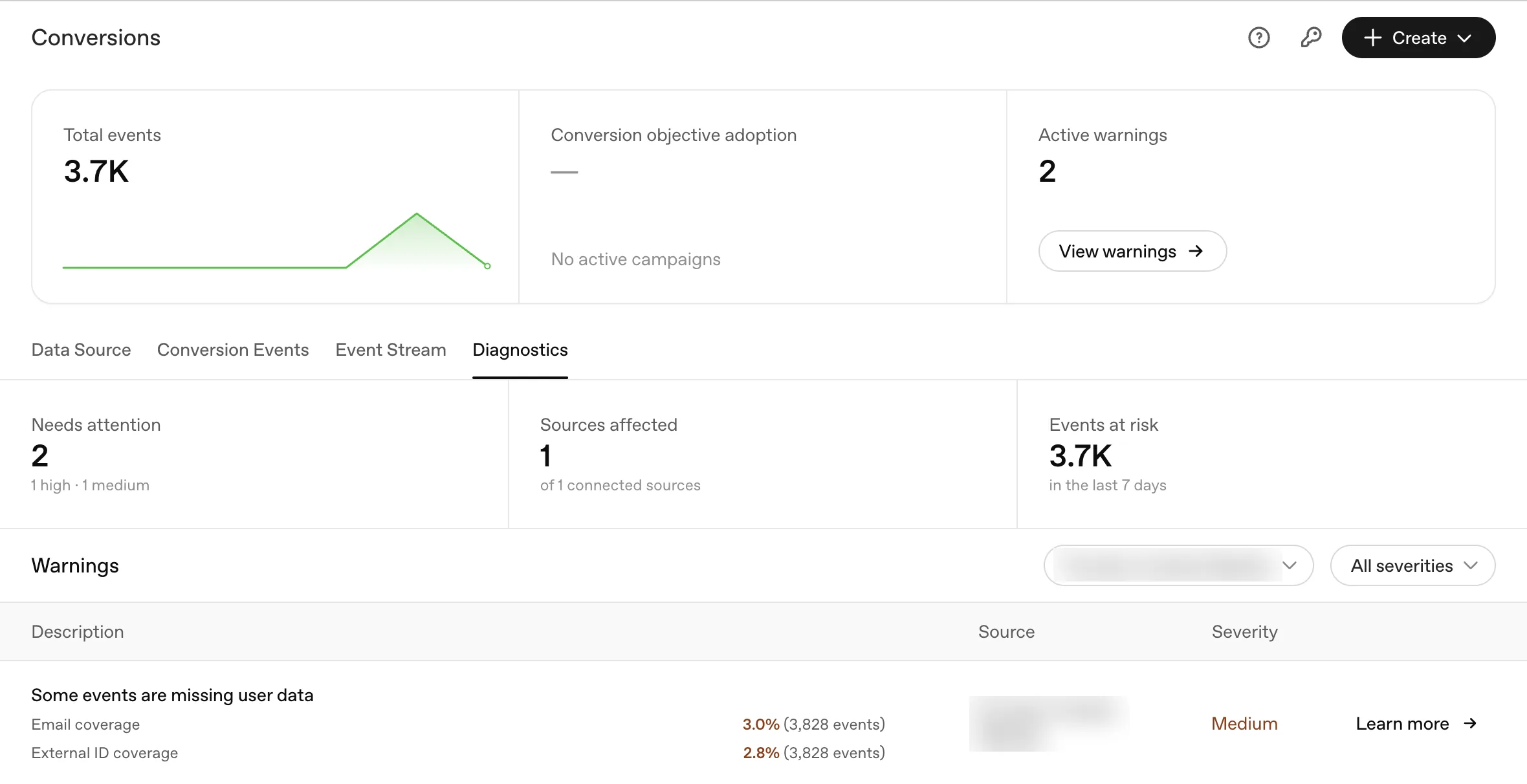
Diagnostics is where the platform tells you what it cannot see. Mine showed two warnings on 3,700 events: email coverage 3 percent and external ID coverage 2.8 percent across all events, which is the page view problem above measured the other way round. The fix is Meta’s advanced matching by another name, passing a hashed email on every event where the visitor is known, and it is worth doing before the campaign spends, because the Needs attention count is also the platform’s opinion of your signal quality.
ChatGPT ads and UCP: the ad is the top of a funnel the protocols own
An ad inside a ChatGPT answer gets the click. What happens after it is being decided by two protocols, and a Shopify store is already wired into both. OpenAI’s Agentic Commerce Protocol, built with Stripe, lets ChatGPT complete a purchase inside the chat. Google’s Universal Commerce Protocol, co-developed with Shopify, is the open version: a merchant profile at /.well-known/ucp that declares what the store can do and lets an agent negotiate the rest. Shopify ships that endpoint on every store; agentic commerce and llms.txt covers the rollout.
Why it matters to the ad buyer: today the ad lands on your storefront, so the pixel and the Shopify order are where the conversion shows up. As the protocol layer matures the buyer may never reach the storefront; the agent reads the feed, checks the UCP profile and completes the order in the conversation, and attribution moves into the agent’s order data. The UCP post works through what that does to Meta’s credit. Here the ad and the checkout sit in the same place, which is better for the buyer and worse for anyone whose feed and well known endpoints are not in order, because those are what the agent reads after the click.
Should a Shopify store advertise on ChatGPT?
Run a small conversion campaign with the pixel on and a credit if you have one, because the only question that matters, whether your customers ask ChatGPT the questions your product answers, cannot be answered from outside. Write the context hints in every language the market speaks. Write titles to 32 characters. Put the ID placeholders in the URL on day one. Watch the event stream for both channels before you read a single conversion number.
Do not move budget from Meta or Google to do it. The inventory is new, the competition is thin, and the price is search level. That is the 2003 Google Ads profile: cheap attention for whoever shows up early, on a platform that will add the missing features one month at a time. The ChatGPT shopping checklist and getting products listed in ChatGPT are the organic side of the same bet, and Shopify’s agentic storefront rollout is where the data for both will end up living.
The campaign was still a draft when I wrote this. I will add the numbers here when it has run for a month.
If you want it set up and read for you
ChatGPT ads test for your store
Pixel first, then the campaign, the context hints in your market's languages, and a 30 day read against Shopify orders rather than platform numbers.
Just want to compare notes
Thirty minutes on a call
Bring your account and the question you are trying to answer with it. Thirty minutes, no pitch.
Frequently asked questions
What is ChatGPT Ads Manager?
How does targeting work in ChatGPT ads?
How much do ChatGPT ads cost?
What ad formats does ChatGPT support?
What are the character limits for ChatGPT ads?
Does ChatGPT Ads have a pixel?
Can I use my customer list in ChatGPT ads?
Is ChatGPT advertising worth it for a Shopify store?
Get new posts in your inbox
Occasional notes on Shopify, paid ads, and what I learn. No spam.
Thanks. Check your inbox to confirm.

Nikhil Sharma
I run data and operations for a DTC brand on Shopify, consult on Meta and Google Ads, and build AI automations for ecommerce teams. I write about what I build and run.