How to Connect Google Analytics to Claude with the Official GA4 MCP Server
Google ships an official MCP server for GA4. Fifteen minutes of setup and you can ask your property questions in plain English: how many users yesterday, which products sold, which channels drove them. Here is the full setup, the PATH problem that breaks most first installs, and what to ask once it works.
I pull numbers out of GA4 constantly, and most of those pulls are the same five reports with different date ranges. Connecting the property to Claude through MCP has turned a lot of that into typed questions.
This is the setup guide I wish had existed when I did it.
What MCP Is, in One Paragraph
The longer version for a non technical reader is what is an MCP server, for store owners.
MCP, the Model Context Protocol, is a standard for letting an AI assistant call tools in outside systems. A server exposes one system as a set of tools, and the assistant decides when to call them. The Google Analytics server exposes GA4 reports. Your job is authentication and wiring. After that, the model writes and runs the queries.
The server is Google’s own, open source at googleanalytics/google-analytics-mcp, and it runs locally on your machine under your credentials. Nothing is hosted by a third party.
What You Need
| Requirement | Where it comes from |
|---|---|
| A GA4 property | You have this already |
| A Google Cloud project | console.cloud.google.com, free |
| Two APIs enabled | Analytics Data API and Analytics Admin API, in that project |
| Python 3.10+ and pipx | Your machine |
| The gcloud CLI | For Application Default Credentials |
Budget 15 minutes if the Cloud project already exists, 25 if you’re starting from nothing.
The Setup
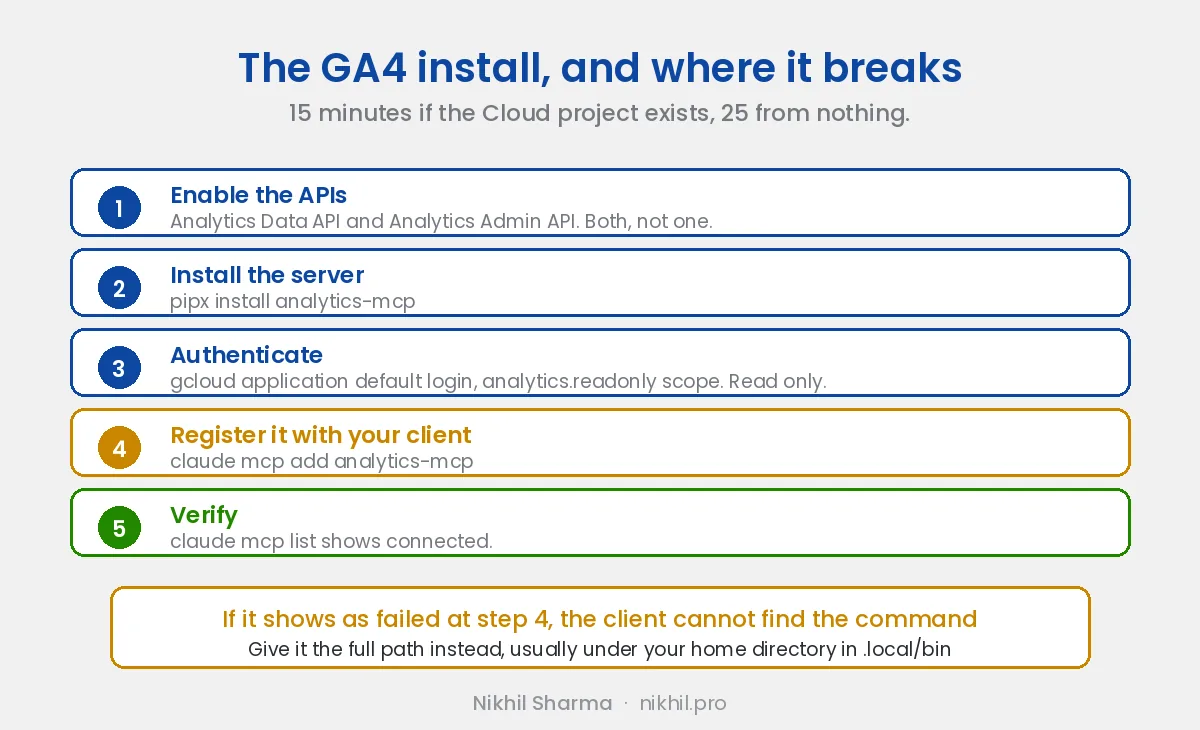
1. Enable the APIs. In your Cloud project, enable the Google Analytics Data API and the Google Analytics Admin API. Both, not one. The Data API runs reports, the Admin API lets the server discover your accounts and properties.
2. Install the server:
pipx install analytics-mcp3. Authenticate. The server reads Application Default Credentials, so one gcloud command does it:
gcloud auth application-default login \
  --scopes=https://www.googleapis.com/auth/analytics.readonly,https://www.googleapis.com/auth/cloud-platform
A browser opens, you sign in with the Google account that has access to the GA4 property, and the credentials land on disk where the server finds them. Note the scope: read only, deliberately.
4. Register it with your client. For Claude Code:
claude mcp add analytics-mcp --scope user -- analytics-mcpFor Claude Desktop, the equivalent entry in your MCP settings:
"analytics-mcp": {
  "command": "analytics-mcp"
}
5. Verify. Run claude mcp list and look for the server reported as connected, or just ask Claude “what can the analytics-mcp server do.”
analytics-mcp command. Clients launch servers outside your shell setup, so your PATH does not apply. Fix it by using the full path to the binary in the config, something like /Users/you/.local/bin/analytics-mcp, instead of the short name.What It Can Do
The tool surface is small and useful: account and property summaries, standard reports against the Data API, and realtime queries. In practice that covers the questions that make up most day-to-day GA4 usage:
- “How many users did we have yesterday, and from which channels?”
- “Top selling products last week by revenue”
- “Compare organic sessions this month against last month”
- “What’s happening on the site right now?”
The model translates the question into the right dimensions and metrics, which quietly removes the worst part of GA4: remembering what anything is called in the API.
The Limits, Honestly
Local clients only. Claude on the web cannot launch local processes. You need Claude Desktop, Claude Code, Cursor, or Gemini CLI. Hosted wrappers exist if browser access matters, with the tradeoff that your tokens then live with the host.
Read only cuts both ways. Nothing can go wrong, and nothing can be done. Acting on findings is your job.
The model sees what it reads. Property data flows into the conversation. For most businesses that’s fine; decide before connecting if yours is different.
The Real Value Is the Second Server
On its own, the GA4 server saves you report clicks. The step change comes when Google Ads is connected in the same conversation, because then you can ask the reconciliation questions: where Ads-reported conversions and GA4 purchase events disagree, by campaign, for the same period. That gap is where budgets quietly die, and I’ve written about the KPIs worth trusting precisely because the two systems never agree on their own.
The Ads setup is more involved, mostly because of a developer token approval that takes days if you don’t start it early. Full walkthrough here: connecting Google Ads to Claude with the official MCP server
Both of those ship an official server you can install. When the system holding your data has none, you write your own. That is what I did for our point of sale: an MCP server for Clover POS, so the owner could ask about sales, items and tips without waiting on anyone to pull a report.
I’m Nikhil Sharma. I run data and operations engineering for a DTC brand and write about the systems underneath ecommerce. If you want help wiring your analytics into something your team can actually query, here is what I build or book a call.
Frequently asked questions
What is an MCP server?
Is there an official Google Analytics MCP server?
Can the GA4 MCP server change my Analytics settings?
What credentials does the Google Analytics MCP server need?
Does the GA4 MCP server work with Claude on the web?
Why does my client show the analytics-mcp server as failed?
Is it safe to connect Google Analytics to an AI model?
Can I connect Google Ads the same way?
Get new posts in your inbox
Occasional notes on Shopify, paid ads, and what I learn. No spam.
Thanks. Check your inbox to confirm.

Nikhil Sharma
I run data and operations for a DTC brand on Shopify, consult on Meta and Google Ads, and build AI automations for ecommerce teams. I write about what I build and run.