The Five Klaviyo Flows Every Shopify Store Needs, in Order
Most of a Shopify store’s email revenue does not come from the newsletter. It comes from five automated flows that trigger when someone does something, send on a timer, and run every day whether or not anyone on the team touches Klaviyo. Stores that have all five set up well typically see a quarter to a third of total revenue attributed to email. Stores that have only a weekly campaign see a fraction of that and conclude email does not work for them.
This is the order to build them, what each one is for, the timing I use, and the mistakes that send them to the wrong people. It assumes Klaviyo is already connected to Shopify and the sending domain is authenticated, because none of this matters if the emails land in spam.
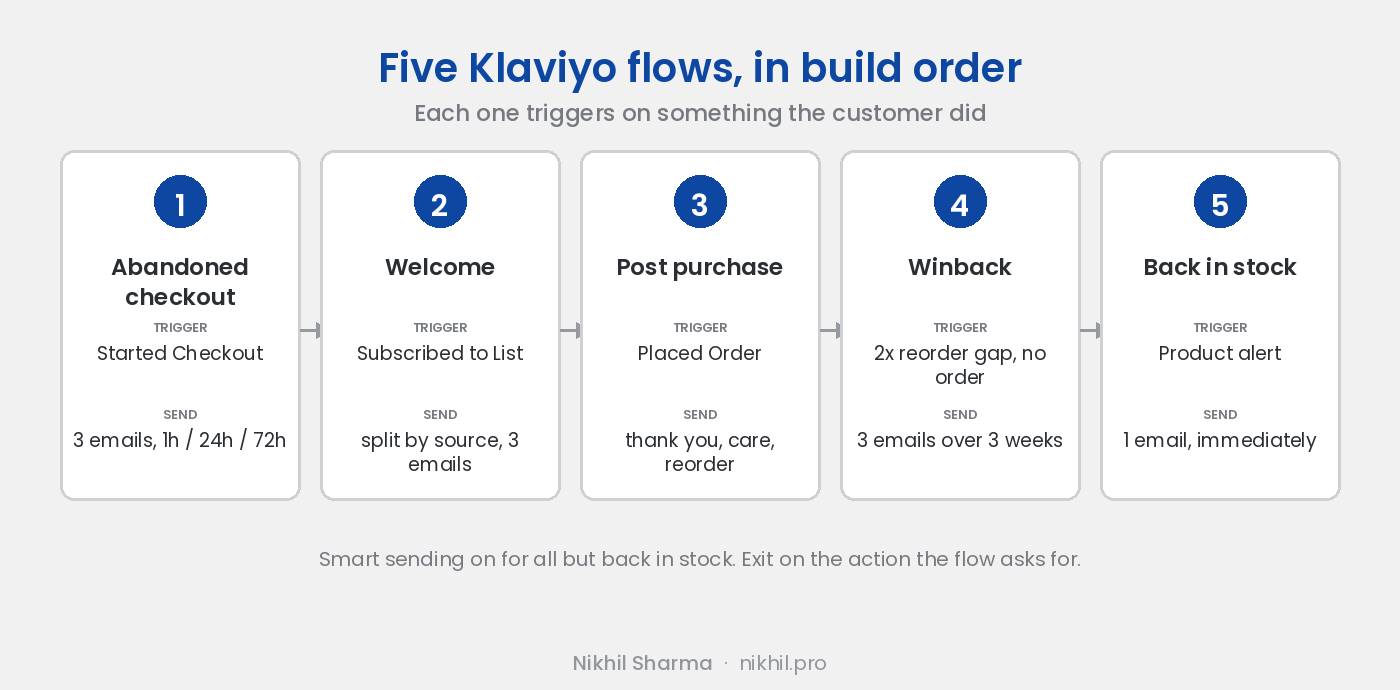
1. Abandoned checkout
Build this one first. It emails people who typed their address into your checkout and left, which makes it the highest intent audience you have, and it recovers revenue from the first day.
Trigger: Started Checkout, with a flow filter that exits anyone who places an order.
Timing: three emails. One hour after abandonment, the cart contents, a clear button, no discount. Twenty four hours, answer the usual objection: shipping cost and time, the returns policy, two reviews of the product in the cart. Forty eight to seventy two hours, an offer if your margin allows one, and if it does not, a final reminder.
What goes wrong: the first email carries a discount, and within a month your regulars have learned to abandon on purpose. Hold the discount back to the third email or leave it out entirely. The other failure is sending the same three emails to someone who abandoned a $20 cart and someone who abandoned a $300 one; split the flow on cart value once it is running.
Shopify’s own abandoned checkout email should be switched off when this flow goes live, or people get both.
2. Welcome
Trigger: Subscribed to List, for the main list.
The welcome flow has to know how the subscriber arrived, because a person who opted in at checkout has just bought and a person who filled in a footer form has not. Send the first a thank you and what to expect, then product news. Send the second whatever the form promised, then the two or three things that make the brand worth buying from, then the best selling product.
Timing: immediately, then day two, then day five. Three emails is enough. The job is to set expectations and earn the second open, not to run a course.
What goes wrong: one welcome flow for everyone, which means a first order discount going to people who already ordered at full price. Split by the list or form the subscriber came from and the problem disappears.
3. Post purchase
Trigger: Placed Order, with a split on whether it is the customer’s first order.
This is the flow most stores skip and it is where repeat purchase rate is made. The order confirmation and shipping emails come from Shopify. This flow is everything after: a thank you from a person rather than a system, how to use or care for the product, when to expect results if the product has them, and, timed to when the product would be running low, the reorder prompt.
Timing: day one thank you, day three to seven usage and care, then the reorder email at the point in your product’s cycle where it makes sense. For a thirty day consumable that is day twenty two. For a piece of furniture it is the cross sell at day thirty and nothing else.
What goes wrong: asking for a review before the product has arrived. Put the review request after the delivery date, which Klaviyo can read from the fulfilment event, and send it once.
4. Winback
Trigger: a segment of customers whose last order is older than twice your average reorder gap, with no order since.
Work out the average days between orders from Shopify’s customer reports, double it, and start the flow there. If customers reorder every 45 days, winback starts at 90 days since the last order. Earlier than that and you are emailing people who were coming back anyway; later and the habit is gone.
Timing: three emails over three weeks. What is new since you last ordered, then the product they bought with a reason to reorder it, then an offer if you use one. Exit anyone who places an order.
What goes wrong: a winback that never ends. After the third email, the flow should stop and the profile should move to a suppressed or low frequency segment. Emailing someone monthly for a year because they bought once is how complaint rates climb.
5. Back in stock
Trigger: Klaviyo’s back in stock subscription, from the button on the sold out product page.
The simplest flow and often the highest converting per email, because the person asked for exactly this message. One email, sent the moment inventory updates, with the product and a button. Turn off smart sending on this one, because the person wants it immediately even if they got a campaign this morning.
What goes wrong: the button is not on the product page, so nobody subscribes. Install Klaviyo’s back in stock snippet on the sold out variant state of the theme and check it on mobile.
Settings that apply to all five
Smart sending on, 16 hours, for everything except back in stock, so a person never gets a flow email and a campaign in the same morning.
Consent filters. Abandoned checkout and post purchase can go to people who gave an email at checkout but did not tick the marketing box, because they are about that person’s own order. Welcome and winback need marketing consent. Klaviyo enforces this if the flow is set up with the right profile filter and sends nothing if it is not, which is the usual reason a flow “is not working”.
Exit on engagement. Every flow exits a profile that does the thing the flow is asking for. Placed Order exits abandoned checkout and winback. A review submitted exits the review step.
An unengaged exit. Any profile that has not opened or clicked in 90 days leaves the flow. This protects the sending reputation more than any other setting.
How to judge them
Revenue per recipient and placed order rate per flow, in Klaviyo’s flow analytics, not open rate. Abandoned checkout should be the highest earner per email on the account. Post purchase should show in the returning customer rate in Shopify within two months. If a flow earns nothing, check the trigger before rewriting the copy; most dead flows are dead because nobody is entering them. The KPIs post covers the email numbers in the context of the rest of the store.
Build the five in this order, one a week, and leave the newsletter until they are live. The marketing checklist has where this sits in the rest of the setup.
Want help with this?
I work with Shopify brands on Meta and Google Ads and the email that keeps the customers they buy. If you want someone to look at why the flows are not earning what they should, book a call. The first thing I check is who is actually entering them.
Frequently asked questions
Which Klaviyo flows should a Shopify store set up first?
What is the difference between a Klaviyo flow and a campaign?
How many emails should an abandoned checkout flow have?
Should the welcome flow include a discount?
When should a winback flow start?
Why are my Klaviyo flows not sending?
How do I stop flows and campaigns sending to the same person on the same day?
Do flows affect email deliverability?
Get new posts in your inbox
Occasional notes on Shopify, paid ads, and what I learn. No spam.
Thanks — check your inbox to confirm.

Nikhil Sharma
I run data and operations for a DTC brand on Shopify, consult on Meta and Google Ads, and build AI automations for ecommerce teams. I write about what I build and run.