HubSpot Meetings Conversion Tracking for Google Ads and GA4
HubSpot tracks the booking perfectly well, for HubSpot. The contact gets a source, the meeting lands on the timeline, the deal is created. What HubSpot does not do is tell Google Ads that the click it paid for turned into a booked call, which is why so many HubSpot accounts run ads optimised for form fills or page views while the meetings pile up untracked.
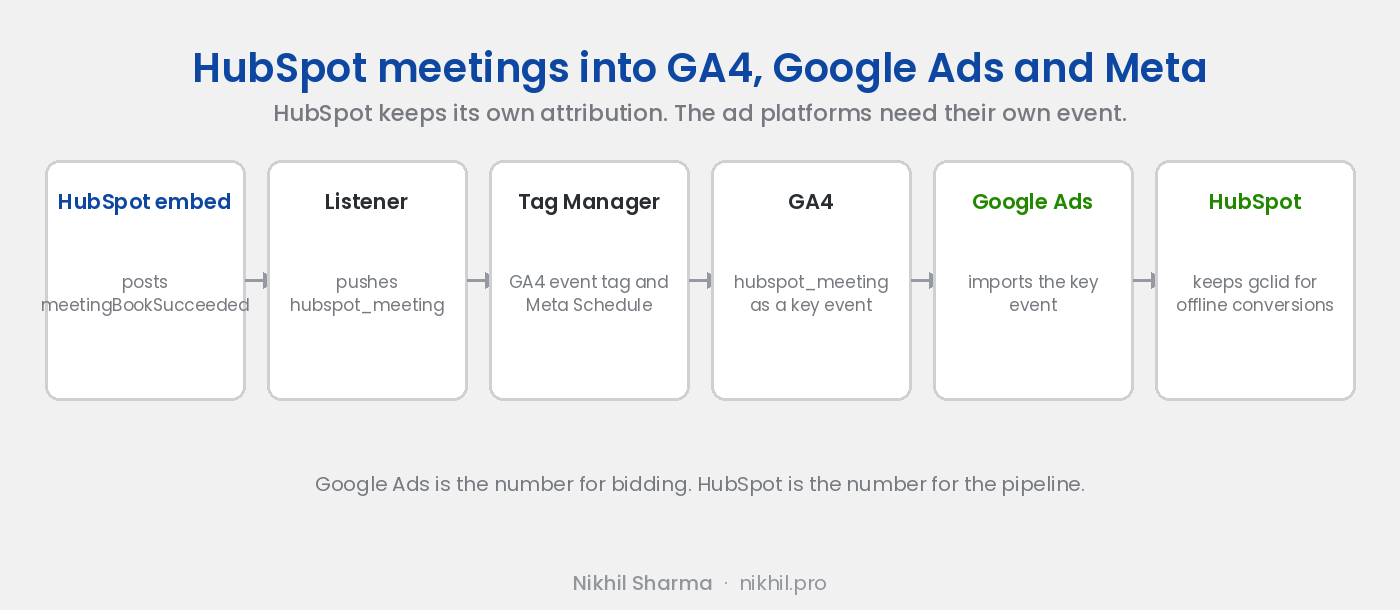
The embed gives you what you need. When a meeting is booked, HubSpot’s scheduler sends a message to the page it is embedded on. Catch it, push it to Tag Manager, and the rest is the same path as Calendly and Cal.com.
Done for you, same day
Booking conversion tracking setup, $199
HubSpot, Calendly, Cal.com or Tally wired to GA4, Google Ads and Meta, tested with a live booking on a call with your accounts open.
If bookings are only part of the problem
Tracking audit across the stack
GA4, Google Ads, Meta, HubSpot attribution and Shopify if you sell, reconciled against what actually happened. Scoped on a call first.
What you need
The HubSpot meetings scheduler embedded on a page you control, not a bare meetings.hubspot.com link. Google Tag Manager on that page. A GA4 property linked to Google Ads. The Meta pixel ID if you run Meta.
Step 1: catch the booking message
HubSpot’s embed runs in an iframe and uses postMessage to tell the parent page what happened. On the page with the embed, add:
<script>
  window.addEventListener("message", function (e) {
    if (e.data && e.data.meetingBookSucceeded === true) {
      window.dataLayer = window.dataLayer || [];
      window.dataLayer.push({ event: "hubspot_meeting" });
    }
  });
</script>
Make a test booking and check the browser console for hubspot_meeting in dataLayer. If nothing arrives, the scheduler is probably opened in a new tab rather than embedded; switch to the inline embed.
Step 2: trigger and tags in Tag Manager
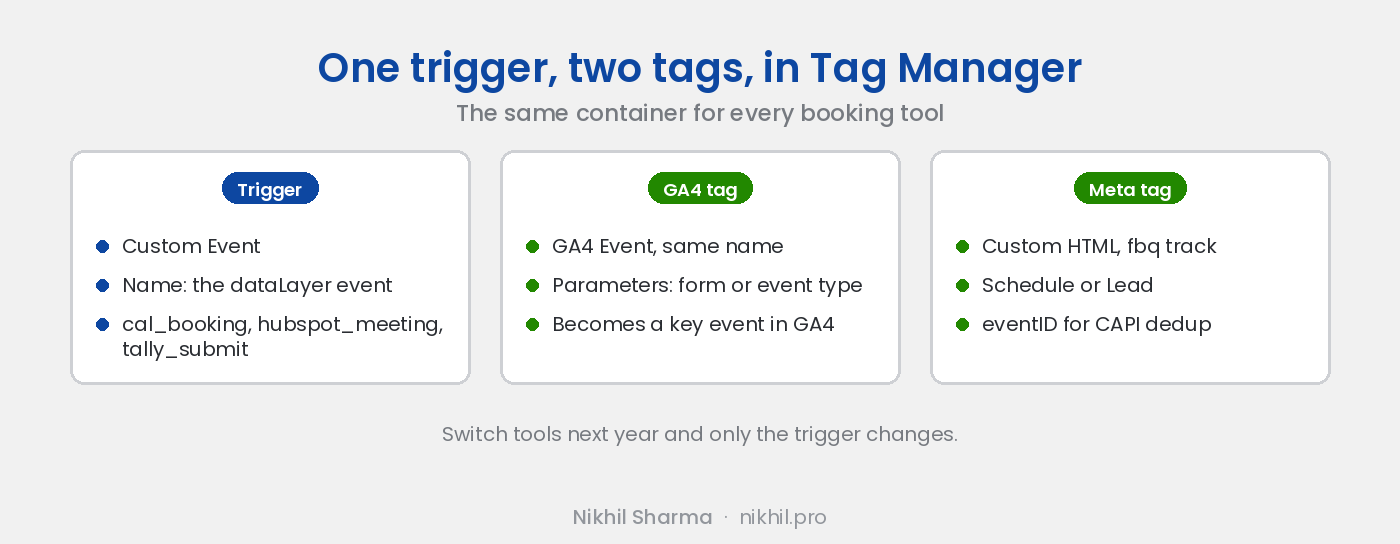
Custom Event trigger on hubspot_meeting. A GA4 Event tag sending hubspot_meeting. A Meta Custom HTML tag with fbq('track', 'Schedule', {}, { eventID: '<unique id>' }). Publish, then verify both fire in Preview with another test booking.
Step 3: key event in GA4, import to Google Ads
GA4, Admin, Events, toggle hubspot_meeting to a key event. Google Ads, Goals, New conversion action, Import, Google Analytics 4, select it. Set it as primary if booked meetings are the outcome the campaigns should learn from. Screenshots for both are in the Calendly post; the steps are identical from here.
Step 4: keep HubSpot and Google Ads telling the same story
This is the part specific to HubSpot. Two things.
Store the click ID on the contact. HubSpot captures gclid on forms when the tracking code is present, or you add a hidden field. Either way, make sure the Google click ID is on the contact record. When that contact closes three weeks later, you can upload the deal as an offline conversion to Google Ads against the original click, and bid on closed revenue rather than booked calls.
Decide which number is the number. HubSpot attributes across sessions and channels, including the email that reminded someone to book. Google Ads attributes inside its own window. They will disagree, and that is fine. Google Ads is the number for bidding. HubSpot is the number for the pipeline. A gap over 40 percent means bookings are not reaching Google Ads at all, which is the problem this post fixes.
Step 5: a server side copy for Meta
Pixels miss bookings on iPhones and behind ad blockers. HubSpot can cover it: a workflow triggered on meeting booked, with a webhook action that posts to Meta’s Conversions API, email hashed, the same event ID as the pixel so Meta deduplicates. If you do not want a workflow doing HTTP, Zapier’s HubSpot trigger does the same.
What this gives you
Booked meetings in Google Ads by campaign and keyword, in GA4 by source, in Meta by ad, and in HubSpot by contact with the click ID attached for the day the deal closes. One container, one trigger, and the ad platforms finally see the outcome the pipeline is built on. If the meeting is booked from a form first, the Tally version tracks that step the same way.
If you would rather have it done, the setup at the top of this post is the same work on a call, tested with a live booking before we hang up.
Frequently asked questions
How do I track HubSpot meeting bookings in Google Ads?
Does HubSpot's own tracking code send bookings to Google Ads?
Why do my HubSpot and Google Ads numbers disagree?
Can I pass the Google click ID into HubSpot?
Does this work with the meetings link on a HubSpot landing page?
Can I send HubSpot bookings to Meta as well?
Get new posts in your inbox
Occasional notes on Shopify, paid ads, and what I learn. No spam.
Thanks — check your inbox to confirm.

Nikhil Sharma
I run data and operations for a DTC brand on Shopify, consult on Meta and Google Ads, and build AI automations for ecommerce teams. I write about what I build and run.