The Right Way to Grow a Klaviyo Email List for Ecommerce
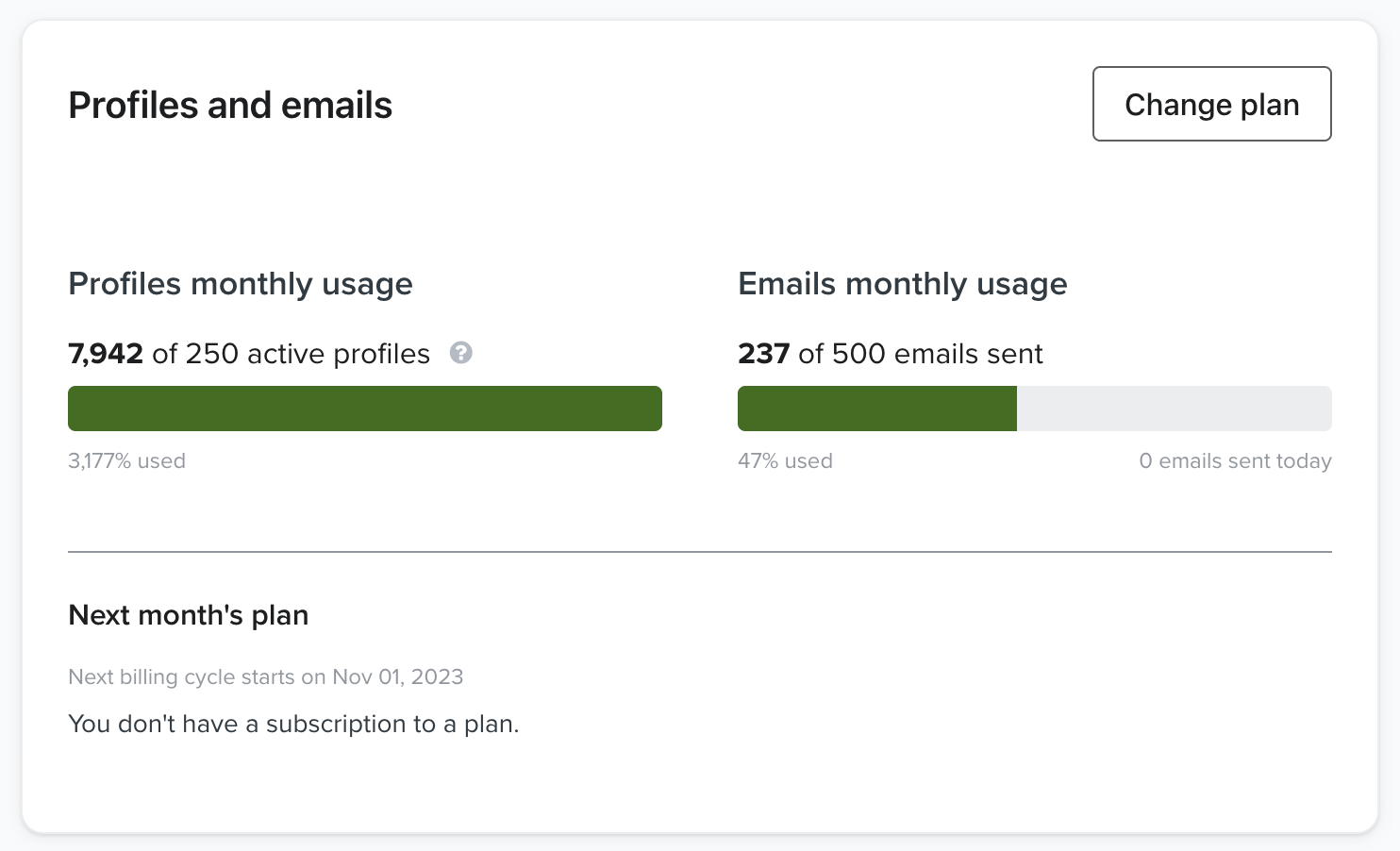
Most Shopify stores greet a first time visitor with a popup offering 10 percent off for an email address. The thinking is that the list will convert later. On most stores it does not. You pay Klaviyo for the contacts, the emails go to junk or get ignored, the unsubscribe rate climbs, and the people who do buy wait for the next discount because that is what they signed up for.
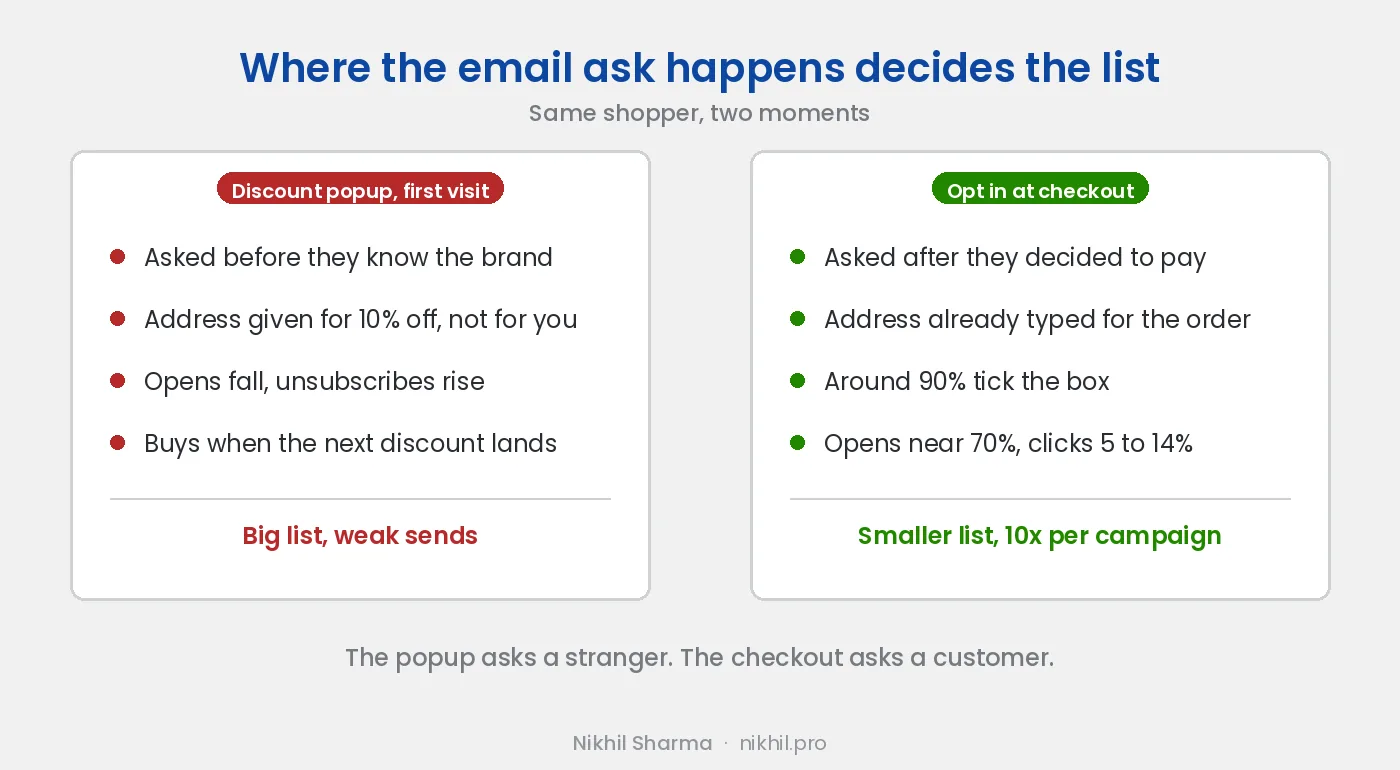
The problem is where the ask happens. A visitor who has been on the site for four seconds does not know the brand. They have no reason to want its emails, and the discount is the only reason they give the address. Unless they came through a referral or through ads they already engaged with, the signup is the end of the relationship, not the start.
Ask at the checkout instead
There is a point on every store where the customer has already decided to trust you with money, is already typing their email so you can send the order confirmation, and is one tick away from saying yes to more. That is the checkout, and it is the best place on the site to grow a list.
Think of it from the customer’s side. A person outside a shopping mall with a clipboard asking for your details gets a polite no. The person at the till who asks whether you want a receipt by email and the occasional offer gets a yes, from the same shopper, because by then you have decided to buy and you trust the shop.
What it produced
On the store this was worked out on, the list reached 8,000 subscribers with no first visit popup. Around 90 percent of buyers ticked the marketing box at checkout. Because every subscriber was a customer, the list behaved like one: open rates around 70 percent, click rates between 5 and 14 percent depending on the campaign, and each campaign returning at least ten times what it cost to send.
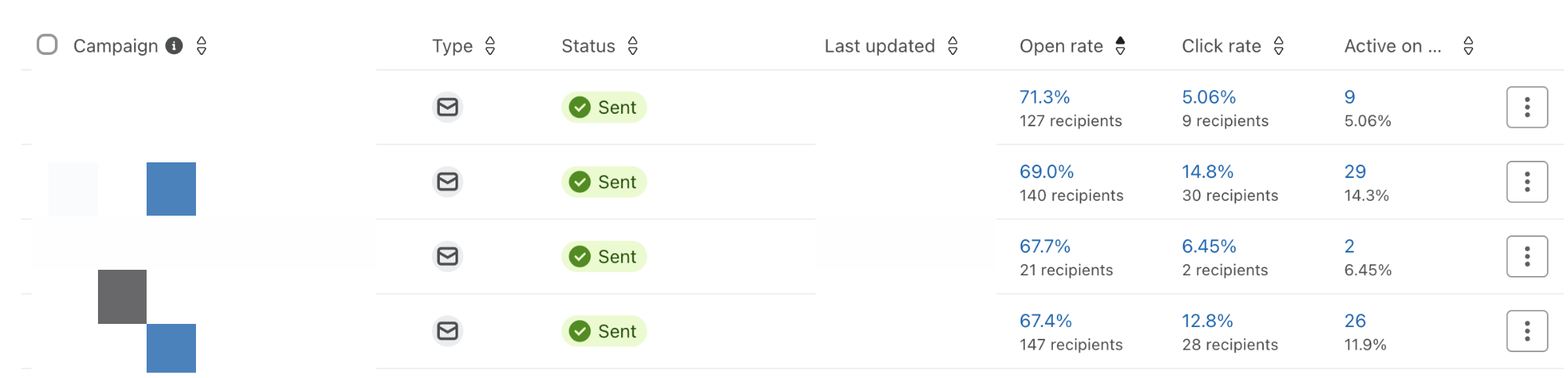
The store kept a footer sign-up and a couple of smaller forms elsewhere, which is how the comparison was possible. The checkout list outperformed every other source on every metric that mattered.
How to set it up on Shopify and Klaviyo
Shopify. Settings, then Checkout, then the marketing options section. Turn on the email sign-up at checkout. Shopify offers to preselect the box in some regions. Leave it unticked where consent law requires an active choice, which includes the EU, UK and Canada, and consider leaving it unticked everywhere. A list of people who actively said yes is worth more than a slightly larger list of people who did not notice.
Klaviyo. The Shopify integration reads the consent status from the order and subscribes the customer to the list you set as the default. Check that the list in the integration settings is the one your campaigns send to. The most common failure is consent flowing into a list nobody emails.
SMS. The same checkout screen has an SMS opt-in beside the email one, and Klaviyo picks that up the same way. Consent given to receive the order is cleaner than consent extracted by a popup, and it converts better for the same reason.
Welcome flow. A checkout subscriber has just bought. Do not send them the welcome discount you would send a stranger. Send the order on its way, then a thank you with what to expect, then product news. The email marketing section of the checklist has the flow order.
What to do with the popups you already have
Keep a footer sign-up. Keep an exit intent form if it is restrained, because someone leaving without buying is a reasonable moment to ask. Remove the full screen discount on first visit. It interrupts the purchase it exists to encourage, and the list it builds costs more to send to than it returns.
If you want the discount to exist, put it on the post purchase page or in the second email, where it goes to someone who has already shown they will pay full price.
The automated side, welcome through winback, is in the five Klaviyo flows every Shopify store needs.
What to send
Product news, restocks, new arrivals, and the occasional offer, in that order. These subscribers are customers, and customers want to know what is new and what is back. The weekly coupon is what trains a list to wait, and a list that waits is the list most stores complain about.
If the emails are landing in spam regardless of who is on the list, that is a different problem and it is usually DNS. The emails going to spam post covers the records to set.
If you want someone to look at the list, the flows and where the subscribers come from, book a call. The first thing I check is the ratio of popup subscribers to checkout subscribers, because that ratio predicts how the list will perform.
Frequently asked questions
Is a discount popup a good way to grow an email list?
Where is the best place to collect emails on a Shopify store?
How do I turn on the email opt-in at Shopify checkout?
Do customers who opt in at checkout actually open emails?
Should I remove all popups from my store?
What should I send to a checkout-grown list?
How does this apply to SMS?
Get new posts in your inbox
Occasional notes on Shopify, paid ads, and what I learn. No spam.
Thanks. Check your inbox to confirm.

Nikhil Sharma
I run data and operations for a DTC brand on Shopify, consult on Meta and Google Ads, and build AI automations for ecommerce teams. I write about what I build and run.