
Six AI Workflows I Run on a Shopify Store, and What Broke
AI workflows for Shopify are internal automations that use a language model to handle a well-scoped step inside an existing business process, such as summarizing customer context before a support call, cleaning user-submitted reviews, or classifying support conversations. The highest-return ones are usually back-office tools that customers never see, not customer-facing chatbots.
Most writing about AI and Shopify falls into two piles. Vendor pages selling an app, and listicles assembled by people who have never had to make one of these things work on a Tuesday when it breaks.
This is the other kind. I run data and ops engineering for a DTC ecommerce brand, and everything below is a pattern I have built, shipped, and had to maintain. It is concept-level on purpose: the approaches and the lessons, not proprietary implementation details.
If you are deciding where to point AI effort in a Shopify business, this is the map I wish I’d had.
The one idea that matters most
Across every AI workflow I have built, the language model was roughly ten percent of the work. The other ninety percent was collecting the right context, deciding what mattered, and delivering the output at the moment someone needed it. AI projects that fail usually fail at the plumbing, not the model.
This is the thread running through everything below, so it is worth stating up front. Getting a modern model to summarize, classify, or clean text is close to trivial. Getting clean inputs to it, and getting its output in front of the right person in a form they can act on in five seconds, is ordinary data engineering and it is where the effort actually goes.
If you take one thing from this guide: scope the model to a single well-defined step, and spend your energy on everything around it.
Where AI actually pays off in a Shopify business
Here is the honest ranking, based on what returned value versus what looked impressive.
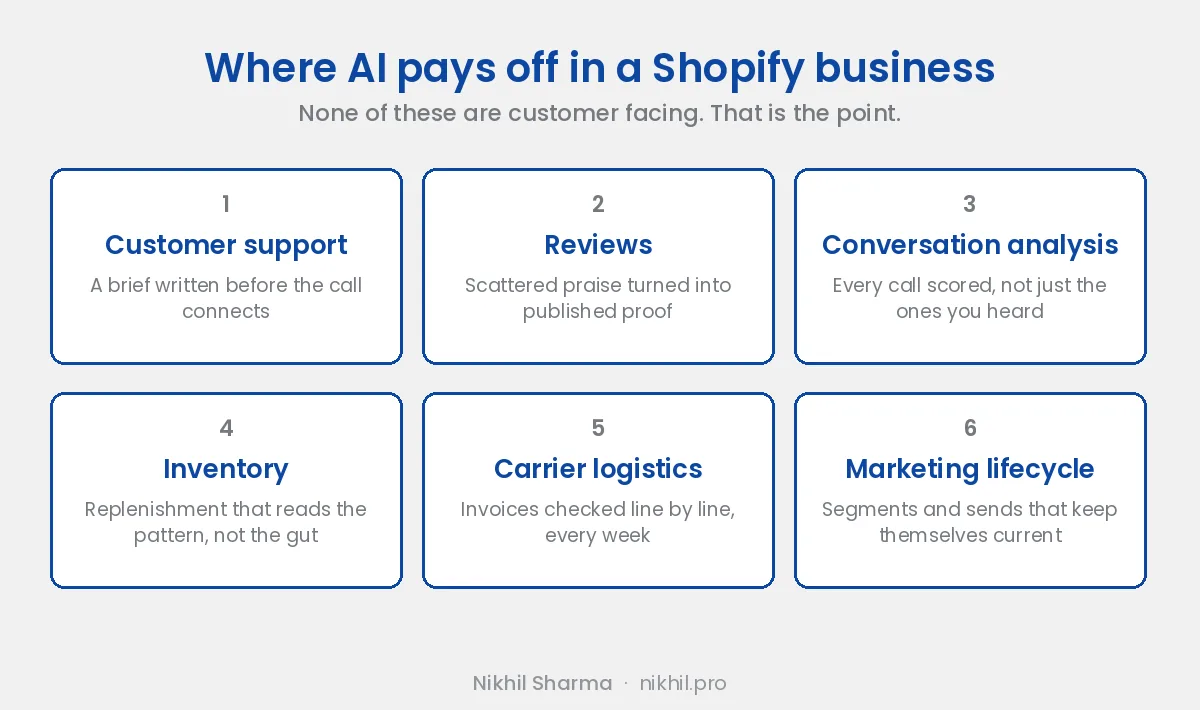
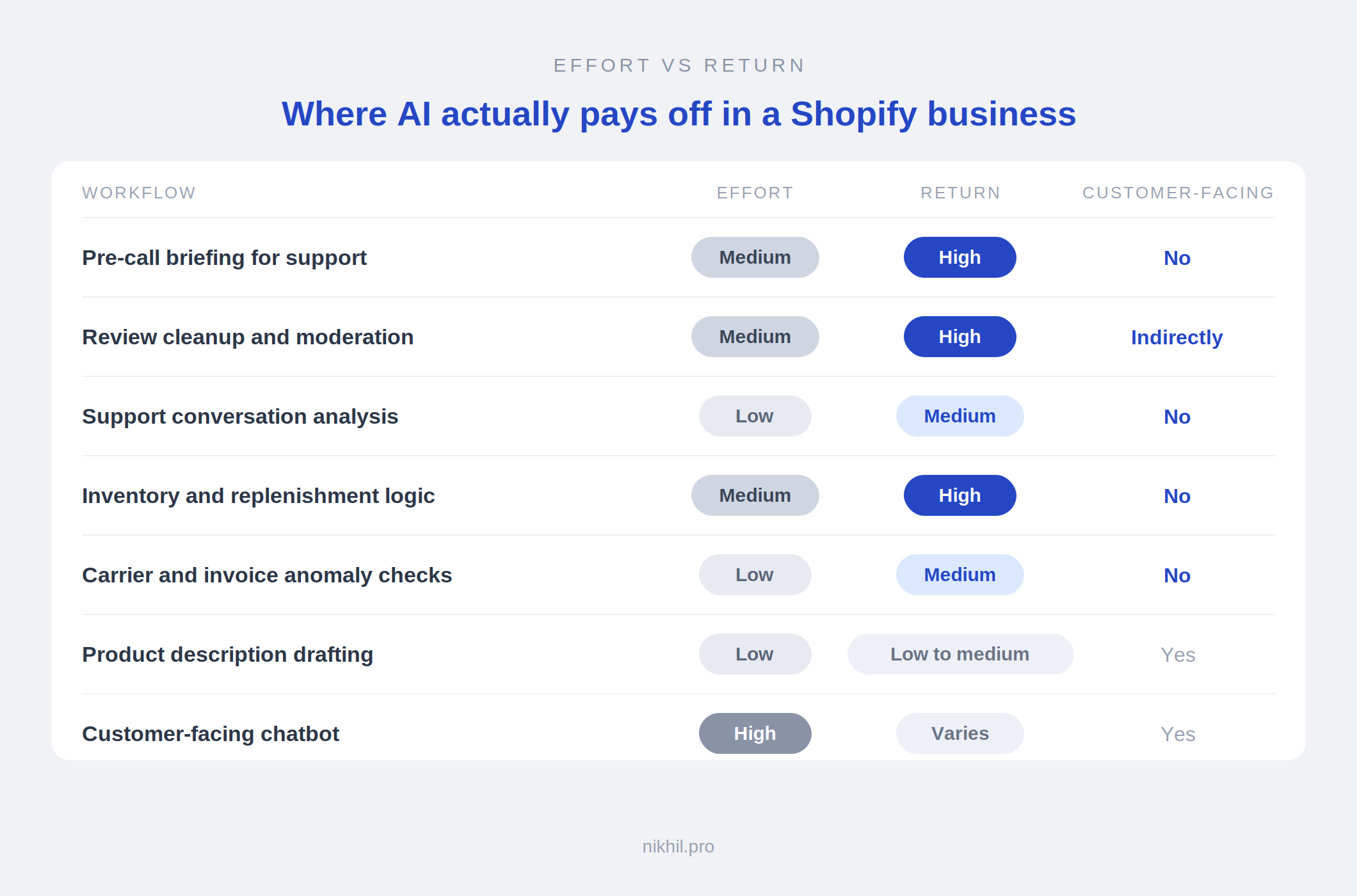
The pattern is hard to miss. The things that paid off were invisible to customers. The most visible option, a chatbot, was the highest effort with the least predictable return.
One category is deliberately missing from that table: discoverability. Getting your products surfaced by AI shopping assistants is a different problem with its own playbook, and I have covered Shopify’s agentic commerce and llms.txt rollout, what Google’s UCP means for Shopify brands, and how to list products on ChatGPT elsewhere.
1. Customer support: pre-call briefing
A pre-call briefing tool assembles a customer’s order history, prior tickets, and account notes into a short brief before a support call, so the agent opens the conversation informed instead of searching across systems. It is one of the fastest internal AI wins in a Shopify business.
The problem. Before every call, an agent jumps between order history, notes, and previous tickets just to learn who they are about to speak with. A few minutes per call, done by someone whose actual skill is talking to people.
The workflow.
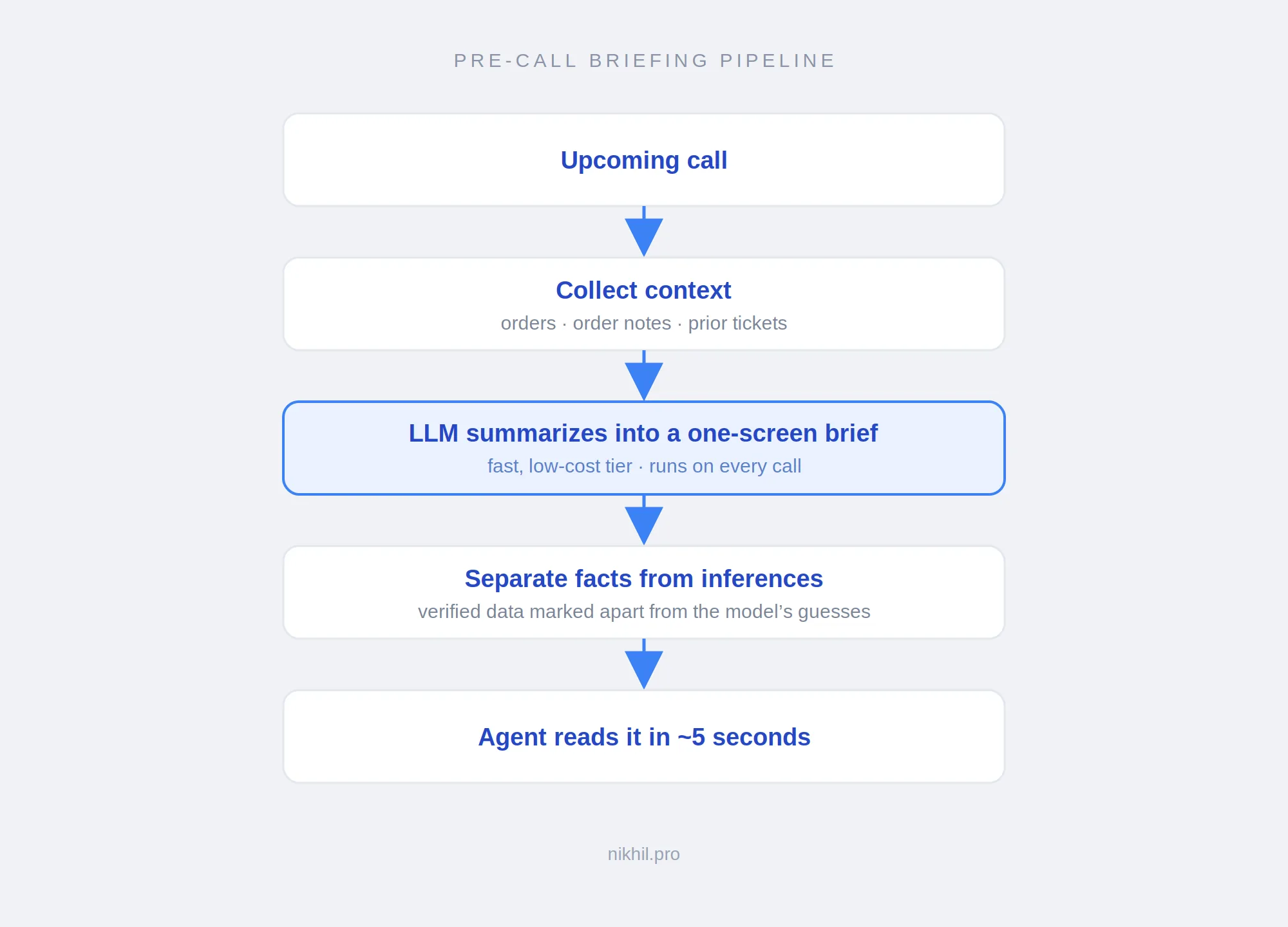
The lesson that generalizes. The model will state a guess in exactly the same confident tone as a verified fact. Splitting facts from inferences visually was the single most important design choice, because a human reading quickly cannot tell them apart otherwise.
The underrated benefit. Order notes are full of human detail nobody has time to surface live, like an order being a birthday gift. Surfacing that lets an agent open with real warmth. The efficiency is the boring win; the better conversation is the real one.
2. Reviews: turning scattered praise into published social proof
A review pipeline uses a language model to clean user-submitted praise, stripping personal information, email signatures, and quoted threads, then formats it into a consistent, publishable review. The model handles the bulk pass while a human stays on consent and edge cases.
The problem. A surprising share of genuine praise never arrives through a review form. It comes in as email replies, sitting in an inbox where no future customer will ever see it. You cannot paste those onto a product page: they contain full names, email addresses, order details, and formatting that looks wrong on a website.
The workflow.
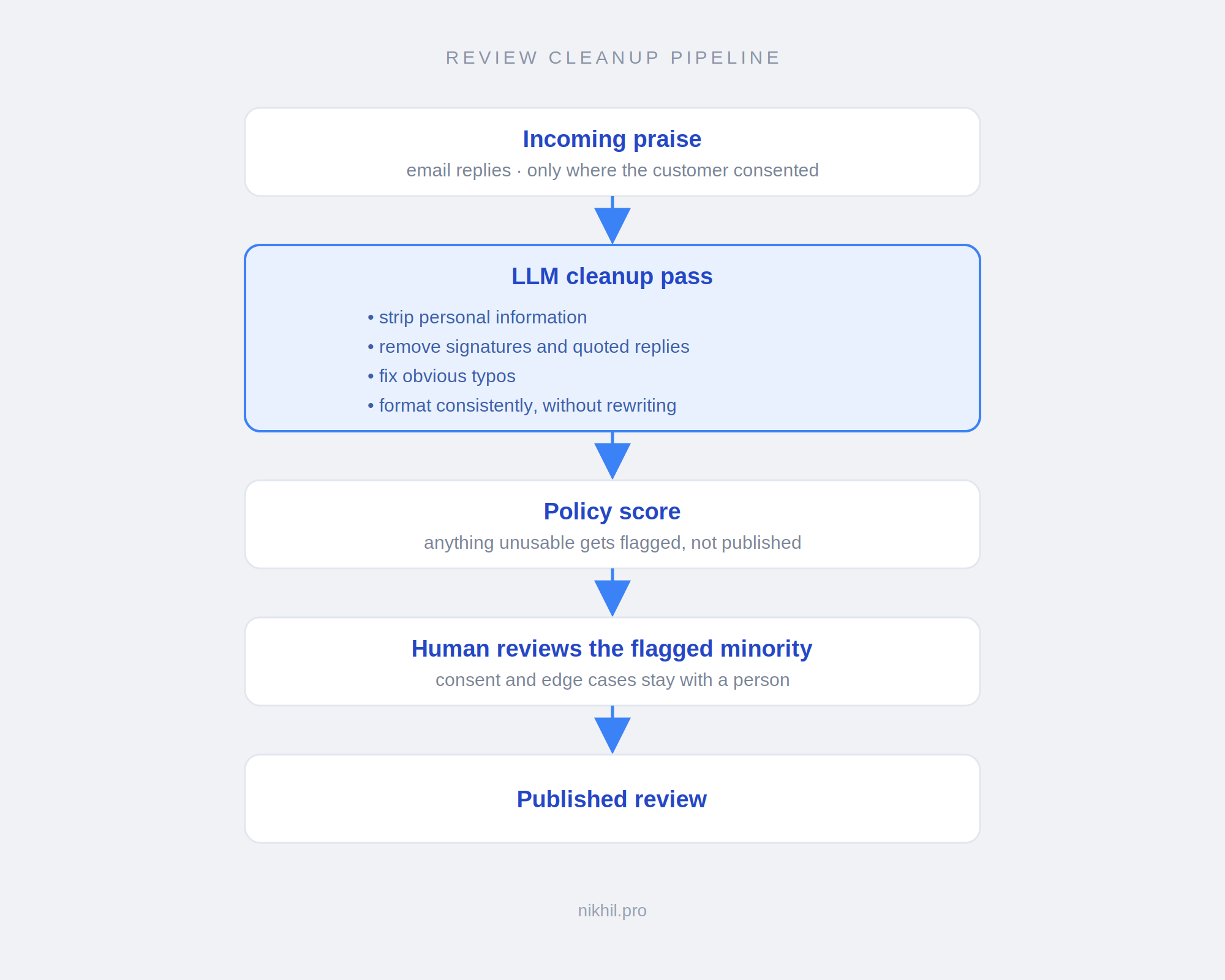
The lesson that generalizes. Constrain the model to clean and redact, not rewrite. Left loose, it smooths a customer’s wording until it stops sounding like them, which quietly destroys the thing that made the review valuable.
The non-negotiable. Consent and privacy are not features you bolt on. Only publish what a customer agreed to publish, and never rely on the model as your only line of defense against a personal-information leak. A confident model is not a careful one.
3. Support conversation analysis
Conversation analysis runs a language model over support tickets or call transcripts to classify and tag them, surfacing why customers actually contact you rather than what your team assumes. It is one of the cheapest AI workflows to build and one of the fastest to produce a decision.
Every support system has a category dropdown, and every category dropdown is wrong, because agents pick whatever is fastest under time pressure. Running a model over the actual conversation text produces a far more honest picture of your top contact drivers.
The output is not an automation, it is an argument. “Thirty percent of contacts are about the same delivery expectation problem” is the kind of finding that redirects a roadmap. Then you fix the underlying issue instead of staffing up to answer the same question forever.
Watch for this. Let the model propose categories from the data before you impose your own taxonomy on it. If you hand it your existing categories, it will dutifully sort everything into the same wrong buckets you already had.
4. Inventory and replenishment
Inventory decisions are mostly arithmetic, not judgment. Reorder points can be calculated from demand rate, supplier lead time, and a safety buffer, which removes most day-to-day guesswork. AI is useful at the edges, for demand pattern detection and anomaly flagging, not for the core math.
This is the section where I will argue against using AI for the main job.
The core of replenishment is a formula: how fast something sells, how long restocking takes, and how much buffer absorbs a bad week. That is a reorder point, and it does not need a language model. Most inventory pain is not a modeling problem, it is that nobody calculated the number.
Where AI genuinely helps is around that core: spotting demand patterns a fixed formula misses, flagging anomalies worth a human look, and handling the cases where history is a bad guide, like seasonality and new products.
The trap. Reaching for a model when a spreadsheet formula would do. Sophistication is not the goal; the correct reorder point is.
5. Carrier logistics and invoice checks
Carrier invoices routinely contain disputable charges, including residential surcharges applied to commercial addresses, delivery area surcharges on newly added ZIP codes, and address correction fees. Automated checks can flag anomalies against your own order data, but disputes and contract negotiation still require a human.
This is my favorite example of where the boundary sits, because it is so clear.
A model can read an invoice, flag suspicious line items, and cross-reference flagged residential charges against orders shipped to business names. That is genuinely useful and takes a morning to build.
What it cannot do: file the disputes, chase the carrier when they stall, or walk into a rate negotiation with six months of documented billing errors. The analysis is the easy part. The recovery is the work.
Most of the leverage here comes from having your own shipping data somewhere you control, which is a large part of why I ended up building an internal fulfilment app rather than living in the carrier’s dashboard.
The generalizable point. For any workflow, separate analysis from execution. AI is excellent at the first and mostly absent from the second. Value lands where you use it to make execution faster, not where you pretend it replaced execution.
6. Marketing and lifecycle
The highest-return AI use in ecommerce marketing is usually analysis rather than generation: segmenting audiences, identifying disengaged profiles, and reconciling ad-platform reported revenue against actual store orders. Generated copy needs heavy human editing to avoid diluting brand voice.
Two things worth knowing here.
List hygiene is undervalued. Email platforms often bill by profile count, so removing genuinely dead profiles lowers your bill and improves deliverability at the same time. It is rare to get both. A model can help classify engagement patterns, but the win is mostly disciplined segmentation.
Attribution needs reconciliation, not generation. Ad platforms report revenue generously and inconsistently with what your store actually recorded. Reconciling platform-reported conversions against real orders is unglamorous analytical work that changes budget decisions. That is a better use of an afternoon than generating another round of ad copy.
On generated copy. It is fine for first drafts of routine product descriptions. It is bad at brand voice, and readers can tell. Use it to beat the blank page, not to ship unedited. The same caution applies to the wider set of AI tools marketed at Shopify stores: most are fine at drafting and weak at judgment.
Choosing a model: the practical criteria
For internal AI workflows, model choice usually comes down to cost-per-run, latency, and structured-output reliability rather than frontier reasoning ability. Tasks like summarization, classification, and text cleanup sit well within reach of cheap, fast model tiers, so a model you can afford to call on every single event usually beats a smarter one you have to ration.
The comparison people expect here is a benchmark shootout. The comparison that actually decides these builds is narrower, because the workloads are narrow.
The four questions that decide it
How often does this run? A tool firing on every support call has completely different economics from a nightly batch job. Anything in the per-event category should default to the cheapest tier that clears the quality bar, because cost scales linearly with volume and quality barely improves for tasks this simple.
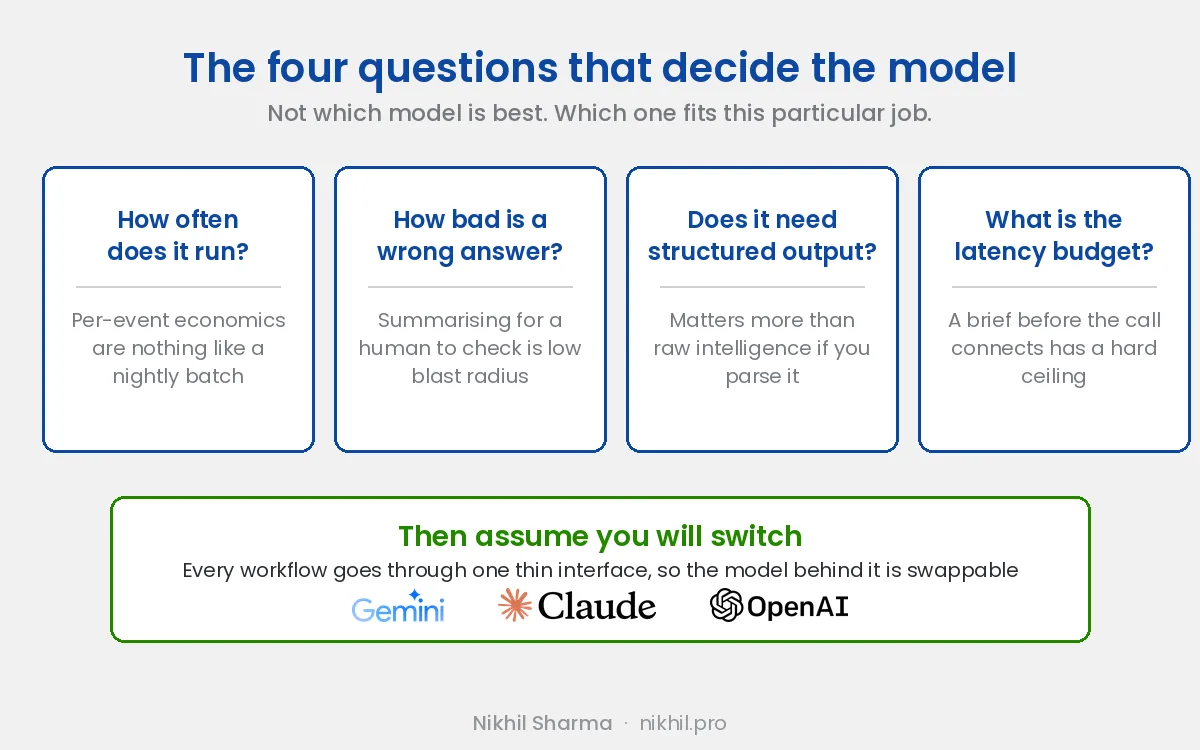
How bad is a wrong answer? Summarizing context for a human who will verify it is low blast radius. Auto-publishing customer-facing text is high. Match model tier and human review to the blast radius, not to the leaderboard.
Does it need reliable structured output? This matters more than raw intelligence for anything programmatic. If you are parsing the response into fields, you need consistent JSON, dependable function calling, and a low rate of the model deciding to add commentary around the payload. A model that is smarter but flakier at schema adherence is worse for this class of work.
What is the latency budget? A brief that has to be ready before a call connects has a hard ceiling. A nightly classification job does not. Latency requirements rule out more models in practice than quality requirements do.
Why Gemini, specifically
I use Gemini’s fast tier for these workloads, and the reasoning is unglamorous.
The workloads are summarization, redaction, and classification, none of which are hard problems for any current model. What matters is that the fast tier is priced for per-event calling, returns quickly enough to sit in front of a live workflow, and handles structured output reliably enough to parse without defensive gymnastics.
The other half of the answer is integration friction. Much of the surrounding data already lives in the Google ecosystem, so Apps Script, Sheets, and service-account auth are already there. Integration friction costs more engineering hours than model quality differences cost in output quality, at least for tasks this well-scoped. That practical consideration decides more real builds than benchmark tables do.
None of that is an argument that Gemini is the best model. It is an argument that it was the best fit for these specific jobs at the time I built them.
The important part: assume you will switch
The genuinely useful engineering decision is not which model you pick. It is refusing to couple your system to the one you picked.
Every one of these workflows goes through a thin internal interface: a function that takes structured input and returns structured output, with the prompt, the model name, and the provider SDK behind it. Business logic never imports the vendor SDK directly. Swapping providers should mean changing an adapter and re-running your evaluation set, not touching the pipeline.
That is not architectural purity for its own sake. The landscape moves fast enough that any model choice you make has a shelf life measured in months. The 2026 open-weight tier alone has been reshuffled repeatedly: Kimi K2.6 arrived in April under a modified MIT license at roughly a trillion parameters with a 256K context, Moonshot’s K3 went live via API with weights scheduled to follow, and DeepSeek’s V4 Flash tier landed at about $0.14 per million input tokens, which reset what “cheap enough to call constantly” means.
If a cheaper or faster option clears my evaluation set next quarter, I want that to be a configuration change.
What would actually trigger a switch
Three things, in rough order of likelihood.
Cost at volume. If per-event calls grow enough that the bill becomes material, the hosted open-weight tiers become worth evaluating on price alone.
Data residency or privacy requirements. This is the strongest argument for self-hosting. A pipeline that handles personal information before redaction is a genuinely different risk profile from one that does not, and keeping that inference inside infrastructure you control is a defensible reason to take on the operational burden.
A capability I actually need. Not a benchmark improvement. Something specific, like materially better structured-output adherence or a context window that removes a chunking step I currently maintain.
On self-hosting, honestly
Self-hosting is the option people reach for emotionally and abandon on contact with the spreadsheet.
The frontier open-weight models are not casually deployable. Running the largest ones at full precision is reported to require on the order of sixteen H100-class GPUs, with quantization bringing the working set down substantially. The smaller end is far more approachable, with Qwen 3.6 27B running on a single high-end consumer GPU under Apache 2.0, and for classification and cleanup tasks a small model is often genuinely sufficient.
But the honest accounting is the one the open-weight comparisons keep repeating: self-hosting does not remove cost, it converts a token bill into GPUs, engineering time, observability, upgrades, security, and utilization risk. For a small team, that trade is usually bad until either volume or a compliance requirement forces it.
Where I think it does become correct: the redaction step. A model that sees personal information before it is stripped is the one component where running inference on infrastructure you control has an argument beyond cost. That is a plausible future split, a small self-hosted model on the sensitive step and a hosted API for everything else, rather than an all-or-nothing migration.
The realistic end state for most teams is not one model. It is a small portfolio: a cheap hosted tier for high-volume work, something stronger for the rare hard task, and possibly a local model for the privacy-sensitive step. Build the seam that lets you route between them, and the choice stops being permanent.
A checklist before you build any of these
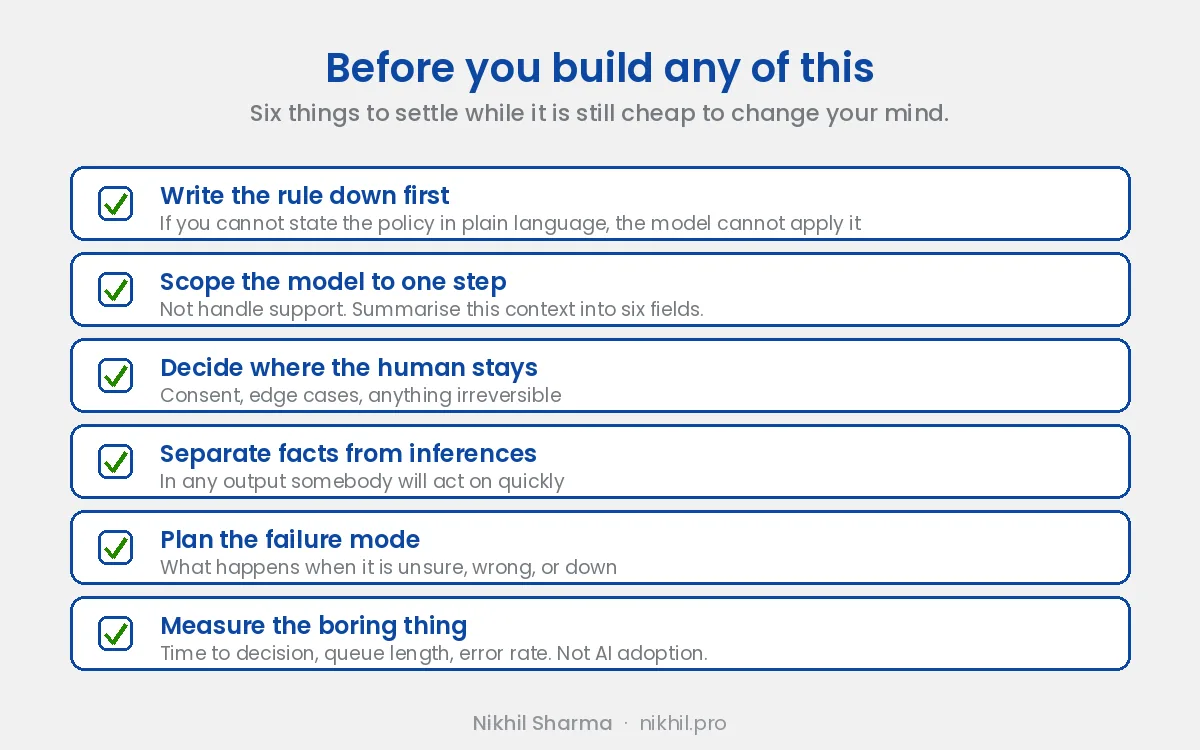
- Write down the rule first. If you cannot state the policy precisely in plain language, the model cannot apply it. Half the value of these projects is being forced to make an implicit standard explicit.
- Scope the model to one step. Not “handle support.” Instead: “summarize this context into six fields.”
- Decide where the human stays. Consent, edge cases, and anything irreversible. Design the handoff deliberately rather than backing into it.
- Separate facts from inferences in any output a human will act on quickly.
- Plan for the failure mode, not just the happy path. What happens when it is unsure, wrong, or down.
- Measure the boring thing. Time-to-decision, queue length, error rate. Not “AI adoption.”
The takeaway
The AI that gets talked about performs for an audience. The AI that earned its place in this business did the opposite: it quietly removed a tax on work nobody enjoyed and nobody saw.
There is no demo and nothing to screenshot. You notice a few weeks in that a grinding task is simply handled, and the people who used to do it are spending their attention on the part that actually needed a person.
If you are choosing where to start, the one page scoring method is how I pick, and the usual winners are the weekly report, support triage and the monthly read, and connecting the tools that already ship an MCP server, Klaviyo and Shopify’s three. If the letters MCP need explaining to whoever approves it, that page is here. Start where your team wastes ten minutes a hundred times a day. That is almost always where the return is, and it is almost never the thing you would put on a landing page.
I write about the unglamorous parts of ecommerce engineering at nikhil.pro, and I build these systems for other ecommerce teams when the fit is right.
This is a concept-level guide describing approaches and lessons, not proprietary implementation details.
Frequently asked questions
What are AI workflows for Shopify?
What is the best AI use case for a Shopify store?
Should I use Gemini or OpenAI for Shopify automation?
Is the model or the integration the hard part of AI automation?
Can AI replace customer support agents in ecommerce?
How do you stop an AI tool from misleading your team?
Get new posts in your inbox
Occasional notes on Shopify, paid ads, and what I learn. No spam.
Thanks. Check your inbox to confirm.

Nikhil Sharma
I run data and operations for a DTC brand on Shopify, consult on Meta and Google Ads, and build AI automations for ecommerce teams. I write about what I build and run.